
Lightroom CC Trial: Trial dialog keeps popping up
Today I installed the Lightroom CC trial version. Download and installation worked without issues. When I clicked the "Start Trial" button in the Adobe Creative Cloud App, Lightroom opened.
Then, a dialog box popped up asking me to start my 7 day free trial of Lightroom CC. I clicked "Start free trial".
The dialog box went away and popped up again, resulting in an endless loop.
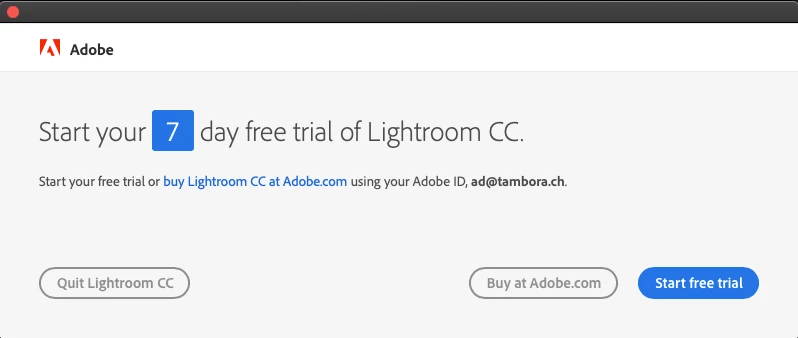
Things I already tried:
- Repairing the installation does not help.
- Uninstalling and reinstalling Lightroom does not help.
- Uninstalling and reinstalling Lightroom + Adobe Creative Cloud does not help.
- Doing the same while also deleting ~/Creative Cloud Files does not help.
grep "ERROR" PDApp.log shows:
...
12/11/18 15:00:46:600 | [ERROR] | 1020 | ASU | LWANative | P7Native | | | 25988 | OOBElib returned error: 42
12/11/18 15:05:59:446 | [ERROR] | 1169 | ASU | PIM | Native-Utils | | | 31809 | File doesnot exists at: '/Applications/Utilities/Adobe Application Manager/CCM/Utilities/AdobeApplicationManager(URIHandler).app/Contents/MacOS/AdobeApplicationManager(URIHandler)'
12/11/18 15:06:00:841 | [ERROR] | 1169 | ASU | PIM | PIM | | | 31809 | Unable to free PIM object
12/11/18 15:36:48:668 | [ERROR] | 502 | ASU | LWANative | P7Native | | | 16755 | OOBElib returned error: 1
12/11/18 15:42:18:685 | [ERROR] | 1057 | ASU | LWANative | P7Native | | | 23247 | Cannot find the session for key -
This is apparently not (directly) related to that dialog box: Clicking on "start trial" does not seem to result in a log line as shown above. I'm pretty frustrated as I intended to invest the day testing Lightroom. Now I used a large part of a day trying to install it and have not even started testing its functionality. I don't know what else to try. Any ideas?
I run macOS Mojave 10.14.1 on a brand new Mac mini (2018).
 AdChoices