
Participating Frequently
March 30, 2019
Answered

Lightroom panels are incomplete

  • March 30, 2019
  • 1 reply
  • 933 views

Hey everyone,

I just got a new computer and transferred Lightroom and Photoshop to it.

I had a Mac before and I switched to windows.

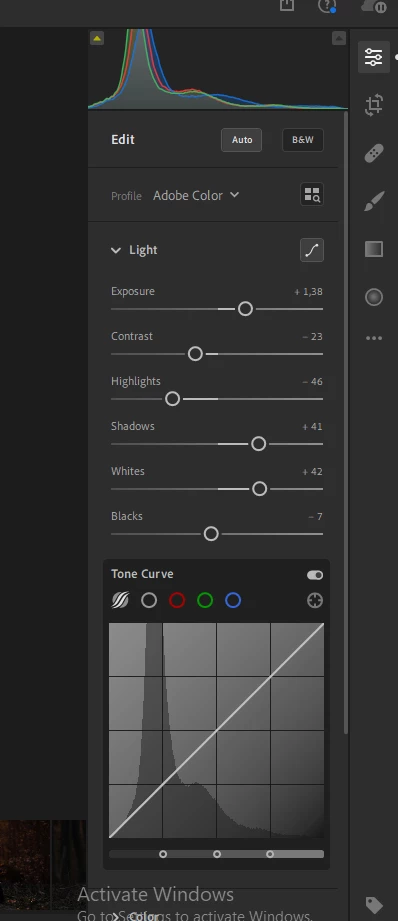
When I started editing photos I noticed that, within the "light" panel, the settings "lights" and "depths" are missing.

The panel itself is there, it's just incomplete.. Has somebody experienced similar problems?
Not sure what to do.

Thank you!

Esther
This topic has been closed for replies.
Correct answer JP Hess

This is what it looks like


You have installed Lightroom CC, the cloud-based Lightroom. Is that what you have been using? Or, have you been using Lightroom Classic CC, the desktop-based Lightroom? The naming convention that Adobe has chosen has confused many users. We need to clarify this in your situation first of all. What is it that is "missing" that you are looking for?

1 reply

JP Hess
Inspiring
March 30, 2019

I'm not familiar with the settings you are referring to. What exact version of Lightroom are you using?

Participating Frequently
March 30, 2019

It's very strange..I had the settings on my mac..the exact version is:

Lightroom CC version: 2.2 [ 20190204-1600-e7ae188 ] (Feb  4 2019)

Participating Frequently
March 30, 2019

This is what it looks like