
Inspiring
June 4, 2021
Answered

Spot Healing brush does not show source when healing

  • June 4, 2021
  • 4 replies
  • 3691 views

Normal operation of the Spot Healing brush shows both the area to be healed or cloned and the source area for the information to use to heal or clone the selection. Recently, Lightroom Classic on a Windows 10 PC is only showing the area to be healed or cloned.  The source is not showing.  Makes the brush almost useless!


Anyone have a soultion?


Thanks
This topic has been closed for replies.
Correct answer Rob_Cullen

And what is your setting for the Spot Healing Brush on the Tool Bar [T] ?

Have you pressed [H] to  Hide/Show the circle guides?


4 replies

Participant
October 27, 2023

check your cap lock is off


Participant
July 24, 2023

Jaldi Karo


Rob_Cullen
Community Expert
Rob_CullenCommunity ExpertCorrect answer
Community Expert
June 11, 2021

And what is your setting for the Spot Healing Brush on the Tool Bar [T] ?

Have you pressed [H] to  Hide/Show the circle guides?


Regards. My System: Windows-11, Lightroom-Classic 15.1.1, Photoshop 27.3.1, ACR 18.1.1, Lightroom 9.0, Lr-iOS 10.4.0, Bridge 16.0.2 .
KBStudioAuthor
Inspiring
June 15, 2021

Thank you WobertC. 


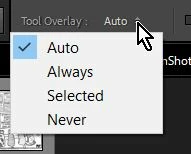
That was the problem.  At some point, the tool overlay was changed to "Never".  Now it is on "Auto" and all is well.  


Thanks again,

Kim

Michael J. Hoffman
Community Expert
Community Expert
June 4, 2021

When you finish using the brush (complete the stroke) you should then see the source displayed with an arrow linking the target and source. At that point, you can drag the source to a different location if needed (hovering the cursor changes it to a hand for grabbing the pin). Are you seeing these results after you finish brushing?


The spot healing brush doesn't work like Photoshop's clone stamp tool.


KBStudioAuthor
Inspiring
June 10, 2021

So Michael, any suggestions on how the remedy the spot healing brush issue I am having?  FYI, I am running version 10.1.1.  Have the lastest updates maybe fixed this problem.


Again, the issue is that Lightroom Classic's Spot Healing tool is not function as it should.  The stoke shows but neither the Source nor the Target are shown after completing a stroke.  Lightroom Classic justs goes ahead with the Clone or Healing leaving the user with no input as to how and where this takes place.


Thanks,

Kim