

reimundl1594886
Participating Frequently
August 9, 2023

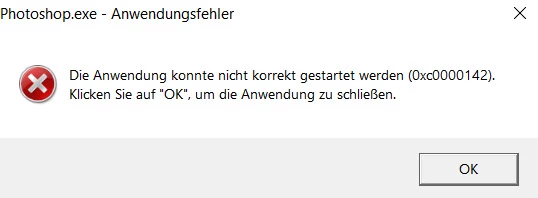
P: Photoshop Beta Startup Error (0xc0000142)
.


The program starts with an error message and then shuts down.

258 답변

Participating Frequently
April 30, 2024

I have the same error message after updating to Photoshop Beta 25.9: 0xc0000142

reimundl1594886
Participating Frequently
April 30, 2024

Thank you for your reply Cury Shubert. This is the text in English.


The application could not be started correctly (0xc0000142). Click on “OK” to close the application.


What surprises me is that the new version is already running and I have already worked with it. Suddenly, one day later, the 25.09 version can no longer be opened.

CShubert
Community Manager
Community Manager
April 29, 2024

Hi @reimundl1594886 do you have the update from today? Adobe Photoshop Version: 25.9.0 20240428.m.2603 2d135fa arm64


Other customers that had this issue said this update fixed this issue.  Please use your CCD app and click check for updates to make sure it goes out and grabs the recent one, then let us know if you still have this issue.


What is the enlish translation of this error message you saw?


Thanks,

Cory - Photoshop Product Manager

reimundl1594886
Participating Frequently
April 29, 2024

This version worked perfectly until yesterday.

Participating Frequently
April 29, 2024
Hello.
As of today (Monday, April 29) I cannot start Photoshop Beta, when I have been working with it until yesterday.
I get a pop-up window with the text "The application could not be started correctly (0xc0000142). Click OK to close it."
If anyone has information on how to fix it (I've uninstalled and reinstalled and the same thing is still happening), I would appreciate it.
What we pay is not enough for these things to happen and not have a solution for it.
Thank you
kglad
Community Expert
Community Expert
April 29, 2024

in the future, to find the best place to post your message, use the list here, https://community.adobe.com/

p.s. i don't think the adobe website, and forums in particular, are easy to navigate, so don't spend a lot of time searching that forum list. do your best and we'll move the post (like this one has already been moved) if it helps you get responses.


<"moved from cc desktop bugs">
Bildermacher
Participant
April 26, 2024

Nach einem Updat von der Version 25.7 auf 25.8 sowie auf der neuen Version 25.9 kann ich die beiden PS Beta Programme nicht öffnen. Nach dem Löschen der Aktuellen Beta Version 25.9 und wieder Installierung der neuen Beta Version 25.9 hatte ich wieder das gleiche Problem.PS Beta öffnete sich nicht,es kam nur das Startbild kurz zu vorschein. Mit dem Update der PS Version 25.7 hatte ich keine Probleme.

Ich konnte mich nur helfen indem ich die Beta Version 25.7 neu Installierte.

CShubert
Community Manager
Community Manager
April 26, 2024

Hi @Bildermacher do you have the DXO NIK plugins installed?  We know of an issue that a few customers have with this and the team is working on a fix, but please let us know if this might be the case for you.


Thanks,

Cory - Photoshop Product Manager

Participant
April 23, 2024

Buenas tardes, desde la actualizacion 25.8 del beta de photoshop no logro hacerla inciar despues de actualizar, he tratado de reinstalarla en varias ocasiones, tambien la he desinstalado parcial y totalmente pero nada. Ahora con la version 25.9 esperaba que estuviera solucionado pero no es el caso, la version  normal y los  demas programas sin problemas por lo que pienso que no es nada en mi equipo, pero no se que mas puedo  hacer.

Podeis comentarme algo estoy abierto a cualquier solucion.

Un saludo y gracias

Ged_Traynor
Community Expert
Community Expert
April 23, 2024
Participant
August 9, 2023

AxelMatt
Community Expert
Community Expert
August 9, 2023

Unfortunately you don't give us any informations about your system. Please consider including the following in your question:

  • Adobe product and version number
  • Operating system and version number
  • The full text of any error message (s)
  • What you were doing when the problem occurred
  • Screenshots of the problem
  • Computer hardware, such as CPU; GPU; the amount of RAM; etc


Thanks. The above info will help to solve your problem.


Please check also if your system meets the system requirements of the recent Photoshop versions. 

The error message 0xc0000142 indicates that your system doesn't match the requirements.


My System: Intel i7-8700K - 64GB RAM - NVidia Geforce RTX 3060 - Windows 11 Pro 25H2 -- LR-Classic 15 - Photoshop 27 - Nik Collection 8 - PureRAW 5 - Topaz Photo