

Community Manager
May 21, 2024
Question

Generator plugins submenu, including Image Assets, relocated

  • May 21, 2024
  • 8 replies
  • 15305 views

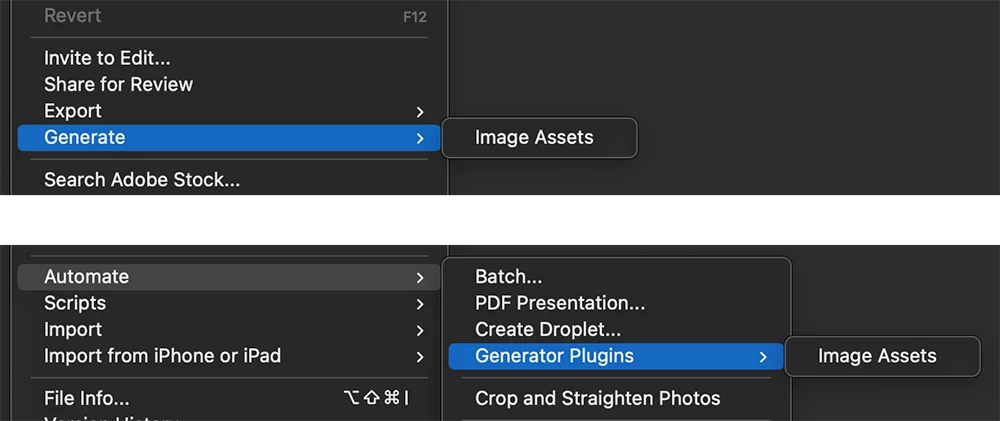
Hello, fans of Generator plugins, including "Image Assets".  With the rise of recent "generative" features, such as "Generative Fill", we have moved the submenu for Generator plugins to avoid confusion.


File > Generate > Image Assets

  is now

File > Automate > Generator Plugins > Image Assets
 

8 replies

Participant
November 8, 2024

Avoided confusion by creating confusion.

Participant
October 30, 2024

The Generator plugins submenu includes a section for managing Image Assets, which have been relocated for better accessibility. This feature allows users to easily create, organize, and utilize image resources directly within the plugin

Participating Frequently
September 12, 2024

Very grateful for this post; there's no chance I would've ever known to look under 'Generate Plugins.' (That's not... guys. That's not a phrase anyone knows. UI is supposed to use pre-existing knowledge to cue the user. This is the opposite and is, hilariously, more confusing than where you started.)


But of course that's neither here nor there. Thanks to OP for sharing this information for the rest of us wandering in circles between the File and Edit tabs, wondering if we've gone crazy. This is the one in twenty time googling something got me an EXACT answer, and I really appreciate it. 

Community Manager
August 2, 2024

Note: this change is now present in the 25.11 normal release of Photoshop.
https://helpx.adobe.com/photoshop/using/whats-new/2024-5.html
I find the entry at the bottom of that page to be rather lacking.  I'll see if I can push to improve it.

Community Manager
August 15, 2024

https://helpx.adobe.com/photoshop/using/whats-new/2024-5.html
and
https://helpx.adobe.com/photoshop/using/generate-assets-layers.html#generator-plugins
have updated text.  There is also now a note at the top of the Image Assets page to highlight the change.

Participant
August 1, 2024

Another stab in the back of the professionals who use this day in and day out. Wasted 25mins of my life trying to work out where it had gone. Don't move stuff for the sake of it. Stick your gimic AI stuff in its own new folder and leave the propper functions that people use for work in the right places.... Shouldn't even need to click generate. should just auto do it when we add a file name to a layer...   

Kevin Stohlmeyer
Community Expert
Community Expert
August 1, 2024

@deltaZeroWhiskeyXray to level set - this is in beta currently - not part of the public general release. The page you referenced relates to the public general release of Photoshop, not beta.

If/when it is released with the public general release there will be notes on the "whats new" page explaining the change.


Known Participant
August 3, 2024

well it's public now, and that page still has the wrong information. 

Got another excuse for adobe? 

Participant
July 29, 2024

What do I do if the "generator plugin" is greyed out? I rely on this feature daily to do my job and it is very frustrating to have to track down this new method and workaround. 

HELP ASAP!

Community Manager
July 29, 2024

Preferences > Plugins > Enable Generator 
You should see the menu enabled after that is checked.

Participant
August 11, 2024


Finally! I've searched everywhere to fix it! 🙂


Participant
July 29, 2024

Generator fehlt

CShubert
Community Manager
Community Manager
July 29, 2024

Sorry @Thomas38872581fj8g we need a bit more information to be able to help, what issue are you seeing, what is the workflow you are using where this issue shows?  Make sure you have the latest Ps bet:


Adobe Photoshop Version: 25.12.0 20240728.m.2716 4b9323b arm64


Thanks,

Cory - Photoshop Product Manager

Participant
May 30, 2024

In Photoshop 2024 (25.10.0) Beta File > Generate > image assets is missing.

Where has this needed feature been moved to?

CShubert
Community Manager
Community Manager
June 4, 2024

Hi everybody, there was a change in where this lived and the post on discussions shares more info:

https://community.adobe.com/t5/photoshop-beta-discussions/generator-plugins-submenu-including-image-assets-relocated/td-p/14631938


Also, check your preferences to see if there were reset in the move of this feature. If the generator plugin is not enabled, the menu iten will be disabled.

One note, when you tick the box for Enable Generator you will need to restart Ps beta to see it ungreyed out.


Thanks,

Cory - Photoshop Product Manager

deltaZeroWhiskeyXray
Participating Frequently
July 26, 2024

Thank you, Cory.


The last time I posted on the Adobe forum was when another feature was moved or removed without any warning. This is inconsiderate to those of us who use your software every day professionally. How would you like it if your mouse was one day missing? Then you would have to ask around the office before finding out that management had decided to unplug it and put it in a box, then put the box in another box so when you check the outer box, you don't see the mouse.


I made you suffer through my cute little analogy because your online documentation about this feature was updated on July 23, 2024, and gives wrong information.


I still get email notifications that users on your forum found my post from years ago helpful. Unfortunately, it's the same issue we are facing today.