
Participant
August 24, 2023
Question

Generative Fill now creating bizarre results

  • August 24, 2023
  • 1 reply
  • 1920 views

I used Generative Fill several times a few weeks ago with great results. I create a 1024 x 1024 selection and fill that, then move the selection square and create another fill, then repeat until I've extended the width of an entire image. It worked great. Now, however, even with simple fills, the results are bizarre.

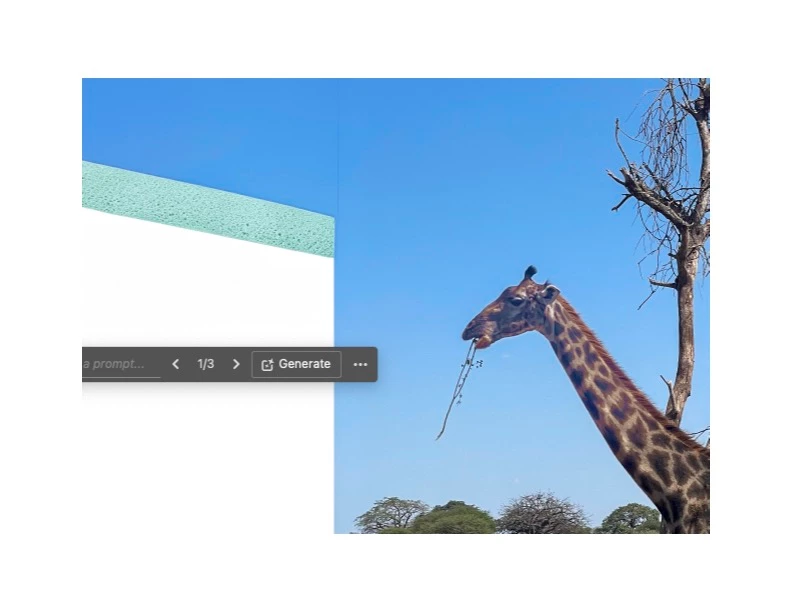
In the example below, which is just a portion of the image, I'm trying to extend it to the left by 1014 pixels. I use a selection box of 1024 x 1024 pixels and overlap the image by 10 pixels. The main issue is that, while at the top of the selection square it created blue sky, it then generated a diagonal line with some green below it. There is no green anything like that in the full image. Then, below the green it's blank even though the selection is a square extending well below the area that it filled in. I have no idea what's going on. Anyone have a suggestion?

:
This topic has been closed for replies.

1 reply

Kevin Stohlmeyer
Community Expert
Community Expert
August 25, 2023

That is odd but have you tried the new Generative expand using the crop tool instead?

The method you are using is outdated thanks to the latest update:


DJFPhotoAuthor
Participant
August 25, 2023

Thank you for the suggestion. However, the expand function is limited to an image that’s 1024 x 1024 pixels. So, it stretches that along the full width or height of the image you’re expanding and that results in much lower resolution, which is very noticeable. The work-around is to use 1024 x 1024 selection boxes one at a time until the full height, or width, has been expanded. The resolution within each of those boxes will be the same as the image so the result is seamless.

Warmest Regards,


<removed personal information>

Kevin Stohlmeyer
Community Expert
Community Expert
August 25, 2023

@DJFPhoto as with all of this - it is a beta and its intention is for testing.

The other reason you may be getting odd results is the large white area around the image. I too got poor results until I cropped into the original image only without a white border.