



Adobe Employee
July 29, 2025
Question

Generative Upscale now in Photoshop Beta!
  • July 29, 2025
  • 12 replies
  • 4901 views


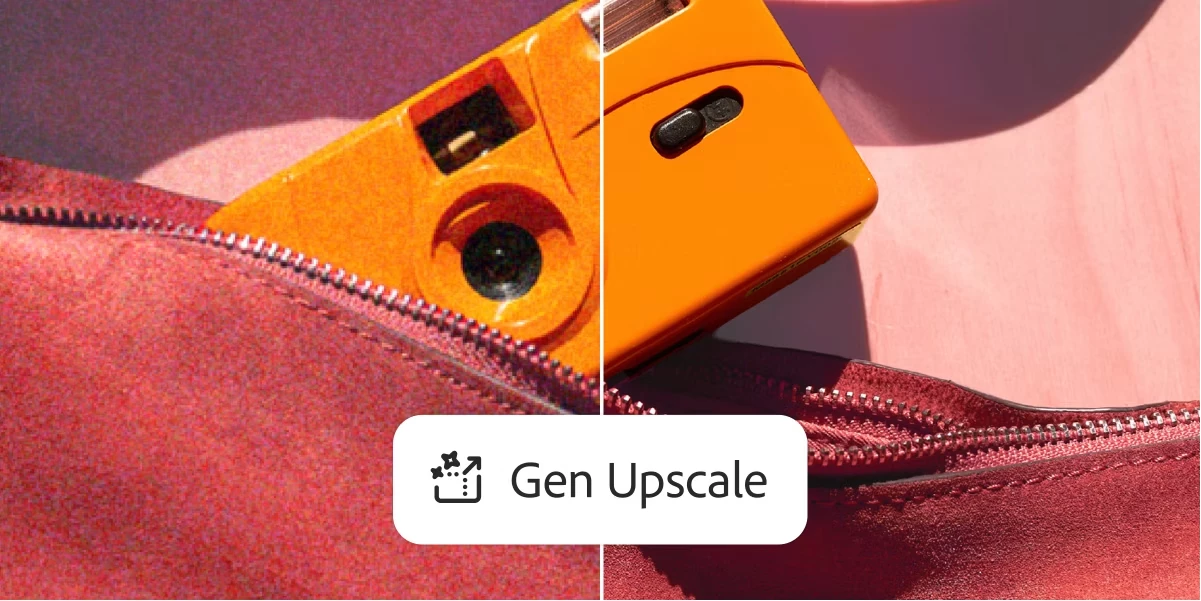
We are excited to share that Generative Upscale is now in Photoshop Beta! Powered by Firefly, you can now increase the resolution, preserve detail and remove artifacts while increasing the size of an image. Functionality is limited for this release as we continue to test and refine the model, but we are eager to learn from users early on! Some things to note about the feature:


  1. Size and ratio limitations: Max output is currently limited to 4096 pixels and/or a max 1:4 ratio for width and height.
  2. Low-resolution: This model is best suited for low resolution images
  3. Output: Output is limited by size and ratio. If your projected output exceeds these limits, the button to upscale will be grayed out. Otherwise, upscaled images will be output to a new document. Note that if an image’s projected output is beyond the max limit, try using Image Size (Image > Image Size) to reduce the original size of the image before upscaling
  4. Credits: in the Beta period, Generative Upscale will not deduct credits
  5. Incompatible Color Modes: Indexed, Multichannel, Bitmap, Duotone, Grayscale. If an image is in one of the non-supported color modes above, convert to RGB before using Generative Upscale. To do this, go to Image > Mode > RGB Color
  6. 32-bit is currently not supported (as with all Generative features)


How to test the feature:

  1. Download the latest beta application (Beta 26.10 or later)
  2. Open the feature from Image > Generative Upscale
  3. Select desired output scale (2x, 3x, or 4x)
  4. If output is within the limits of the feature, select upscale
  5. Upscaled image will be output in a new document


Let us know what you think!

12 replies

Inspiring
February 17, 2026

I’ve got the latest PS Beta - 27.5.0 - but I’m continually locked out of generative upscale. I do a lot of photography in museums, and frequently use a prime lens, so no zooming in on small objects. I shoot RAW, so get a lot of detail, but in some cases an upscale saves the project. Unfortunately, in almost every case in this latest release, I get the error message: ‘We have encountered an issue and cannot complete your request at this time. Please try again.’ This seems to only happen where art containing human figures is involved. In one case, it was an ancient Greek ring with a naked Aphrodite, in another, a fully clothed winged Nike. Both bombed. If this is Adobe’s filters thinking I’m trying to sneak in some porn, I’d like to point out that this is art seen by schoolchildren on a daily basis - with no ‘trigger warnings’. It’s classical art. Is there some way to resolve this human figure issue?  Example below, the naked Aphrodite. She just took a bath, folks! 


Participating Frequently
September 25, 2025

Will the non-beta versions open up it's size limitations? 4000px seems way too low for real use cases. Most images are already that kind of size or larger by itself so won't allow any upscale to happen.

Inspiring
September 25, 2025

You have to resize the image smaller before you can do the generative upscale. Then it makes it 2X bigger than what you resized it to. As of now the 4X is not working on my Beta--it says it will be too big--strange. 

Participating Frequently
October 7, 2025

Ok seems a little counter-intuitive though as the purpose is to have a bigger image. If we shrink then size back up, then we just get the same size image. Might be due to it being beta and testing I guess.

Participating Frequently
September 21, 2025

Just downloaded the beta as I need to upscale some very old product photos that I can't get any better photos of. Attached left to right is 2x via Image Size, 2x Neural Filters Super Zoom, and 2x Gen Upscale. Have to say I was pretty dissapointed with the result, maybe slightly better than Image Size, but the Gen Upscale is not what I was expecting. I'll play around a bit more with it, maybe reduce JPG artifacts first, but certainly nothing impressive.


Inspiring
September 23, 2025

I did generative upscale on your middle image,


And I think it looks much clearer and crisper, IMO. I wonder if mine works better than others? It works great on my end for my bracelets. 

Inspiring
September 23, 2025

well, that image is very small so you can't really see the difference well, sorry.

Legend
September 13, 2025

I've given it time. I'm not getting any errors, 3x has gone from the upscaling options, but the result is no different. It is still dreadful.


Participating Frequently
September 13, 2025

I too am able to use the upscaling now and 3x is still missing.

Inspiring
September 12, 2025

For the last couple of days, generative upscale has been working GREAT! Newest version of PS Beta. Now, when I try to use it today, I get the message '1004: Server not responding.' What is going on? I really need to use this. It improves my product photographs immensely. 

Inspiring
September 12, 2025

Here's pics of trying to do the upscale and the error message.

Participant
August 20, 2025

Pixel limit needs to be like 5x higher

Legend
August 19, 2025

I exported a shot from LrC to Full HD size (1920 x 1080) as a JPEG.


Opened the JPEG in Photoshop 2025.11 (beta). I used Generative Upscale to upsize by 2x to 4K size (3840 x 2160) and also made a copy resized by 200% using Preserve Details 2.0. In the side by side crop show below, on the left is the Generative Upscale version and on the right is the Image Resize version.


The detail is obliterated in the Generative Upscale version: look at the bird flying overhead, it is just a blob; look at the pelican; look at the fisherman's net; spots have been added where there were none in the original shot. It's a horrible result which I am now seeing far too often in Generative output. It has become so bad, it is at a point where it's generally useless to me.


To me, it seems that Adobe has completely dropped the ball.


MicahBurke
Community Expert
Community Expert
August 20, 2025

Give it time. It would probably be more useful if there were a prompt that could better translate the pixels.  But without something telling the AI what the object is, it's just a blob. 

Chemilinski
Participating Frequently
September 26, 2025

The prompt is irrelevant, PS' genAI is hamstrung by not having the required pixel output to make this generative upscale remotely decent.
I read online that it has an upper bound of ~1000px, and given the low-quality output I've seen on this thread, that seems to be unadjusted for this feature? It begs the question what the point of any of it is, and how the upscale can be achieved within such constraints.
I imagine you would have to upscale your image in chunks and then stitch it together manually? That's perhaps what Photoshop itself should be doing for us, but alas.
Or perhaps trying to use the current generative technology for this purpose just isn't appropriate, and some completely different solution would be necessary. One which doesn't regenerate the image and try to make a close facsimile of it. 

Legend
August 19, 2025

This is so bad. The competitors must be laughing their socks off.


Chemilinski
Participating Frequently
August 1, 2025

So funny that literally a couple days ago, I was looking online and in Photoshop for a generative upscale feature, and now I see it's been added! It wasn't there of course, so I used your existing feature, 'Preserve Details 2.0', in the Image Size dialogue to upscale the image I wanted to use, from 1080x1920 to 2160x3840. The result was very decent!

So I just downloaded the beta client and loaded in the same FHD image and used the generative upscale feature to upsale it 2x.
Horrible. It looks like I stretched the image in Paint, and called it a day. There's no preservation of detail, there's clear artefacting.. I'm truly baffled! Have the engineers forgottent to turn the feature on?
I mean, keep at it, I guess. I don't mean to trample on the work of the people that, I assume, have tried to bring this AI feature to PS. But gosh, at a base level, aim for it to be better than the feature you have already shipped that serves the same purpose.

erreenne
Participating Frequently
July 30, 2025

For now, it's not very exciting; the images are still quite blurry, and the details are missing...