
Known Participant
August 29, 2023
Answered

Kein Zugriff auf Photoshop Beta

  • August 29, 2023
  • 2 replies
  • 1646 views

Ich habe in meinem Foto-Abo die aktuelle Version von Photoshop installiert.
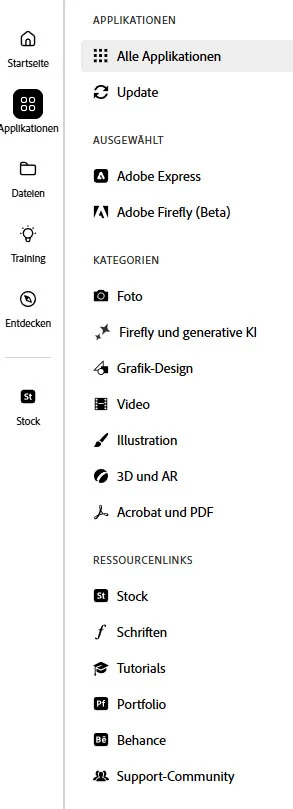
Nun möchte ich zusätzlich die Beta-Version laden, finde aber auf der linken Seite der Adobe-Cloud unter Applikationen nicht den Zugriff, der dort erscheinen sollte.

Ich habe einen Screenshot beigefügt.

Woran kann es liegen, dass ich Beta nicht finden kann?
This topic has been closed for replies.
Correct answer AxelMatt
quote

Hi, and thanks for your replies.
No I'm not member of any group. I saw that Adobe, too, gives the same answer to reveal this problem.


By @Colorful_play0D45


There's a few step ypu should try:

  • Try to logout and relogin in the Creative Cloud Desktop Client
  • In the next step try resetting the CC App. Make sure it's in the foreground, then press:

            Win: Ctrl + Alt + R

            Mac: Cmd + Opt + R


quote

...

Just one more question:
To communicate my problem in this forum I selected German language being German. Therefore I posted in German. But it seems that English is the only language to communicate in this forum. Is it so? Then I will use English to post my next question, whenever this will be.


By @Colorful_play0D45


This is a international public forum. It doesn't matter if you write in English or in your mother language, German.

There's a button to translate the text in the appropirate language.

Most of us answer in English becaues it's the most used language here.


2 replies

AxelMatt
Community Expert
Community Expert
August 29, 2023

If you're an Enterprise customer it can be that option might have been disabled. Please check with your IT department.

More infos you'll find also here: Photoshop Beta not available in Creative Cloud Des... - Adobe Support Community - 13834355


My System: Intel i7-8700K - 64GB RAM - NVidia Geforce RTX 3060 - Windows 11 Pro 25H2 -- LR-Classic 15 - Photoshop 27 - Nik Collection 8 - PureRAW 6 - Topaz Photo AI
Known Participant
August 30, 2023

Hi, and thanks for your replies.
No I'm not member of any group. I saw that Adobe, too, gives the same answer to reveal this problem.
Thus, it seems I will not be able to use the beta versions. Well, I will survive it.

Just one more question:
To communicate my problem in this forum I selected German language being German. Therefore I posted in German. But it seems that English is the only language to communicate in this forum. Is it so? Then I will use English to post my next question, whenever this will be.

Best regards<br />Horst
AxelMatt
Community Expert
AxelMattCommunity ExpertCorrect answer
Community Expert
August 30, 2023
quote

Hi, and thanks for your replies.
No I'm not member of any group. I saw that Adobe, too, gives the same answer to reveal this problem.


By @Colorful_play0D45


There's a few step ypu should try:

  • Try to logout and relogin in the Creative Cloud Desktop Client
  • In the next step try resetting the CC App. Make sure it's in the foreground, then press:

            Win: Ctrl + Alt + R

            Mac: Cmd + Opt + R


quote

...

Just one more question:
To communicate my problem in this forum I selected German language being German. Therefore I posted in German. But it seems that English is the only language to communicate in this forum. Is it so? Then I will use English to post my next question, whenever this will be.


By @Colorful_play0D45


This is a international public forum. It doesn't matter if you write in English or in your mother language, German.

There's a button to translate the text in the appropirate language.

Most of us answer in English becaues it's the most used language here.


My System: Intel i7-8700K - 64GB RAM - NVidia Geforce RTX 3060 - Windows 11 Pro 25H2 -- LR-Classic 15 - Photoshop 27 - Nik Collection 8 - PureRAW 6 - Topaz Photo AI
Kevin Stohlmeyer
Community Expert
Community Expert
August 29, 2023

Hi @Colorful_play0D45 are you in a managed environment like education or enterprise or are you an indivudal account?
