
Participant
May 23, 2023
Answered

No AI feature with new update

  • May 23, 2023
  • 139 replies
  • 287036 views

Just updated to the new beta version for PS, 24.6.0. (with AI)
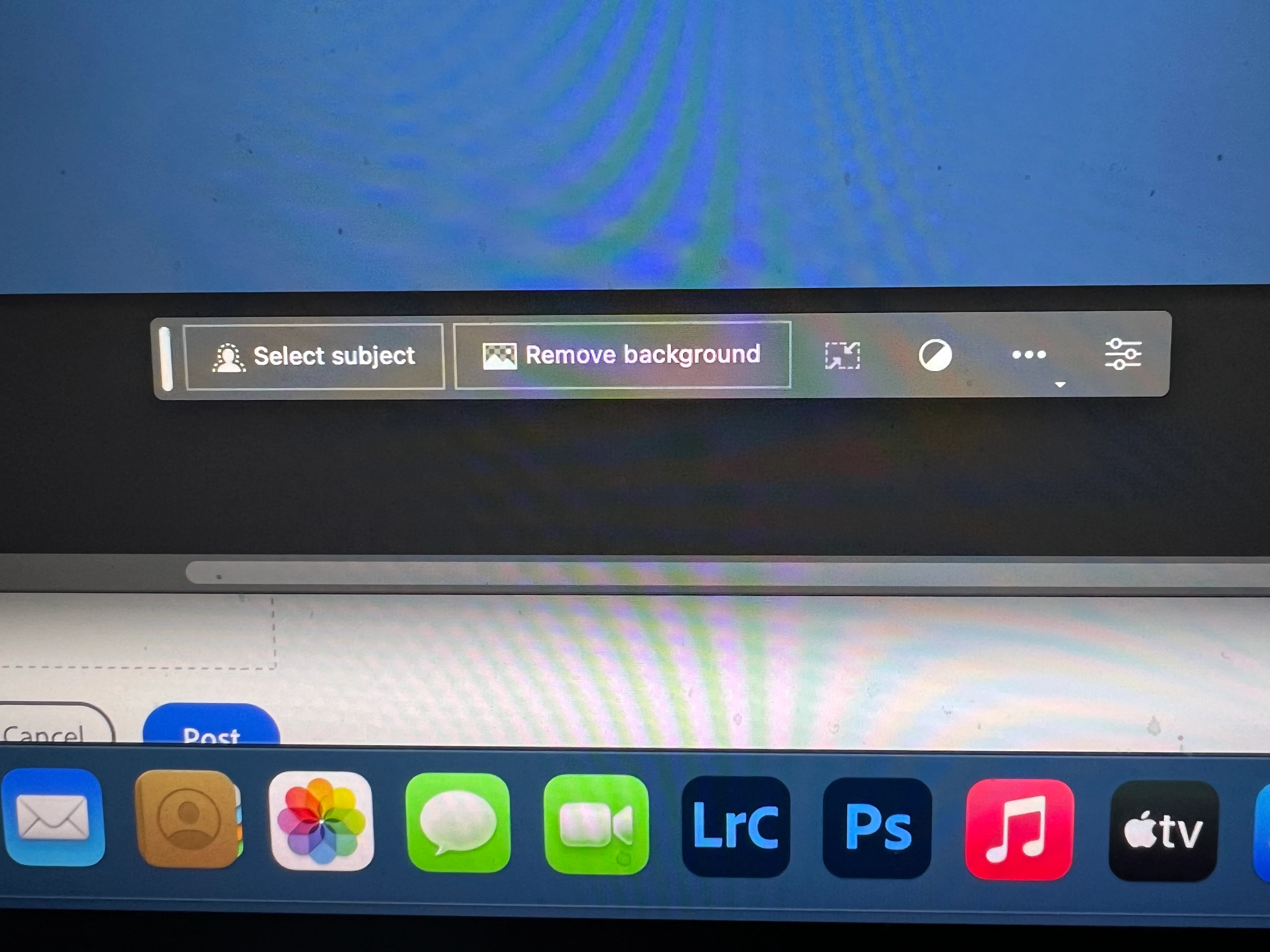
I got the new UI but it lacks the AI portion (or option) in the menu bar, or anywhere else.
Is there a minimum hardware requirement that I need? I might have missed the minimum requirements.
I am running Apple iMac Monterey 12.6.6. (Late 2015 build).
I am providing a screen shot of the UI I have available to me at this moment.
Thanks for any help you could provide.
Correct answer Kevin Stohlmeyer

Hi @Andrew30210510i27y uninstall that version then reinstall. The iterative version with Generative fill is 24.6.0 20230520.m.2181 4e0245f arm64 you are on the 516 release.

139 replies

Participant
May 25, 2023
Go to beta app in creative cloud account, there you will find photoshop beta 24.6 install
Participant
May 25, 2023

Hey guys! I cracked the code!


If your generative fill button is greyed out, the thing that is missing is.. our birth date! Adobe states that we must be over 18 to use the generative feature. So, for some of you that do not have the information displayed, do it through your account settings, on Behance! For me, that was it!


I hope this helps!

Participant
May 25, 2023

Yes this work, DOB in Behance


dawsons36799784
Participant
May 25, 2023

Found EASY fix, if you installed and verified the version is correct. If you're on windows, go to the search bar and type "photoshop beta". Open the program with the white icon!

CShubert
Community Manager
Community Manager
May 25, 2023

@dawsons36799784 curious when you launch Ps beta in the process you listed, do you have the ability to make a selection and click the Generate button and add a prompt?


ashleyking33
Participant
May 26, 2023

I have uninstalled PS, then went to re-download, but only 24.5 is available under my subscription ... where is 24.6?

Participant
May 25, 2023

I cannot see 24.6, I tried checking for update multiple times, I reinstalled creative cloud and restarted, There is no option to change Date of birth in behance


Participant
May 25, 2023

I have a problem with this. I can see this function but I can't use it 


Participant
May 25, 2023

FINALLY I've got the answer. Just login on Behance and fill your age under 18. That will solve the problem!!!

Participant
May 26, 2023

it works! Thank you


Participant
May 25, 2023

I cannot activate this feature generative


Kevin Stohlmeyer
Community Expert
Community Expert
May 25, 2023

Hi @HUSSIN25700166z2lx 

Why is the Generative Fill button not available?
If you find that Generative Fill is greyed out for you, it is possible that you may not have a valid Date of Birth associated with your Adobe ID account. To update your Date of Birth, you can do any of the following:
• Log into Behance with your Adobe ID and enter your Date of Birth.
• Log into your Adobe account and enter your Date of Birth. To learn more, see Error: "Not eligible to use Creative Cloud services".
Once your Date of Birth is up to date, relaunch the Photoshop (beta) app to enable Generative Fill.
https://helpx.adobe.com/photoshop/using/generative-fill.html

Participant
May 25, 2023

I can't get this to work at all 😒 Tried logging out of CreativeCloud Desktop, rebooted my Macbook Pro M2, uninstalled and reinstalled Photoshop Beta version 24.6.0 20230520.m.2181, but the Generative Fill feature is greyed when I have selected anything in the image.

Participant
May 25, 2023

I have exactly the same problem! I've updated my Macbook, I've updated Photoshop Beta, reboot the computer, I've done everything I can.. Anyone had the same greyed option and solve it?

Participant
May 25, 2023

When I am selecting an area in the image I get option for generative fill. But I am unable to type anything in the box.

Participant
May 25, 2023

Does anyone know why there are no Beta apps in the categories list?

Thank you in advance for the answers.

Participant
May 25, 2023

Hi,
I am a photoshop user and i 1st time install beta to test your great Generative Fill option.
but for no ression i am getting guidline warning can you please tell me why?
I clicked the generate button without any pompt then why am getting this warning?

Trevor.Dennis
Community Expert
Community Expert
May 25, 2023

Did you View Guidelines as the prompt suggested?