
Trevor.Dennis
Community Expert
Community Expert
October 10, 2023
Beantwortet

P: Layer Mask Icons in 25.1

  • October 10, 2023
  • 21 Antworten
  • 26372 Ansichten

Someone has asked about this in the main Photoshop forum.  I'd not opened 25.1 and can't find any information — like a what's new.  @CShubert can you explain how the new layer mask icons work?  Thanks.
 

Beste Antwort von Kevin Stohlmeyer

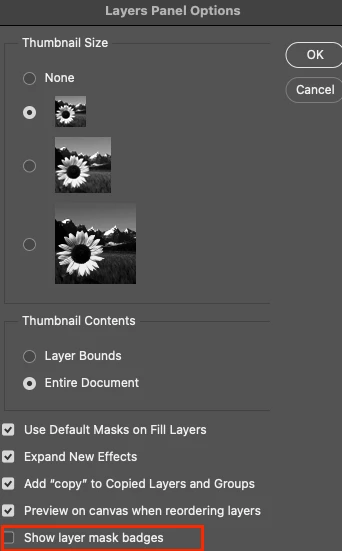
Hi all - happy to announce that this feature has been added as an option in the latest public release 25.2. Update your Photoshop 2024 to access via the Layers Panel Menu.

BONUS - it was off by default after update.
 

21 Antworten

Participating Frequently
October 10, 2023

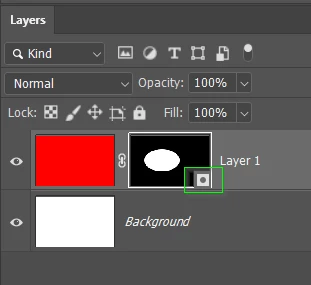
In Photoshop Beta, I'm seeing a new format for layer mask icons, which displays a small square graphic positioned in the lower right-hand corner of the mask icon.  Does anyone know the purpose of this?  I don't like it at all because it obscures part of the layer mask icon.  I can't see what purpose it serves; clicking on it directly is no different than clicking anywhere else on the icon.  Hopefully someone can fill me in on the reason/purpose of this "improvement."  And better yet... how to turn it off!

Thanks, David

Trevor.Dennis
Community Expert
Community Expert
October 11, 2023

I'd have to guess without seeing a screen shot.  Is it one of these?


Trevor.Dennis
Community Expert
Community Expert
October 11, 2023

Okay, I guess the addition of this new graphic is to be able to differentiate between different types of layer masks.  I still don't like it, and hope Adobe gives us the option to turn it off.  I now have to use a larger icon thumbnail so that the mask area isn't obscured as much.


OK, that's actually new to me.  I stopped using the beta version when they consolidated the beta features into the full release version, but there has been another beta update since then which I have not yet opened (because MAX is on, and I have been following it online).  So thise layer mask icon is completely new to me.


I have started a thread in the Photop beta forum and tagged one of the Adobe beta team guys asking for help, so  if you follow that thread, you'll find out when I do.'

https://community.adobe.com/t5/photoshop-beta-discussions/layer-mask-icons-in-25-1/m-p/14150232#M11578
