
Participant
April 27, 2023
Answered

Photoshop Beta is missing from Creative Cloud

  • April 27, 2023
  • 4 replies
  • 27679 views

Hi, i just subscribed to Photography plan yesterday and looking for Photoshop beta in the creative cloud beta apps but i didn't found it . Is it normal ?

(Windows 11, Creative Cloud 5.10 installed twice)
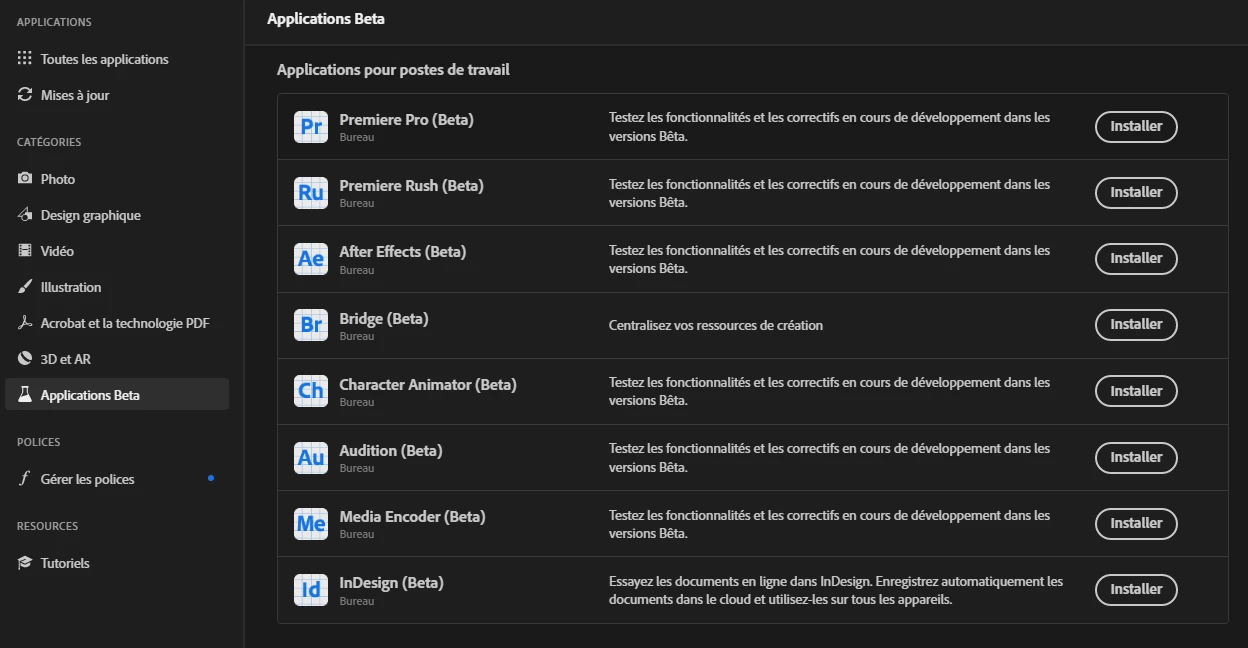
 

Thanks


Correct answer Valentin301007491aq0

Hey,

Not an entreprise account on my PC. I tried everything (CC uninstaller) but nothing worked. Creative Cloud did not lauch again after that (i reinstall CC many times) so i decided to reinstall windows 11 (i know, brutal solution) and everything is OK now. Creative Cloud is working and Photoshop Beta is here.

Thanks 🙂

4 replies

Participant
February 26, 2025

I just un-installed photoshop and restarted pc. And photoshop beta appeared in apps

Participant
September 13, 2023

I reinstalled Creative Cloud and was then able to access the beta. However, it is now missing and there is nothing I can do to get it back. I am on enterprise so I am unable to get help from Adobe. My IT manager says he sees no way to turn on the access for me. 


Valentin301007491aq0AuthorCorrect answer
Participant
May 29, 2023

Hey,

Not an entreprise account on my PC. I tried everything (CC uninstaller) but nothing worked. Creative Cloud did not lauch again after that (i reinstall CC many times) so i decided to reinstall windows 11 (i know, brutal solution) and everything is OK now. Creative Cloud is working and Photoshop Beta is here.

Thanks 🙂

Participant
May 30, 2023

I have the exact same problem... But i don't want to reinstall W11... I have to find another way.

jane-e
Community Expert
Community Expert
May 30, 2023

@Callistratus wrote:

...I have to find another way.


Did you try any of the three ideas from me?

Jane


jane-e
Community Expert
Community Expert
May 29, 2023

Hi, i just subscribed to Photography plan yesterday and looking for Photoshop beta in the creative cloud beta apps but i didn't found it . Is it normal ?

By @Valentin301007491aq0


It's not "normal", but we have seen a couple of posts. 


First, if you are on an Enterprise account, you need to talk to your IT department to give you access.


Otherwise, see if this thread helps:

https://community.adobe.com/t5/download-install-discussions/beta-apps-are-not-showing-up-in-creative...

The OP with the same issue solved it this way:

"I downloaded and ran a Creative Cloud Uninstaller (straight uninstall wouldn't work) then downloaded and re-installed Creative Cloud. It's shows up now."


A second thread (in Enterprise) has a different solution provided by an employee:

https://community.adobe.com/t5/enterprise-teams-discussions/adobe-creative-cloud-app-5-7-1-1-not-sho...

There is a screenshot there as well.


A third idea is to contact Adobe Customer Care and let them assist.


Try the link to auto-open the Chat:
https://helpx.adobe.com/contact.html?rghtup=autoOpen  
Type "agent"

If your browser blocks the Chat window, try the troubleshooting tips here:
https://community.adobe.com/t5/creative-cloud-services/how-to-contact-adobe-support/td-p/11875703  

You can send a tweet to @AdobeCare.

Do not reply to PMs, which are likely to be scammers.


Please let us know which of these works for you.


Jane


Participating Frequently
May 30, 2023

The Beta apps category is missing in my Creative Cloud desktop app. I know it was there several months ago because I've downloaded beta apps before. I've tried suggestions like using the Adobe CC uninstaller and reinstalled the app with no success.


Adobe support would not help and said that Beta access is restricted to invite-only but I don't think that's true. 


Any idea how I can get the Beta apps back?

Kevin Stohlmeyer
Community Expert
Community Expert
May 30, 2023

Hi @Tyson788 it appears you are in a managed environment like Enterprise or Education. Contact your plan Administrator to allow access to the Beta apps. They control this with the Admin panel.