


Participant
January 27, 2023
질문

Problem with Neural Filters - Photo Restoration

  • January 27, 2023
  • 3 답변들
  • 2316 조회

I have a problem with the Photo Restoration filter. I tried to restore some old photos - various file sizes, pds, tiff, jpg. On some of the photos the filter doesn't work and instead gives me a message "We've temporarily disabled this filter because of an error."
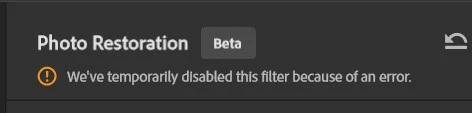
I've contacted an agent in support, and we spent over 1,5h trying to fix the issue - reinstalling and uptading graphic card drivers, photoshop, restarting the PC. Nothing helped. The filter just doesn't work on some photos, seemingly without a pattern.

이 주제는 답변이 닫혔습니다.

3 답변

Participant
February 17, 2023

I have the same exact problem, it worked for about 50 or so photos, the closed Photoshop and then I have this message since. Changed some parameters according to deiffferent forums, removed Beta, no difference, even change to larger sratch disk, whatever I tried, that plugin doesn't work anymore. Even with different contraùst photos, even more sepia ones.


I just don't get it. It worked, nothing changed then this happens, I also did some updates before removing PS Beta, to no avail. Here is my setup;

Processor Intel(R) Core(TM) i5-4460 CPU @ 3.20GHz 3.20 GHz
Installed RAM 16.0 GB
Device ID A522527C-721B-4D67-89D8-E5E59864A275
Product ID 00326-10000-00000-AA525
System type 64-bit operating system, x64-based processor
Pen and touch No pen or touch input is available for this display

Edition Windows 10 Home
Version 22H2
Installed on ‎2020-‎09-‎30
OS build 19045.2604
Experience Windows Feature Experience Pack 120.2212.4190.0

Advanced Micro Devices, Inc.
AMD Radeon ™ R9 255
RAM 2G
2021-05-11
27.20.20903.8001

Participant
February 18, 2023

Just an update on my issue. I reinstalled PS Beta, Neural Photo Restore failed again, tried the colorization one, worked, tried Photo restore, worked. I alternated for about 4-5 photos and it worked, then again Photo Restore failed. Then I tried JPEGs with a maximum of 1000 pixel instead of CR3 or TIFF, it owrked for 4 photos, then again would not complete the task, one after another one or alternate with a different Neural filter. What deception.

Inspiring
February 4, 2023

I've been working with the Photo Restoration (Beta) filter all week and now I get the same message. Is Adobe that turned this filter off? Or is it something that is hoppening to just a few?

Kevin Stohlmeyer
Community Expert
Community Expert
January 27, 2023

Unfortunately this is a Beta feature right now, meaning there are no guarantees that this will be readily available or work all the time.

It is not finalized hence the notification of Beta. Run at your own risk.

Kumakk작성자
Participant
February 6, 2023

The filter worked during the many hours I've spent using it after discovering it. It stopped working only at certain photos. I chatted live with a very helpful and kind consultant, who took control of my computer, tried restarting everything, installing new drivers ect. I sent him the files that the filter didn't work on, and it worked in his Photoshop. So it's not a matter of the specific files, or the filter being Beta in general (because it worked flawlessly at the consultant's computer). It's a bug that I was asked to report by the consultant I talked to. It's still not working.