
Participant
May 2, 2024
Answered

Text bullet Photoshop beta

  • May 2, 2024
  • 3 replies
  • 2508 views

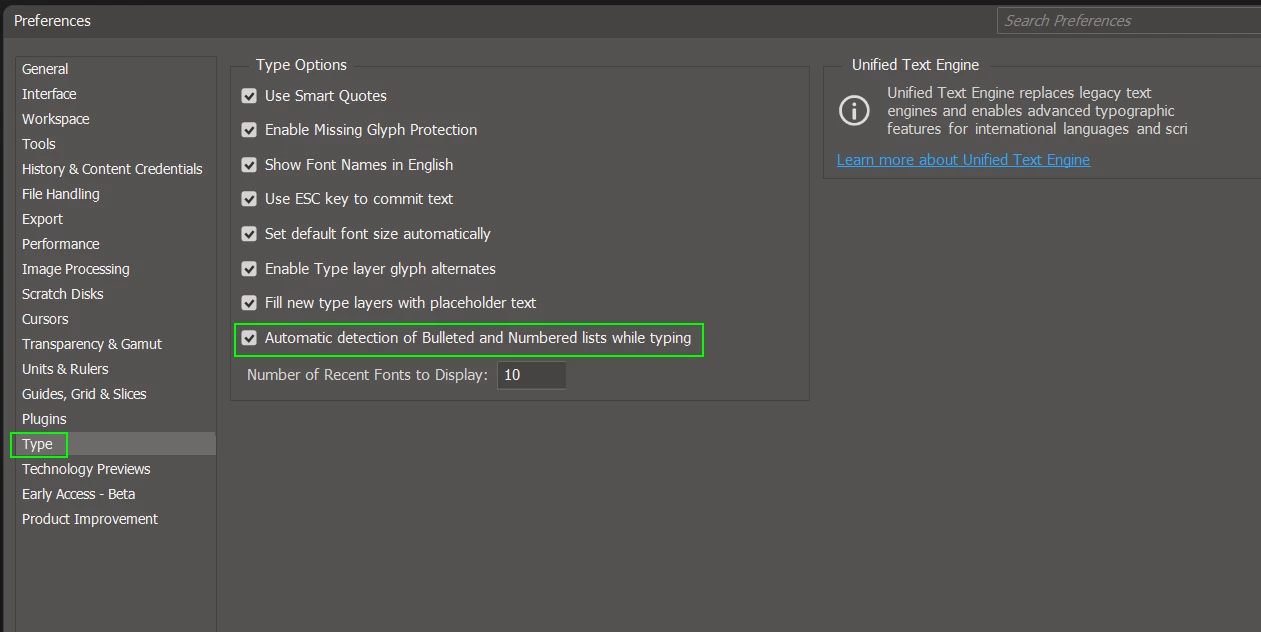
Does anyone know if there's a way to disable automatic bullet points on Photoshop? I've been using the new beta version and when a create a text layer he creates a bullet text automatically and i can't edit the bullet point.
This topic has been closed for replies.
Correct answer Trevor.Dennis

Hi Arthur.    You can turn that feature off in Preferences > Type.


3 replies

Trevor.Dennis
Community Expert
Trevor.DennisCommunity ExpertCorrect answer
Community Expert
July 3, 2024

Hi Arthur.    You can turn that feature off in Preferences > Type.


Participating Frequently
July 3, 2024

There is no such selection line in my Photoshop Preferences.

c.pfaffenbichler
Community Expert
Community Expert
July 3, 2024

What is your exact Photoshop version? 

Please read this (in particular the section titled "Supply pertinent information for more timely and effective answers”):
https://community.adobe.com/t5/using-the-community/community-how-to-guide-tips-amp-best-practices/td-p/11601738?page=1

Participating Frequently
July 3, 2024

If you have an unwanted bullet on the first line of the text you can't remove that bullet or number of numbered list. I have tried without luck. But you can start a new text block. Don't copy line where unwanted thing is. Rewrite that manually. This is a very akward and could easily be corrected by Adobe with selection "kill bullets/numbering" in current text block.

c.pfaffenbichler
Community Expert
Community Expert
May 6, 2024

Could you please post screenshots taken at View > 100% with the pertinent Panels (Toolbar, Layers, Character, Paragraph, Options Bar, …) visible? 

Does this also happen if you create a new Type Layer and start typing?