
Participating Frequently
August 29, 2023
Question

updated Photoshop beta and now it crashes when i launch with my computer

  • August 29, 2023
  • 1 reply
  • 1484 views

HELP PLEASE..


I had the original beta on my computer and was working great. then i noticed the generative fill was causing an error 400 .. i updated it and now it any newer verion crashes upon openning on my computer. the older versions that do not crash do not offer generative fill.


here are specs of my computer.
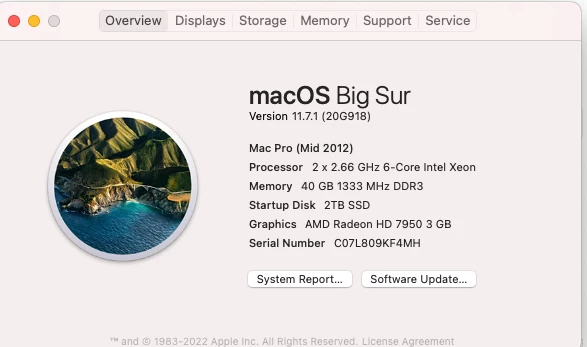
This topic has been closed for replies.

1 reply

CShubert
Community Manager
Community Manager
August 29, 2023

Hi @MARK SQUIRES to use GenAi, you must update to Ps beta 25.0 or later, support was removed in the 24.7 beta build to to technology needs due to the amount of images created... so to be clear, GenAI will no longer work in any Ps beta earlier than 25.0.


It is possible that in the new version of Ps beta your machine is hitting this issue that others are also facing.
https://community.adobe.com/t5/photoshop-beta-bugs/p-photoshop-beta-25-critical-error/idi-p/14018103


We see your system is over 10 years old so let's make sure there are no issues with the GPU:

https://helpx.adobe.com/photoshop/kb/troubleshoot-gpu-graphics-card.html#multiple-gpus


Participating Frequently
August 29, 2023

Yes cory it seems i am having similar issues to people in that thread. 


yes my computer and system are older . my OS system is big sur as you can see. is that why? will the newer beta version run on that? or is that the issue? I had a new graphics card installed. but before the orig version of photoshop beta was working on my computer and the generative fill was really great. now when i launch the recent version this error comes up and when i click on ok it then just crashes.


additionally .. I did manage to donwload and launch the recent update ap on another (friend's) newer macbook but tbh we tried to do generative fill there and it was really bad and didnt do the simple "remove" or "extend background" prompts that we gave it. it was really bad and just gave us variations of words on a random background. my image was basically replaced. but that is a side note.

the real issue is getting it to work on my desktop comp.

Participating Frequently
August 29, 2023


it says i have a photography plan but now it also says photoshop is not in my plan? what is going on here?


also under photoshop beta it says (try or buy)