

Error message: There was an error opening your printer... crashes Photoshop
Greetings,
I'm getting this error message (strangely) when I was trying to File->Export-> Artboards to Files
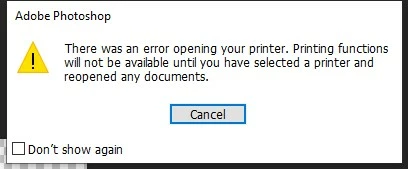
"There was an error opening your printer. Printing functions will not be available until you have selected a printer and reopened any documents"
and then PS crashes.
Noticing it mentioned the printer, I tried to just go to File -> Print, and doing this causes the error as well and then crashes PS. I unstalled PS, rebooted my machine and reinstalled PS, but still having the same problem. I sent a crash error email message to Adobe via the box that popped up after the error.
My system specs are below. Thank you for any help on this
System specs
Photoshop: 25.7
Machine: Intel(R) Xeon(R) CPU E5-2630 v3 @ 2.40GHz 2.40 GHz
RAM: 16.0 GB
Windows 10 Pro
Version: 21H2
OS Build: 19044.2965
 AdChoices