



ajabon grinsmith
Community Expert
Community Expert
October 21, 2024

P: ExtendScript Debugger does not correctly send Japanese strings to Photoshop 2024 or later.

  • October 21, 2024
  • 5 replies
  • 923 views

To the Moderator, 
This is a bug report in Japanese, so please do not move it to the Japanese community.


[テストに使用した環境]

macOS 13.7  MacBookPro 2021 (Apple M1 MAX),

macOS 12.7.6  MacPro Late2013 (Intel)

VS Code 1.94.2

ExtendScript Debugger 2.0.3

Photoshop 2023 (24.7.4), 2024 (25.12.0) and 2025 (26.0.0)


[テストに使用したスクリプト]


var folderA = Folder.selectDialog("処理するフォルダA を選択");


これは単純な、フォルダーの選択を求める1行だけのスクリプトです。


[2023 (24.74) 以下による実行結果]

正しい文字列が表示されている。
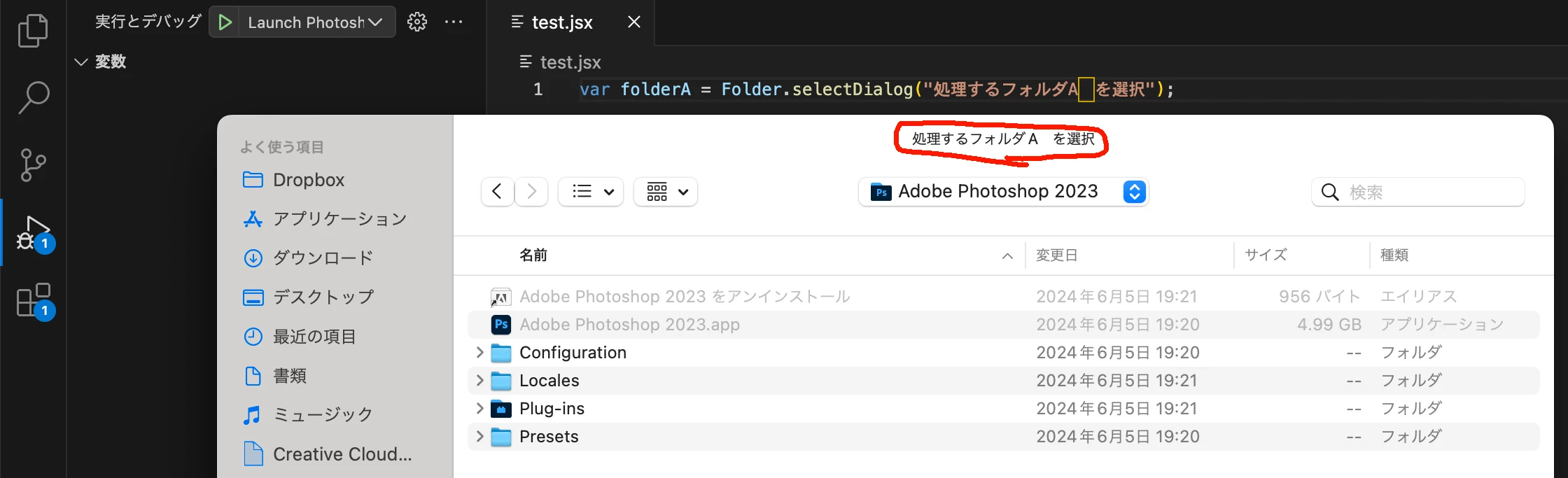
 

[2024 (25.12.0) 以降による実行結果]

文字列の表示が正しくない。
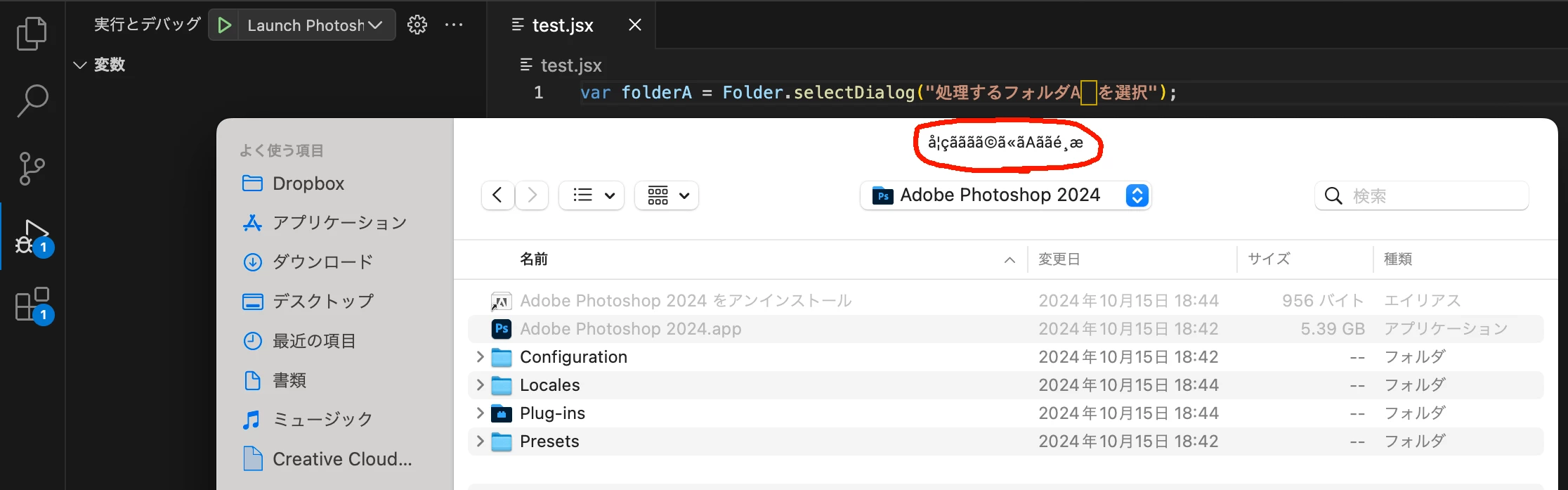
 

[期待される結果]

メソッドの引数に記述した通りの文字列が表示されること、Photoshopのバージョンに依らず同一の結果となること。


[備考]

現状、最初の報告者と私によるmacOSでのテストしか行えていません。

Windowsで検証できる方からの追記を期待します。


----------- for English ------------

Issue: When debugging with Photoshop 2024 or later, sent strings are corrupted.

Photoshop 2023 (24.7.4), 2024 (25.12.0) and 2025 (26.0.0)

macOS 13.7  MacBookPro 2021 (Apple M1 MAX),

macOS 12.7.6  MacPro Late2013 (Intel)

with

VS Code 1.94.2

ExtendScript Debugger 2.0.3


Steps to reproduce:

  1. Write script on VS Code.
  2. Select Photoshop 2024 or later scripting engine on VS Code and run debug,  even 'alert("こんにちは"');'
  3. Garbled execution results.


Expected result
Actual result: The string should be displayed as described in the method argument, and the results should match the results of Photoshop 2023 or earlier.


*Verification by Windows has not yet been done.

5 replies

ajabon grinsmith
Community Expert
Community Expert
March 10, 2025

I've verified that it works properly with version 26.3.
I'll report it to the Japan Forum as well. Thanks!

Community Manager
March 7, 2025

@ajabon grinsmith, I suspect the root of this issue (XML in ES) was resolved in 26.3.  Please let me know if that is the case.

Participant
November 30, 2024

There are some Chinese characters in the file path. Normally there is no issues, but it arises sometimes after photoshop updates. The file path becomes garbled so the debugger cannot run the script. Now I cannot run my script on Photoshop v26.1 or v25.12, but v25.11 is ok.


Last time this happened was also after photoshop updated, but then Adobe updated the ExtendScript Debugger a few hours later and that issue was solved. So is there a connection between these two? I hope Adobe update the debugger more timely.


Legend
November 30, 2024
ajabon grinsmith
Community Expert
Community Expert
October 25, 2024

Shivani,

Thank you very much. The bug ID URL could not be viewed due to “Device Verification Error’, but we hope it will be fixed successfully anyway.

Regards!

Participating Frequently
October 24, 2024
Hey ajabon grinsmith, Thanks for bringing this to our attention. We are aware of this issue, and the bug has already been logged. Thanks, Shivani