Participating Frequently
November 17, 2023
Answered

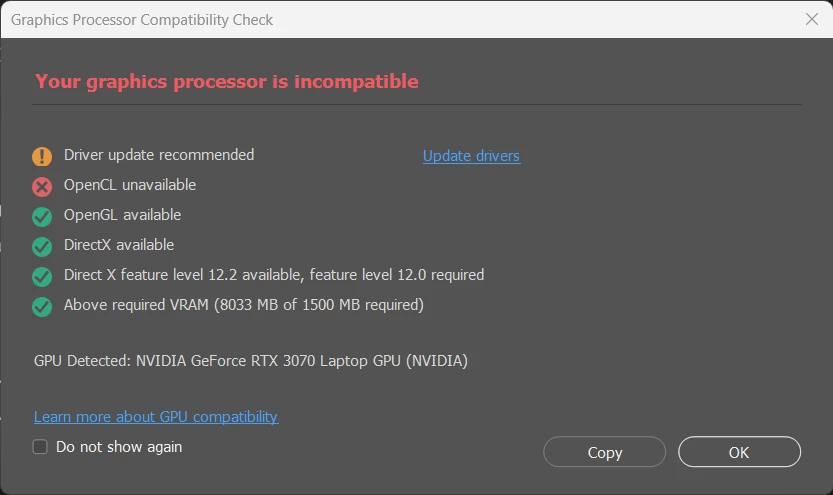
Graphics Processor STILL Incompatible & Open CL unavailable after driver update Photoshop 2024
  • November 17, 2023
  • 19 replies
  • 4322 views

Help. I already Updated my GPU and have the latest version of photoshop. What to do?

This topic has been closed for replies.
Correct answer D Fosse

Disable the integrated GPU completely. Dual GPUs can often conflict and it's a common problem with laptops. See section 6 & 7 here:

https://helpx.adobe.com/photoshop/kb/troubleshoot-gpu-graphics-card.html 

19 replies

Inspiring
May 24, 2024

I am having the same issue.  However, my GPU is already turned off and in the box it states "Unknown GPU (UNKNOWN)"

Inspiring
January 14, 2024

I have a 3090 RTX and the only solution that worked for me was to open the Microsoft Store and install the OpenCL™ and OpenGL® Compatibility Pack. Works flawlessly every time now! 

D Fosse
Community Expert
Community Expert
November 19, 2023

@Llamasheaber2 


"The increasing number of threads on the forum in the past few days indicates that there is an issue somewhere, and it's not an isolated bug."


Yes, I absolutely agree with every word there, and I've said the same thing in many other threads. I'm just trying to find out what the baseline is, what conditions and premises we're supposed to start from.


But yes, there's clearly something that just recently broke.


Look at this thread:


https://community.adobe.com/t5/photoshop-ecosystem-bugs/p-photoshop-25-0-graphics-processor-compatibility-check-fails-unknown-gpu/idi-p/14218782 

Participant
November 19, 2023

Thank you for the information. I've been using laptops with integrated and dedicated graphics for years, and I've never encountered this error before. It only appeared after the recent Photoshop update a few days ago. So, there is definitely something that the Adobe developers changed in the software that is causing this issue. The increasing number of threads on the forum in the past few days indicates that there is an issue somewhere, and it's not an isolated bug. However, apart from this error message, I don't feel like it has any impact on the usability of the software, so it's okay for now.

D Fosse
Community Expert
Community Expert
November 19, 2023

@Llamasheaber2 


Yes, I get that, but apparently there aren't any APIs that allow Photoshop to choose the GPU. The dual GPU problem has been well known to Adobe the whole time. It's been specifically mentioned in the troubleshooting guides for many years.


The point is - if it was possible, they would have done it a long time ago. Unless you want to make conspiracy theories or assume they're just incompetent.


The underlying problem is a fundamental one: this isn't a one-way downstream flow like it traditionally was, and still is in simpler applications. Photoshop uses the GPU for actual data processing, and the result returned to Photoshop for further processing. In this equation, there can only be one GPU. You can't send data to one and get it back from the other.


Keep in mind that applications aren't written to run directly on hardware. They are written to standardized APIs (Application Programming Interfaces). You have to assume that whatever is on the other side of those APIs work as intended.

Participant
November 19, 2023

Same issue here since yesterday. Disabling the integrated graphics card solution works for me. Now, I don't consider this a permanent solution. The purpose of a laptop is to be able to use it on the go. Will Adobe fix this bug, considering it has been present since yesterday (following a Photoshop update)?

Participant
November 19, 2023

Same issue in PS2024, just after Intel, Nvidia, and Windows updates. My issues started yesterday and I tried everything I could find to try and nothing worked, not even disabling the Integrated GPU. I finally decided to see if disabling Nvidia would work and sure enough it worked. So, if the issue should arise again, there's another option to try.  I am finding it odd that it's only Photoshop that has the issue with this, not Illustrator or any other programs.

Participating Frequently
November 17, 2023

Well I'll be damned. It worked. I disabled the integrated GPU and Photoshop responded in favor. 
I'm a lil scared...doesn't that put more stress on the GPU now tho?

Participant
November 17, 2023

do you know why this is happening only as of today?

Kevin Stohlmeyer
Community Expert
Community Expert
November 17, 2023

@decampos-design see above disable the Intel integrated GPU.