Inspiring
September 22, 2024

History Panel

  • September 22, 2024
  • 16 replies
  • 1516 views

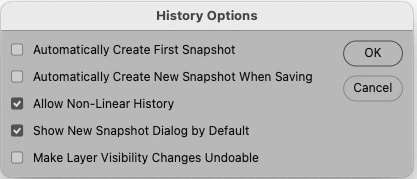
A problem with the  History Panel. When I Open History Options and check “Show New Snapshot Dialog by Default”, this function does not work, I do not get a New Snapshot Dialog.  See attached screen shot.  Suggestions welcome.
 

16 replies

Inspiring
February 1, 2025

I just updated to the latest version of PS and the History Panel problem persists.  I ran the Script suggested by Stephen Marsh, and that did not fix the problem.  That Script is installed in the Bridge Start-Up folder, which is confusing since this is a Photoshop problem.  Any help would be appreciated.  This problem has existed through at least three PS Updates.

Stephen Marsh
Community Expert
Community Expert
November 1, 2024

@Mark_Weidman 


Under my script I provided a link with full instructions:


https://prepression.blogspot.com/2017/11/downloading-and-installing-adobe-scripts.html

Inspiring
November 1, 2024

Thank you, I will review the instructions and proceed if comfortable with the steps.

Mark Weidman

______________________________

H. Mark Weidman Photography
[PII Removed by Moderator]

Inspiring
November 1, 2024

I just downloaded and installed the latest PS update, version 26.0.0; running on an Apple Mac w OSX v14.7.1.  This latest PS update did not fix the problem with the History Options.  I still do not get a new snapshot dialog when creating a new Snapshot.  Dissapointed this was not fixed.  I see someone posted a Script for a temporary work around.  Though I am somewhat familiar with Terminal, the suggested Script is too complex for me.  Suggestions welcome!

Participating Frequently
October 7, 2024

hi, it appears with the update 25 12 0 and 24 7 4. on mac os; I try with mac studios or macboopro, in sonoma or other ...

In the history panel, when I use the option key before clicking on the icon to create a new snapshot, before the update, a widow appears to choose the snapshot name... since the update... didn’t working.. I try with some old action, It  works, but I can't change the name anymore... please restore this function...

mglush
Community Expert
Community Expert
September 22, 2024

What version of Photoshop are you using and what Mac OS are you running on?

Did you turn this on and restart Phtoshop?

Michelle

Inspiring
September 22, 2024
I am running Adobe Photoshop v25.11.0 on an Apple Macintosh running OSX v14.6.1. Yes, I have rebooted but the problem persists. Mark Weidmam
