


Inspiring
September 20, 2024

New snapshot options (after the ellipsis)

  • September 20, 2024
  • 26 replies
  • 2170 views

Hi-

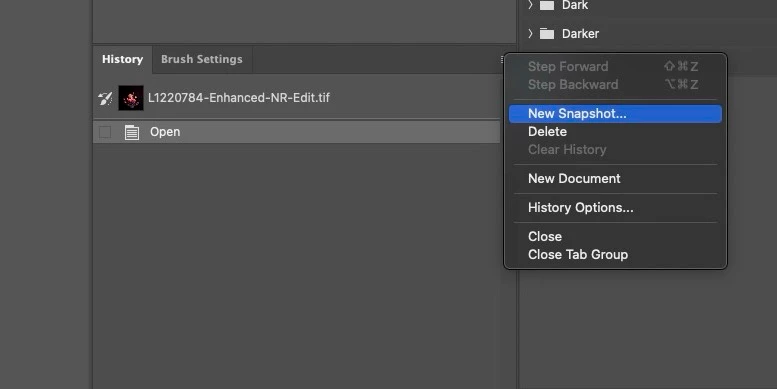
In Photoshop 25.12 on Mac 14.6.1 going into the history flyout panel to "New Snapshot" no longer opens the additional options box for selecting current layer.  Instead, a new overal snapshot is produced like it would be if you clicked the little camera icon at the bottom of the palette.  Any idea if something has changed?
 

26 replies

Stephen Marsh
Community Expert
Community Expert
October 16, 2024
quote

I hope this get fixed soon. We use snapshots in a lot of actions and need the naming option. Please Adobe Team fix this soon? Pretty please? @jk19035953 


Until this is fixed, the following code will add a name field to the previous script so that you can enter the name and select the options:


/*
New Snapshot Script.jsx
A temporary hack to workaround a bug in Ps 2024 (25.12.0)
v1.0 - 21st September 2024, Stephen Marsh
v1.1 - 16th October 2024, Added a field to enter the snapshot name
v1.2 - 17th October 2024, Added code to auto increment the default Snapshot name # number
https://community.adobe.com/t5/photoshop-ecosystem-bugs/new-snapshot-options-after-the-ellipsis/idc-p/14872580
*/

#target photoshop

// Main function to create snapshot
function makeSnapshot(theName, fromParam) {
    var s2t = function (s) {
        return app.stringIDToTypeID(s);
    };
    var descriptor = new ActionDescriptor();
    var reference = new ActionReference();
    var reference2 = new ActionReference();
    reference.putClass(s2t("snapshotClass"));
    descriptor.putReference(s2t("null"), reference);
    reference2.putProperty(s2t("historyState"), s2t("currentHistoryState"));
    descriptor.putReference(s2t("from"), reference2);
    descriptor.putString(s2t("name"), theName);
    descriptor.putEnumerated(s2t("using"), s2t("historyState"), s2t(fromParam));
    // Change DialogModes.NO to DialogModes.ALL to confirm overwrite
    executeAction(s2t("make"), descriptor, DialogModes.ALL);
}

var dlg = new Window("dialog", "New Snapshot Script");
dlg.orientation = "column";
dlg.alignChildren = ["fill", "top"];
dlg.spacing = 10;
dlg.margins = 16;

// Get the history states
var historyStates = app.activeDocument.historyStates;

// Create variables to store the highest snapshot number and track if "Snapshot 1" exists
var highestSnapshotNumber = 0;
var snapshotOneExists = false;

// Loop through the history states and check for snapshots named "Snapshot #"
for (var i = 0; i < historyStates.length; i++) {
    if (historyStates[i].snapshot) {
        var snapshotName = historyStates[i].name;
        // Check if the snapshot name follows the pattern "Snapshot #"
        var match = snapshotName.match(/^Snapshot (\d+)$/);
        if (match) {
            var snapshotNumber = parseInt(match[1], 10);
            // Update the highest snapshot number
            if (snapshotNumber > highestSnapshotNumber) {
                highestSnapshotNumber = snapshotNumber;
            }
            // Check if "Snapshot 1" exists
            if (snapshotNumber === 1) {
                snapshotOneExists = true;
            }
        }
    }
}

// Determine the next snapshot name
var nextSnapshotName = snapshotOneExists ? "Snapshot " + (highestSnapshotNumber + 1) : "Snapshot 1";

// Add edittext for the snapshot name
dlg.add("statictext", undefined, "Snapshot Name:");
var nameInput = dlg.add("edittext", undefined, nextSnapshotName);
nameInput.characters = 20;

// Create dropdown with user-friendly labels
var dropdownItems = [
    ["Full Document", "fullDocument"],
    ["Merged Layers", "mergeLayersNew"],
    ["Current Layer", "currentLayer"]
];
dlg.add("statictext", undefined, "From:");
var dropdown = dlg.add("dropdownlist");
for (var i = 0; i < dropdownItems.length; i++) {
    dropdown.add("item", dropdownItems[i][0]);
}
dropdown.selection = 0;

// Create buttons
var btnGroup = dlg.add("group");
btnGroup.orientation = "row";
btnGroup.alignChildren = ["fill", "top"];
var cancelBtn = btnGroup.add("button", undefined, "Cancel");
var okBtn = btnGroup.add("button", undefined, "OK");

// Button click handlers
okBtn.onClick = function () {
    var selectedValue = dropdownItems[dropdown.selection.index][1];
    var snapshotName = nameInput.text; // Get the user-entered name
    makeSnapshot(snapshotName, selectedValue);
    dlg.close();

};

cancelBtn.onClick = function () {
    dlg.close();
};

// Show the dialog
dlg.show();


https://prepression.blogspot.com/2017/11/downloading-and-installing-adobe-scripts.html

Participating Frequently
October 16, 2024

Hey there, 


We're sorry for the trouble. Could you please update Photoshop to the latest version, 26.0, and check if the issue persists? 

https://adobe.ly/3Yp09RU


Thanks, 

Shivani 


Participant
October 16, 2024

I have also noticed that in the latest version of Photoshop, the 'Snapshot' dialogue box no longer appears (even though I have the option enabled in the protocol options). I used to be able to use it to overwrite existing snapshots with the same name, but now it just creates a snapshot without asking me.

Is there any way you can fix this? It is really disrupting my workflow and it would be great to have this feature back.

Inspiring
October 16, 2024

I hope this get fixed soon. We use snapshots in a lot of actions and need the naming option. Please Adobe Team fix this soon? Pretty please?

Inspiring
September 21, 2024

Thank you Stephen. 

Stephen Marsh
Community Expert
Community Expert
September 20, 2024

As a temporary workaround until fixed, this can be scripted:


/*
New Snapshot Script.jsx
A temporary hack to workaround a bug in Ps 2024 (25.12.0)
v1.0 - 21st September 2024, Stephen Marsh
https://community.adobe.com/t5/photoshop-ecosystem-bugs/new-snapshot-options-after-the-ellipsis/idc-p/14872580
*/

#target photoshop

// Main function to create snapshot
function makeSnapshot(fromParam) {
    var s2t = function (s) {
        return app.stringIDToTypeID(s);
    };
    var descriptor = new ActionDescriptor();
    var reference = new ActionReference();
    var reference2 = new ActionReference();
    reference.putClass(s2t("snapshotClass"));
    descriptor.putReference(s2t("null"), reference);
    reference2.putProperty(s2t("historyState"), s2t("currentHistoryState"));
    descriptor.putReference(s2t("from"), reference2);
    descriptor.putEnumerated(s2t("using"), s2t("historyState"), s2t(fromParam));
    executeAction(s2t("make"), descriptor, DialogModes.NO);
}

// Create the user interface
var dlg = new Window("dialog", "New Snapshot Script");
dlg.orientation = "column";
dlg.alignChildren = ["center", "top"];
dlg.spacing = 10;
dlg.margins = 16;

// Create dropdown with user-friendly labels
var dropdownItems = [
    ["Full Document", "fullDocument"],
    ["Merged Layers", "mergeLayersNew"],
    ["Current Layer", "currentLayer"]
];

var dropdown = dlg.add("dropdownlist");
for (var i = 0; i < dropdownItems.length; i++) {
    dropdown.add("item", dropdownItems[i][0]);
}
dropdown.selection = 0;

// Create buttons
var btnGroup = dlg.add("group");
btnGroup.orientation = "row";
var okBtn = btnGroup.add("button", undefined, "OK");
var cancelBtn = btnGroup.add("button", undefined, "Cancel");

// Button click handlers
okBtn.onClick = function() {
    var selectedValue = dropdownItems[dropdown.selection.index][1];
    makeSnapshot(selectedValue);
    dlg.close();
};

cancelBtn.onClick = function() {
    dlg.close();
};

// Show the dialog
dlg.show();


https://prepression.blogspot.com/2017/11/downloading-and-installing-adobe-scripts.html

Stephen Marsh
Community Expert
Community Expert
September 20, 2024

I can confirm with an Intel Mac running Photoshop 25.12.0 and OS 13.7


Holding down the Option modifier key when pressing the snapshot icon at the foot of the panel doesn't work either.