


Olá a todos, estão tendo problemas ? / Hi everyone, having problems with Photoshop 2023? I'm :((
Olá a todos, estão tendo problemas com o Photoshop 2023? estou com um pouco de medo e decepcionada.
A demanda no trabalho como freelancer aumentou e finalmente consegui comprar ontem a versão paga do Photoshop 2023 para não usar mais a versão "Jack Sparrow" e aproveitar para aprender a IA
Porém estou tendo alguns problemas, que me preocupam
Problema 1: precisava fazer um cartão de visitas para um cliente mas na hora de aplicar o verniz local, mudou tudo!!
Quando abro o canal >> selecionar inverso >> e pressiono a tecla "del" ele não exclui o fundo preto para separar essa camada, como anteriormente.
(fiz uma gambiarra criando uma outra camada e parece ter ido, mas a toda preta ficou em baixo e não sei como vai sair na impressão)
Problema 2: na hora de selecionar a Cor Spot >> Pantone red 32
Aprece uma mensagem dizendo que o photoshop não trabalha mais com algumas cores e inclusive essa que é pedida pelas gráficas não tem mais...(coloquei uma que chegasse mais próximo e não sei se vou ter problemas ou a máquina da empresa de imprimir não vai reconhecer)
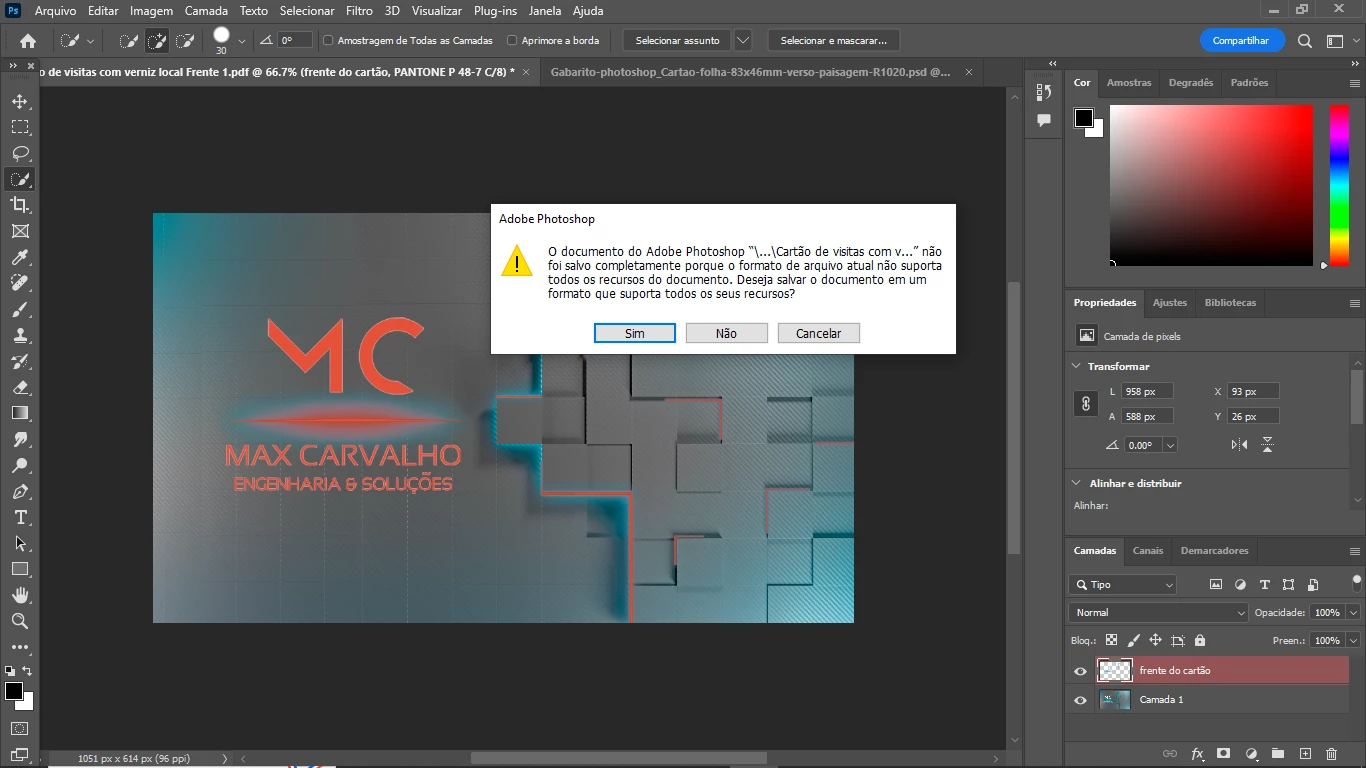
Problema 3: usei as alternativas para contornar as adversidades acima, e ia mandar para a gráficar ver se imprimia...e na hora de salvar o PDF aparece uma tela enorme dizendo que "o documento não foi salvo completamente porque o arquivo não suporta todos os recursos do documento"
HEEELP!!! Se eu não conseguir executar meu trabalho, não valeu de nada e ainda a compra foi totalmente em vão e comprei o pacote mais completo com todos os apps 😞
Hi everyone, having problems with Photoshop 2023? I'm a little scared and disappointed.
Demand at work as a freelancer has increased and I managed to buy the paid version of Photoshop 2023 yesterday so that I no longer use the "Jack Sparrow" version and take the opportunity to learn AI
But I'm having some problems, which concern me
Problem 1: I needed to make a business card for a client but when it came time to apply the local varnish, everything changed!!
When I open the channel >> select inverse >> and press the "del" key it does not delete the black background to separate this layer, as before.
(I made a workaround creating another layer and it seems to have gone, but the all black one stayed at the bottom and I don't know how it will come out in print)
Problem 2: when selecting the Spot Color >> Pantone red 32
There is a message saying that photoshop no longer works with some colors and even the one that is requested by the printers is no longer available... to recognize)
Problem 3: I used the alternatives to get around the adversities above, and I was going to send it to the printer to see if it would print... and when I save the PDF, a huge screen appears saying that "the document was not saved completely because the file does not support all document resources"
HEEELP!!! If I can't do my job, it's not worth anything and the purchase was totally in vain and I bought the most complete package with all the apps 😞
 AdChoices