Participant
April 29, 2025

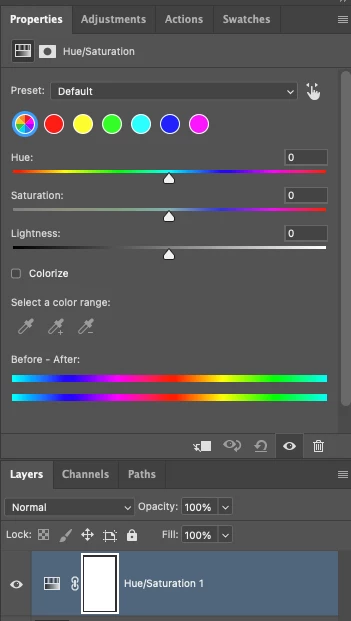
P: Adjusting layer properties doesn't work for Hue/Saturation/lum. HSL layers

  • April 29, 2025
  • 62 replies
  • 11512 views

The tab to click on and change the properties for an adjustment layer randomly disappears. Quitting and re-opening the app solves the issue, but it will happen again within minutes, usually when switching between different projects or different app on the computer. 

On Photoshop v26.6 - Mac Mini M4 pro, 32gb ram, 1tb ssd.


Any help would be appreciated!
ss

62 replies

AxelMatt
Community Expert
Community Expert
February 25, 2026

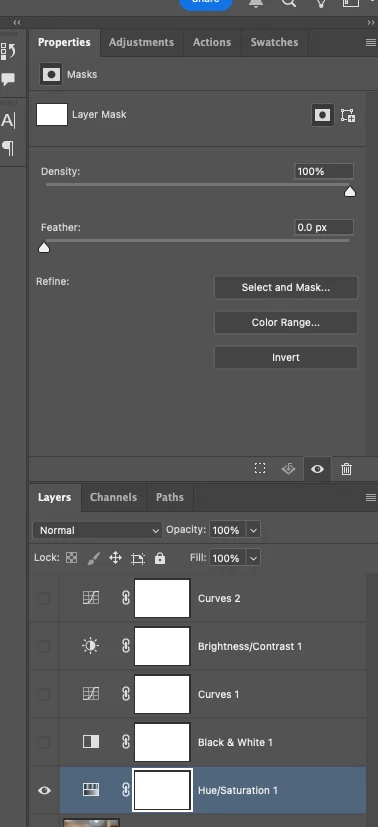
As I see in your screenshot the properties panel shows the settings for a mask. What happened if you click on the mask and the back again?

Try to create a new document and insert a hue/saturation layer. what happened?

As a first try I would try to reset the preferences to the default settings and the try again.


My System: Intel i7-8700K - 64GB RAM - NVidia Geforce RTX 3060 - Windows 11 Pro 25H2 -- LR-Classic 15 - Photoshop 27 - Nik Collection 8 - PureRAW 5 - Topaz Photo
PixelDeluxe
Known Participant
February 25, 2026

Unfortuately, when I click the mask and go back again the controls are not visible. I’ve had to setup then copy and paste an existing Hue/Sat layer and place it where I want in the layer stack - when it is placed, the Hue/Sat controls disappear.

It’s been hit and miss whether this happens or not, it was happening on some PSD documents and not on others. I’ll try resetting the preferences if it keeps happening, but Adobe, this should not be happening at all.

It seems as though Adobe have merged my thread with this one now, it’s the same issue.  ​@AxelMatt 

PixelDeluxe
Known Participant
February 25, 2026

I’m getting this in 27.4 on Windows 11 too.

PixelDeluxe
Known Participant
February 25, 2026

When a new Hue/Saturation layer is selected, the properties to adjust it don’t appear in the Properties panel. Using Photoshop version 27.4.


February 22, 2026

Adobe, what's wrong with you? In this thread, you confirmed that you were able to reproduce this bug, but nothing happened, and the bug hasn't been fixed. The Hue/Saturation layer still can't be used.

@Aleke  @CMass @Srishti Bali @Anshul_Saini ​@Sameer K ​@Srishti Bali 

Participant
February 20, 2026

week 610 of waiting for anyone at adobe to acknowledge such a broken, vital tool, that requires hard reboots to fix, despite about 100 peope now giving them exact feedback on the issue. 

still broken, to this day, when you merge a layer, this tool breaks. 

this customer service is inexcuseable. 

Participating Frequently
February 6, 2026

Now we have February 2026 and the issue still exists in version 27.3.0 on Windows. On a Hue/Saturation layer with a mask it only shows mask properties and no posibility to adjust the hue/sat sliders, and on a layer without mask, the property panel only shows the text “No properties”

Miron0226
Participant
January 28, 2026

Summary

Occasionally, Photoshop’s Properties panel stops responding/updating: the panel looks like nothing is selected (controls appear disabled / not highlighted), even though a layer or mask is selected. The issue is temporarily fixed by closing the document or restarting Photoshop.

Steps to Reproduce

Not 100% reproducible. Happened ~2–3 times total.

  1. Open any document.

  2. In Layers, select an adjustment layer (e.g., Hue/Saturation) and/or click the layer mask thumbnail.

  3. Go to the Properties panel.

  4. Observe that the Properties UI does not update for the current selection and appears inactive (as if no mask/target is selected).

Expected Result

The Properties panel should update to match the current selection (layer/mask/adjustment) and show the relevant active controls.

Actual Result

The Properties panel appears “stuck” / inactive:

  • controls are not highlighted and look disabled,

  • it may show a state like “No mask selected” (or equivalent) even when a mask/layer is selected,

  • switching selections does not restore normal behavior.

Frequency

Rare / intermittent. Occurred about 2–3 times over the entire usage period.

Workaround

  • Close and reopen the document or

  • Restart Photoshop
    After doing this, the Properties panel behaves normally again.

Environment

  • Adobe Photoshop Version: 27.2.0 20251213.r.15 e3408e7 arm64 (final, Release)

  • Operating System: Mac OS 26.2.0

  • Hardware: Apple M2 Max, 32 GB RAM

  • GPU: Apple M2 Max (Use Graphics Processor: ON, OpenCL: ON)

  • Displays: 2 monitors (SDR)

Attachments

  • Screenshots showing the disabled/unresponsive Properties panel state

  • Full System Info / GPU Sniffer output (pasted below)

Additional Notes

  • No third-party plugins failed to load (Plugins that failed to load: NONE).

  • Some UXP extensions are installed (e.g., Lumenzia, StreamDeck Plugin), but the issue appears sporadic and not tied to a specific action I can reliably reproduce.

If you want, paste this as-is and then append your full system info block underneath.


Known Participant
November 19, 2025

@Chloe5DC2 


I believe this bug parasitizes the "Prominent Colors" feature in Photoshop 26.6, which was introduced in March this year.

So if rolling back is indeed an option for you, I would recommend version 26.5.


Here is how you can access older versions in your CC desktop app:


Participant
November 17, 2025

Is anyone at Adobe even looking into this still? people here have given you a step by step guide on how to recreate this problem. Can we please get an update? I use photoshop for work everyday and this bug is majorily interferring with my workflow. The 'work around' of closing the file and reopening is not a work around at all. My files are huge, and svaing them and reopening can take up to 5 minutes each time.. it's beyond frustrating. The bug happens everytime you merge saturation adjustment layers with any other layer, thats the trigger.  Can we at least please have download access to photoshop 2024 again, until you figure out this problem and fix it? This version is no longer available on the creative cloud and it was the last version that didn't have this bug. I'm on the latest version of photoshop now, 2026 and its still happening. PLEASE HELP

Marek Domke
Participating Frequently
November 17, 2025

This is still an issue in Photoshop 27.0.0 on widows.