
Participating Frequently
April 14, 2021

P: Can't detect GPU

  • April 14, 2021
  • 156 replies
  • 8470 views

Recently I just did an update of Photoshop to V22.3.1

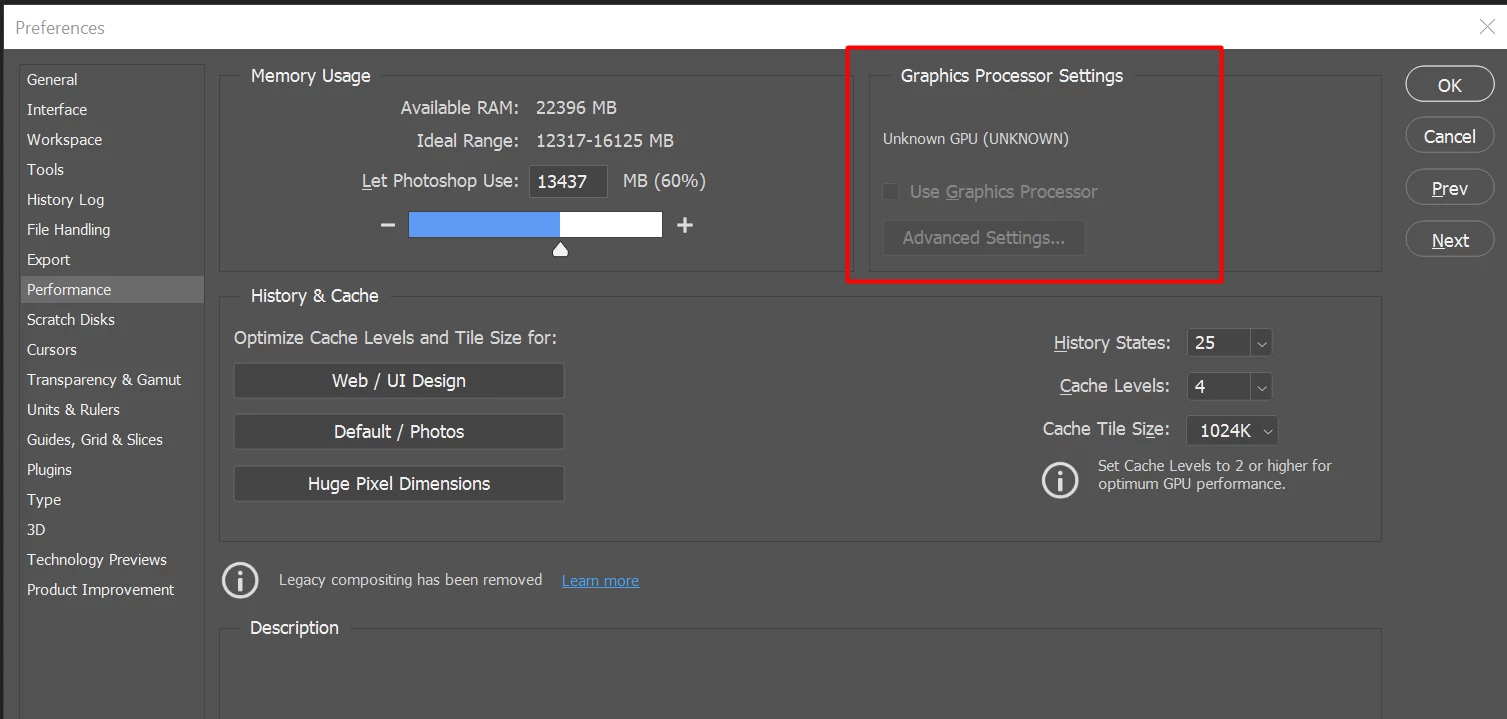
After I launched PS, and then go to the performance dialog box, then noticed that it can't detect my GPU GTX1050i.

This was working fine with the previous version of PS. I suspect that the latest update had something to with this problem.

Thank you

BR,

FS Wong

This topic has been closed for replies.

156 replies

CanyonJim
Participating Frequently
May 13, 2021

GPU now recognized in 22.4.  Thank you.

Inspiring
May 13, 2021

Thank Gawd! Confirmed, my GPU works again! Hope this works for everyone else as well.

Mark C. Dahm
Community Manager
Community Manager
May 13, 2021

@fung_swee_wong , try out 22.4; I believe transform warp and GPU detection were improved.

nikunj.m
Community Manager
Community Manager
May 13, 2021

Hi all,


We're happy to announce the release of Photoshop 22.4 in which we have included some bug fixes related to the "GPU not getting detected" in Photoshop. Please update Photoshop to the 22.4 version and let us know your feedback. To update Photoshop to the latest version, you can check: https://helpx.adobe.com/creative-cloud/help/creative-cloud-updates.html


For information on other issues fixed with this update, please check: https://helpx.adobe.com/photoshop/kb/fixed-issues.html


Regards,

Nikunj


Regards,

Nikunj

CanyonJim
Participating Frequently
May 13, 2021

Well, since installing the latest Windows 10 update last night, I can't get Photoshop to recognize my GPU no matter what magical incantation I use.

I hope Adobe gets the patch out soon!

Mark C. Dahm
Community Manager
Community Manager
May 13, 2021

I'll announce it here when it comes out.

Participating Frequently
May 12, 2021

@mark_dahm, just to be precise: with my AMD Radeon Pro WX 3100 on W10 the problem is not sporadic but systematic. The gpu is visible every time I launch Photoshop, but it consistently switches off the moment I have worked on the first picture that I opened in that session. Perhaps this might help with regard to the scope of the problem. Good luck.

Inspiring
May 12, 2021

I wonder if there will be some kind of notification made to the users when the patch is available? Will I get an email, or do I need to keep checking here, or ... ? 

In my case, I can't even open Photoshop, and I don't leave Creative Cloud running, so those routes of communication would not help me.

Participant
May 12, 2021

@mark_dahm, I appreciate your response. However, I believe that Adobe needs to inform all of their customer reps what is going on. I have had half-dozen of Adobe's customer reps working on my computer and they blame Windows, my system, or the GPU's and they really do not know what is going on. Not a single one of them has said that we are facing a glitch on the update and that Adobe s working on it. 

Mark C. Dahm
Community Manager
Community Manager
May 12, 2021

@al_olvera , we're working with AMD to improve GPU detection; sorry for the complication and we'll have a fix available very soon.

One of the internal tests we run on GPUs to determine if they are in working order is a performance test, and under some circumstances, given the right (or wrong) operating conditions, the GPU may fail that test. That could be why the problem is so sporadic. Either way, we're close to having a patch we believe will settle this issue down. Thanks for your patience.