Known Participant
April 22, 2020

P: Curves lag since version 21.1

  • April 22, 2020
  • 43 replies
  • 2595 views

There's a noticeable lag in curves since version 21.1.
I am now on 21.1.2 and it's still there.
Up until 21.0 they used to refresh smoothly. I am attaching a video to illustrate the problem.
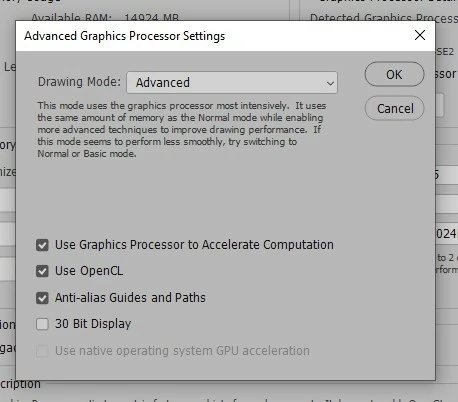
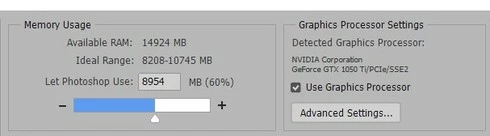
I'm also attaching a couple of screenshots of my performance tab in "Preferences".
These are my PC specs:

Operating System
Windows 10 Home 64-bit
CPU
Intel Core i7 7700K @ 4.20GHz
Kaby Lake 14nm Technology
RAM
16.0GB Dual-Channel Unknown @ 1070MHz (15-15-15-36)
Motherboard
ASUSTeK COMPUTER INC. PRIME Z270-A (LGA1151)
Graphics
4095MB NVIDIA GeForce GTX 1050 Ti (Gigabyte)
NVIDIA Studio Driver 442.92 (latest one)

Thanks!
 

This topic has been closed for replies.

43 replies

Inspiring
October 27, 2021
omarjosef.com
Known Participant
May 14, 2021

Testing 22.4
-After a few minutes testing on a very large heavily layered image, the adjustment layers are very smooth and snappy.
-Activation of "show overlay" for the clone stamp tool and healing brush doesn't seem to produce lag in the sampling click (alt/option click), so alt clicking does actually sample instead of drawing inadvertently, like when there was click-lag.

So far so good. This might be the one.

Inspiring
May 5, 2021

Why is this marked as "solved"? I'm still having the same lag problem in photoshop. Or am I missing the solution somewhere?

omarjosef.com
Known Participant
April 21, 2021

Has this been fixed in 22.3.1?

The changelog mentions cursor lag when dragging TARGETED adjutments on the canvas but it doesn't say anything about the unusably laggy sliders in the adjustment layer properties.

Inspiring
March 18, 2021

Tested v22.3 and it's still bad.

Inspiring
February 9, 2021

@6ralnmff9qivf Checked v22.2 and v21.2.5 - both bad, stick to v21.0.3 (though note that it's not actually available from the app anymore so I suspect it's going away fully soon).

Inspiring
October 21, 2020

In version 22.0[.0] the problem with lagging curves seems to be resolved, at last.

But I don't find it mentioned at the page Fixed issues in Photoshop:
https://helpx.adobe.com/photoshop/kb/fixed-issues.html#photoshop-desktop-fixed-issues

Closest: "Hue/Saturation not updating real-time".

(i7-9700K 3.6 GHz, 64 GB RAM 3200 MHz, GeForce GTX 1660 Super 6GB, Samsung 970 EVO Plus 500 GB M.2, Windows 10 Home)

2.11.0.0
Inspiring
October 21, 2020

Just to note that the new point release, 22.0.0 suffers the same handle-dragging lag as all the post 21.0.3 versions.

Additionally has some nasty render errors when transforming the new live shapes, so that's... great?

Inspiring
September 9, 2020
I mean it's the same as 21.2.2, bad. Stick to 21.0.3.

It feels a lot like they've tied the update of the slider's handle to the update of the canvas since then. Where you used to be able to make precise changes to the slider handles and then wait for a moment for the canvas to update, you now move the slider, it doesn't move with your movement until the canvas updates. By which point you've over or undershot because of the lack of visual feedback. And with complex images, that can take a moment even with the beefiest machine.

Now, arguably this wouldn't be a problem if PS leveraged the GPU more extensively (like the competition!) as even on complex documents, the vastly more parallel GPU architecture would be able to cope with live updating of the canvas, but PS is still mostly CPU driven, and largely single core at that for this sort of operation, so it'd be better to go back to the scenario where you could at least see where you were dragging your handle live...
Participating Frequently
September 9, 2020
I did not understand ... it is worth updating to 21.2.3?!? Is it like 21.0.3?