
Participating Frequently
November 4, 2020

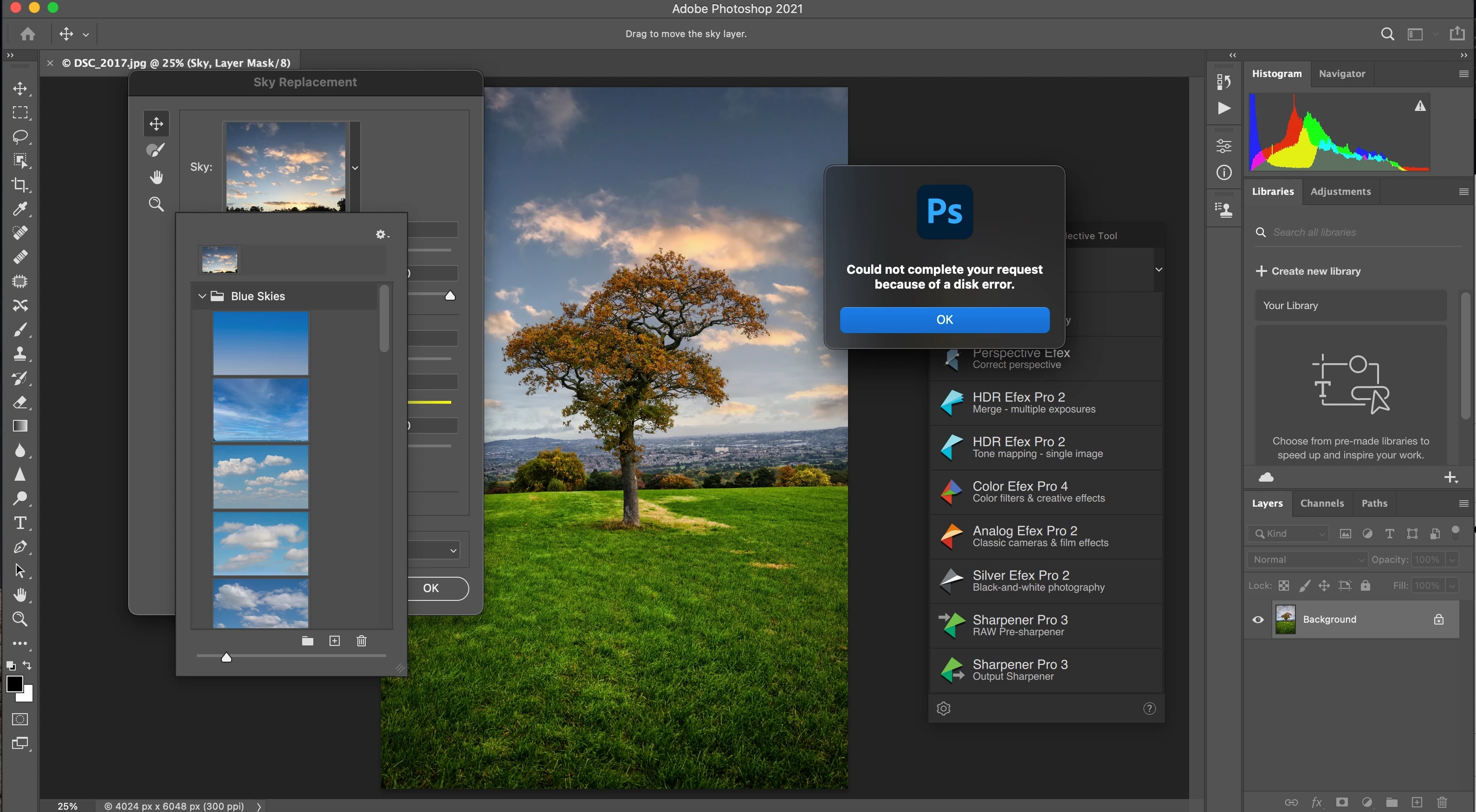
P: Disk Error when trying to import Skies

  • November 4, 2020
  • 21 replies
  • 1032 views

I seem to have an issue importing Sky Presets, the presets are in my Downloads folder on my booted Mac Big Sur laptop, the same issue exists if the files are on my desktop as well.


Edit- Sky Replacement

Sky Replacement Window Appears

Click the Arrow next to the Sky: Box

Select Import Skies, select the file and click Open


Window pops up with Disk Error


This topic has been closed for replies.

21 replies

Akash Sharma
Legend
March 10, 2021

Greetings,

This issue should be fixed in the Photoshop 22.3 update that went live today. This update includes fixes to some of the top customer reported issues among other bug fixes. See Bug fixes and security updates


To update Photoshop to 22.3, click "Update" in the Creative Cloud desktop app next to Photoshop. See: More detailed instructions for updating


Let us know how it goes.

Thanks,

Akash

Inspiring
February 28, 2021

Exactly the same for me when I attempt to import skies from a SKY file.

Has this been addressed yet?

Inspiring
February 4, 2021

Same here.

OS Name Microsoft Windows 10 Pro
Version 10.0.19041 Build 19041

Photoshop 22.1.1.

"Could not complete your request because of a disk error" - this comes up when I try to import previously exported *.sky from the same Photoshop version 22.1.1.

This is true for two previous updates.

Tested with different sky image sizes and amounts from 1 to 50.

Here is one of the files I am trying to import:

https://www.dropbox.com/t/dBLNCZ1TsB3pObJR

Participating Frequently
January 9, 2021

Yep, happened the same to me now... can't find any workaround....

(Mac OS Catalina, running on MBP Pro 2019)

Participating Frequently
January 8, 2021

Any news on this? I am having the same problem here.

Participating Frequently
January 8, 2021

Same problem here. Any news on this issue?

Participant
November 29, 2020

@JeffreyTranberry  I am getting the same error. I manually created a sky group using the Sky Replacement toolbox. I then exported it as a .sky file, deleted the group from PS and when I tried to bring the group back in using the .sky file I got the exact same error. I had saved the .sky file to an external drive, and even after copying it to my local drive and trying it I got the same message.

Update: On a hunch, I copied my sky file to the  C:\Program Files\Adobe\Adobe Photoshop 2021\Required\Sky_Presets

folder in the belief that it might have to be placed in that location in order to avoid a 'disk error'. I thought that perhaps the location had gotten 'hard wired' in the software. But this did not work. I then tried to export another sky group to this location but of course the folder was not accessible to me.

The Sky Replacement tool is a very cool new feature but I hate to think of the work required to reset such user sky groups when reinstalling or upgrading.

Legend
November 25, 2020

Interesting. Seems to be these .sky files specifically. Let me have engineering take a look.

Participating Frequently
November 25, 2020

@JeffreyTranberry

These are not mine, but the same error occurs, and this seems to be a common issue, several YouTube videos highlight the issue.

Link to DropBox

Legend
November 23, 2020

Very strange. Let me ask some of my colleagues to see if they can reproduce. Anything specific about the file you're trying to import? (if you want, share the sky file you're trying to import - via dropbox or CC files)