
January 8, 2020
解決済み

P: Document window resize

  • January 8, 2020
  • 返信数 30.
  • 9380 ビュー

Since the release of photoshop cc 2018 (photoshop ver 19.0) thru the
current photoshop 2020 (photoshop version 21.0.2) on both windows and mac, although it's most apparent on the mac side when the Application Frame is turned Off, when using floating document windows with the option to Open as Tabs enabled, the document windows resizes depending on the size
(pixel dimensions) of the next document being opened.This also happens i with vertical documents versus horizontal documents and windows with small documents will be sized up if a larger document is opened.

In other words, for example, if you have a larger document of say 8000 px x 4000 px open and you open a much smaller document of say 640 px x 480 px, the document window will resize down to the small file just opened as shown in the screenshots below.


Large document open that fills much of the screen when opened
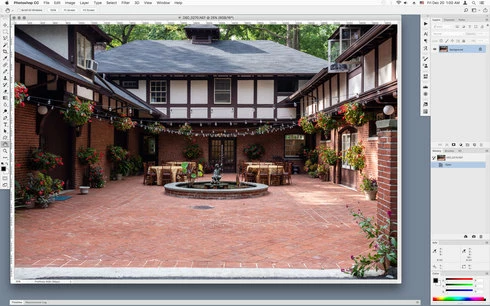


Document window resizes when much smaller documents is opened
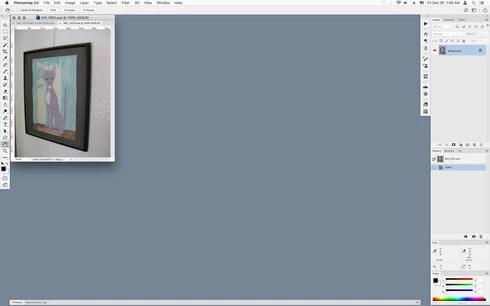


This did not occur on photoshop versions cs4 thru photoshop cc 2017. which would keep the window size of the original opened document.
Is this a deliberate change?

このトピックへの返信は締め切られました。
解決に役立った回答 Mohit Goyal

Hi all,


We're happy to announce the MAX 2021 release of Photoshop 23.0. This update includes the fix for this issue. To see the list of all fixed issues, click here


To update Photoshop to 23.0, click "Update" in the Creative Cloud desktop app next to Photoshop. More detailed instructions for updating


Let us know if the update resolves the problem for those affected and share your feedback with us.


Thanks,

Mohit

返信数 30

CShubert
Community Manager
Community Manager
December 16, 2022

Hi @Jeff Arola thanks for letting the team know. Could you explain what you are seeing so we can make sure we are not confusing things with other issues that have been resolved?


  • Liquify zoom lag? 
  • Fit on Screen for floating windows?

It is possible that issues have been merged and the original issue missed or assumed fixed.


Thank you,

Cory

Jeff Arola
Community Expert
Community Expert
December 15, 2022

Still an issue in photoshop 2023 (ps ver 24.1)

Inspiring
June 7, 2022

Thanks, Cory.

CShubert
Community Manager
Community Manager
June 6, 2022

Hi all, wanted to share that the team has been working on this so please test and let us know if it is resolved in future builds.

Thank you,

Inspiring
June 6, 2022

Oh dear.  Fixed and then broken again a year later.  Please fix this, Adobe!

Participant
June 3, 2022

This issue has been driving me nuts! I keep updating hoping the bug will be resolved and nothing yet.

Jeff Arola
Community Expert
Community Expert
April 13, 2022

This was fixed in the last couple of updates to both 2022 and 2021 (mac and windows), but now seems to be broken again in the photoshop 2022 (22.3 update) on both mac and windows.


Note this is not the same issue as this:

https://community.adobe.com/t5/photoshop-ecosystem-bugs/p-photoshop-opens-window-too-small-when-using-external-monitor/idi-p/12416846


Inspiring
December 17, 2021

Thanks Mohit, great to have this feature back.  So much better for my workflow.  Always good to see Adobe listening to customers.

Mohit Goyal
Community Manager
Mohit GoyalCommunity Manager解決!
Community Manager
October 26, 2021

Hi all,


We're happy to announce the MAX 2021 release of Photoshop 23.0. This update includes the fix for this issue. To see the list of all fixed issues, click here


To update Photoshop to 23.0, click "Update" in the Creative Cloud desktop app next to Photoshop. More detailed instructions for updating


Let us know if the update resolves the problem for those affected and share your feedback with us.


Thanks,

Mohit

Lance021
Participating Frequently
June 25, 2021

Still not fixed in photoshop 2021 ( photoshop version 22.4.2)