
patrikl
Participating Frequently
September 26, 2020

P: Full Screen Mode bug? Images is off screen

  • September 26, 2020
  • 32 replies
  • 4879 views

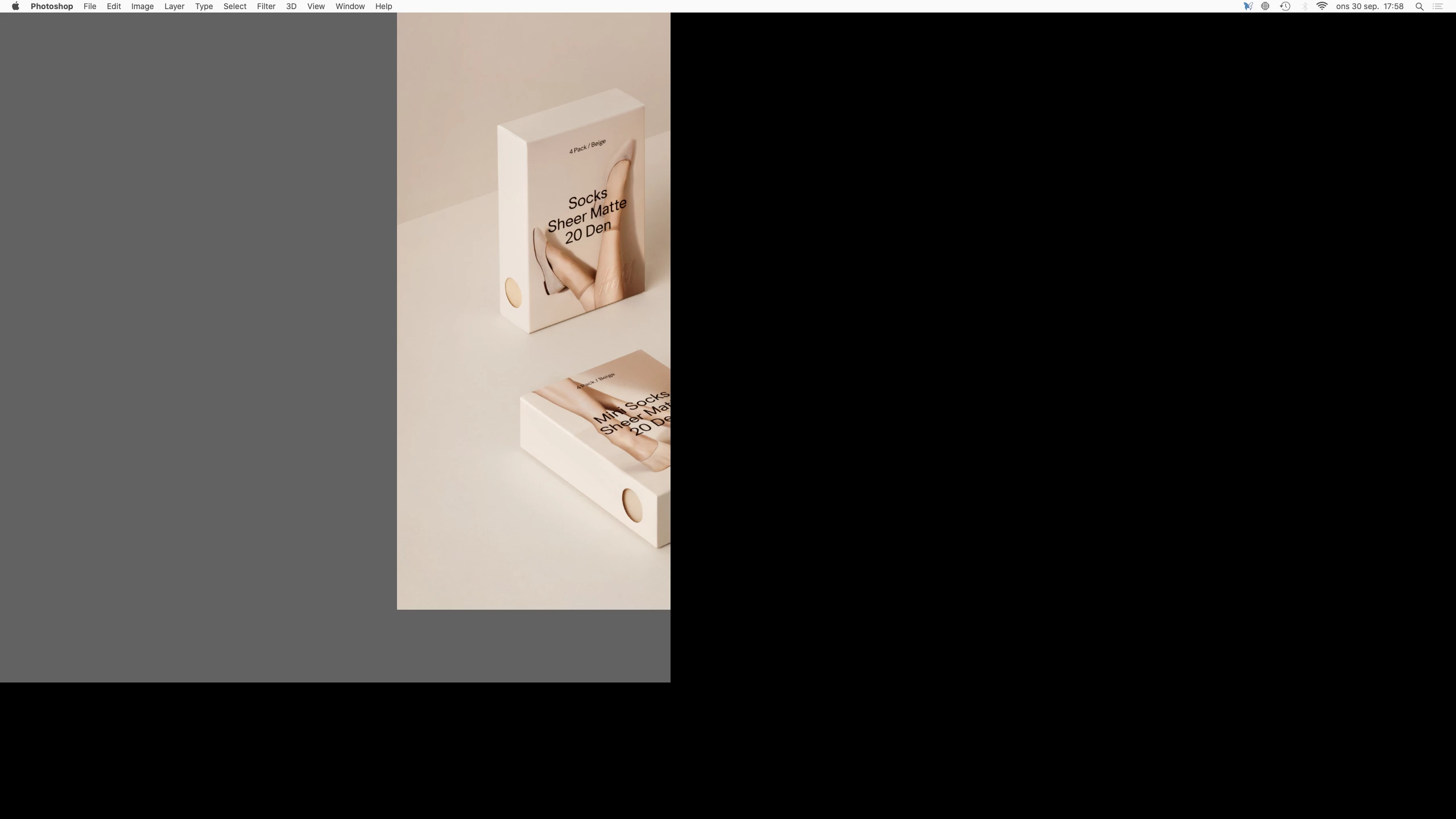
When I toggle between open Photoshop documents in Full Screen Mode (to view them centered etc) the images and canvas are off screen. I can only see a part of the image and canvas. Images is also cropped.

So I'm not able to view the images fully centered to compare them or even view them in Full Screen Mode. I use this feature a lot.

Is this a known bug and is there a fix?


Regards,
Patrik


Photoshop 21.2.3
Mac mini (2018)
Eizo CG2730 Monitor
Catalina 10.15.7 (19H2)
 

This topic has been closed for replies.

32 replies

Inspiring
May 10, 2021

it is not fixed… i'm using 22.3.1 and still have these problems. But only when a second screen is detected. 

Inspiring
March 7, 2021

Thanks for your reply. I noticed that when PS is fullscreen, it does not appear as a Space in the OS, unlike my other full-screen apps. My theory now is that Adobe is using a proprietary windowing system for PS, like in Adobe Air (if that still exists?), and this system simply doesn't play nicely with OSX.

Participating Frequently
March 7, 2021

Bad luck Edward, I've got so used to the workaround and the silence from the people I'm paying monthly that I assume this is the new normal.  Adobe keep sending me satisfaction surveys so there's evidently no fix coming anytime soon.

Inspiring
March 6, 2021

I'll just add my own experience to this thread as it has just started to happen for me, after updating to 22.2.0. It took a frustratingly long time to work out what the workaround was (i.e. don't use full-screen), as unfortunately I didn't find this post until later on.

MacBook Air (13-inch, Mid 2012)

Participating Frequently
February 10, 2021

I'm not a regular user of this forum. Does anyone from Adobe look in and advise on timescales?  As it has been many months since I typed in my symptoms they've still been taking my tenner and not fixing this for what seems to be a significant number of people. So how do we get their attention?  It remains a nuisance on my Macbook Pro with 16gb ram...

Inspiring
February 10, 2021

Hi All, yes exactly the same issues occurring for me on 22.1.1 but does now appear to be intermittent which I suppose is a step in some direction.

Amazes me such an issues are not resolved when previous releases of PS where fine in Full Screen. 

*Sympa is there any response to the previous posts please. It's been quiet since October from Adobe and we're still having these issues!

Thanks in advance and optimism 🙂

Inspiring
January 12, 2021

I'm having a similar problem. The Photoshop images are OK if the window is a certain size (smaller than full screen) but when I enlarge them to full screen either horizontally or vertically, a big chunk of the image disappears. It comes back when I reduce the window size.

Inspiring
December 31, 2020

Hmmm. Today I downloaded PS 2021 v 22.1. ...

MAC OS/macbook pro

What's going on Adobe? How do I make this work?

THanks,

GAK59

Participant
November 8, 2020

My issue with the “Full Screen Bug” continues and it does not appear that Adobe has either noticed or is working on a fix. At least there is no mention here of anything going on to address this. Opening Creative Cloud this morning there appeared to be an update to PS and the system downloaded and installed it. However - it is the same PS v22.0.0 that was installed previously, so there has been no change in the full screen behavior in Tabs.

To reiterate - When opening images in Tab Mode on my my MacBook Pro, OS X Catalina, the image is totally off the top of the screen and cannot be seen. When I try to zoom in on the image is appears briefly before disappearing off the top again. The only way that I can see and image to work on it is to drag the tab off the tab bar and make it a window. Then it works fine. So I have set my Preferences so that all images open in a window. This bug apparently only exists in Mac OS X and not Windows 10. I have both types of machines and Windows 10 appears to work just find. Issues with Neural Filters, but that would be for another post.

Adobe - is there a fix coming for this inability to edit images in Tab Mode in Mac OS X Catalina, and the coming Big Sur?

Participant
November 1, 2020

What I have discovered is that this bug seem most prevalent when Window/Application Frame  is checked. When I uncheck that, and uncheck Photoshop/Preferences/Workspace - Open documents as tabs (check box empty) then my images open in their own windows on screen and pressing F works just fine. The key for me seems to be having the Application Frame un-selected so everything just floats on the screen. This is not the way that I like to work, but until Adobe addresses this I guess it will have to do.