
steveharrington1974
Known Participant
April 22, 2025

P: Photoshop 2025 v26.6 Bug - black document window

  • April 22, 2025
  • 179 replies
  • 36814 views

Photoshop 2025 v26.5 was working absolutely fine, then I made the mistake of updating to the latest patch, version 26.6.0 on my M4 Mac Mini.


After updating to 26.6, the actual document window is solid black - even if I open a photo or previous document...
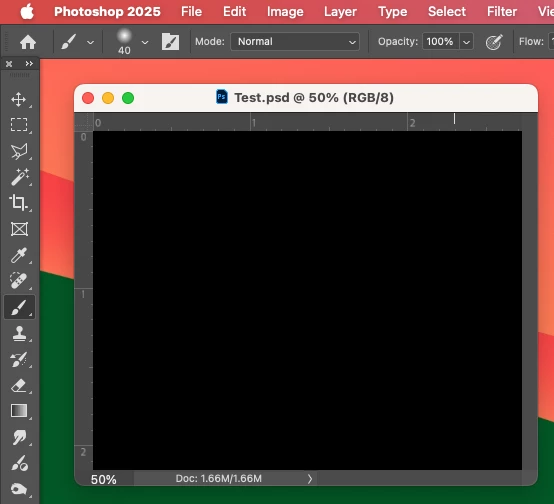


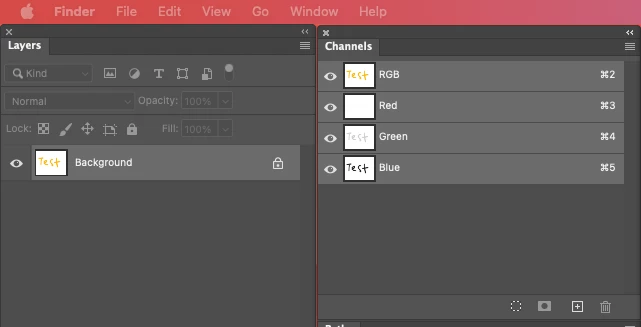
Even though the Layers and Channels palette preview thumbnails are showing what's in the document...


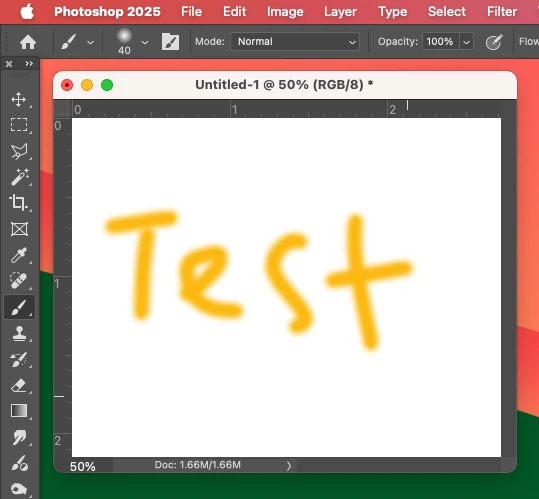
After digging around in Preferences, I tried turning off the "Use Graphics Processing" option and relaunching Photoshop afterwards, and it's working fine again...


I'm just wondering if this is a bug related to the M4 Mac Mini graphics driver compatibility with the version 26.6.0 release? And, if so, when can we expect a fix from Adobe. 


I've discovered the workaround for now, but obviously turning off the Graphics Processing setting will affect perfomance. Like I say, with this option switched on previously to the latest 26.6.0 release, it was working fine so it must be a new bug with 26.6.


I'm never updating this software ever again!!

179 replies

Known Participant
April 30, 2025

When I open a picture from Lighroom in PS it appears black ... no picture shown .. all updates done 

Anshul_Saini
Community Manager
Community Manager
April 30, 2025

Hi @Peterulimax,


Thanks for reporting this. This issue, when opening from Lightroom to Photoshop, has been reported by several other users. Also, some issues have been reported with the PS artboard/ canvas appearing black. You can track this discussion here:
https://adobe.ly/3GwqS8Q

https://adobe.ly/42C4l38


Please confirm if you are facing a similar issue or if it's something else.


Best,

Anshul Saini

Known Participant
April 30, 2025
Confirm I face the same
Mit freundlichen Grüßen

Peter Müller


Sent from my mobile device
Participating Frequently
April 30, 2025

Forgot to mention. If you updated to 26.6.0 and are having the black screen issue:
1. Uninstall 26.6.0
2. Re-install 26.5.0
3. Delete MachinePrefs.psp while in 26.5.0
4. Then re-install 26.6.0
You should be good to go!


Participating Frequently
April 30, 2025

These settings work fine for RGB/Graphics processor after deleting Machine Prefs.psp before updsting to PS 26.6.0 from 26.5.0

Community Manager
April 29, 2025

Thanks to all that have provided information and workarounds.

I just want to reiterate that the best way to bypass this issue while we work on a solution is to

  1. Close Photoshop. Delete MachinePrefs.psp from your machine and relaunch. This file is responsible for storing application preferences so you may lose your list of recent files in the Open Recent menu.  This file is located here:  ~/Library/Preferences/Adobe Photoshop 2025 Settings/MachinePrefs.psp
  2. A second option is to go to Preferences > Technology Preview and uncheck the Precise color management for HDR display checkbox.  Close and restart Photoshop.  Unless you work specifically with HDR color management, this should not impact your workflow in any way.


It is recommended that you do not turn off your GPU, as it will degrade performance, or change the color profile to CMYK, as it’s unnecessary if you do one of the options above. 


A test that would help isolate the issue is to go to Preferences > Performance > and click the button under Use Graphics Processor called “Advanced Settings”

Uncheck “GPU compositing,” click OK, and then open a new document.  Does the file open correctly?


  If you’re comfortable, please take a screenshot of Mac > System Settings > Displays and post here or share directly with Shrithi. (Open her profile, then click Send Message.) Example screenshot.

Inspiring
April 29, 2025

This is a strange one.  I have a Mac Studio running Sequoia and the latest version of Photoshop (26.6) and for some reason layers stopped showing on this machine.  If I look at the same file on my Macbook Pro with the same OS and Photoshop version, the same file displays just fine.


The really strange thing here is that the thumbnail on the Layers pallette displays correctly, but the main window is black. The obvious stuff like the little eyeballs are on and the layer opacity is at 100% is covered.


Any ideas?


PS;  The alpha channel displays correctly when selected.  So do grayscale and CMYK files.  The problem seems to be with RGB display.


TIA

Legend
April 29, 2025

v26.6 has been reported to the developers for the black window issue.

P: Photoshop 2025 v26.6 Bug - black document window


Larry
Participant
April 29, 2025

Version der App: Photoshop 26.6

Meine Konfiguration:
iMac 3,6 GHz 8-Core Intel Core i9

Radeon Pro Vega 48 8 GB

64 GB 2667 MHz DDR4

MacOS Sequoia 15.4.1


Seit Photoshop 26.6 wird mir – bei eingeschaltetem Grafikprozessor – statt des Bildes lediglich eine schwarze Fläche angezeigt. Ausschalten des Grafikprozessors sorgt zwar für Abhilfe, dafür werden Bilder jedoch teilweise verpixelt angezeigt. In welchem Format die Grafik vorliegt, spielt keine Rolle, der Fehler taucht zuverlässig auf.
Nach einem Downgrade auf Version 26.5 ist alles wieder in Ordnung.
Der Fehler liegt also nachvollziehbar an der Version 26.6.


Community Manager
April 29, 2025

Hi @Roland Dietz! Welcome to the community!

This is a bug that appeared with the most recent version of Photoshop. The team is currently investigating and will provide a fix as quickly as possible. You can find more info in my message here.

Thank you!

Alek

*(If you mention me with an @, like @Aleke, I’ll get a notification and can respond faster.)*
Legend
April 29, 2025

Just another data point, I am NOT seeing this on three machines.


Intel MacBook Pro, Sequoia 15.4.1, one external display via USB-C dock plus built-in

M1 Mac mini, Sequoia 15.4.1, two displays, one Thunderbolt and one HDMI

M3 MacBook Air, Sequoia 15.4.1, one external display via Thunderbolt plus built-in

Inspiring
April 29, 2025

@top10man, third variant - remove file MachinePrefs.psp in Photoshop preferences folder and no need to change color mode or disable GPU acceleration.

Participating Frequently
April 29, 2025

both workarounds (switching to cmyk color and turning off GPU acceleration) do work. however the usage of Photoshop is significantly degraded by both solutions. 


i've just downgraded to version 26.5 until Adobe figures this out.

Inspiring
April 29, 2025

@davidt3344986, better remove file MachinePrefs.psp in Photoshop preferences folder than change color mode.