
steveharrington1974
Known Participant
April 22, 2025

P: Photoshop 2025 v26.6 Bug - black document window

  • April 22, 2025
  • 179 replies
  • 36820 views

Photoshop 2025 v26.5 was working absolutely fine, then I made the mistake of updating to the latest patch, version 26.6.0 on my M4 Mac Mini.


After updating to 26.6, the actual document window is solid black - even if I open a photo or previous document...
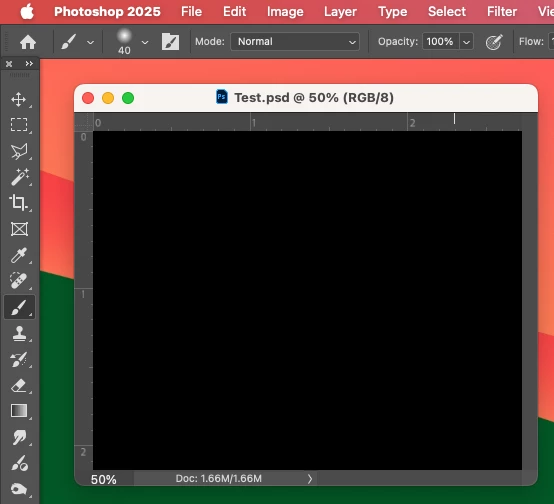


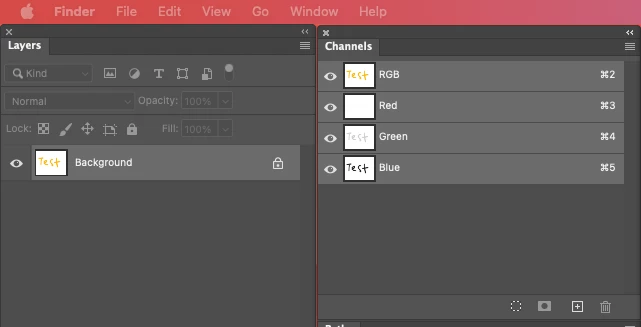
Even though the Layers and Channels palette preview thumbnails are showing what's in the document...


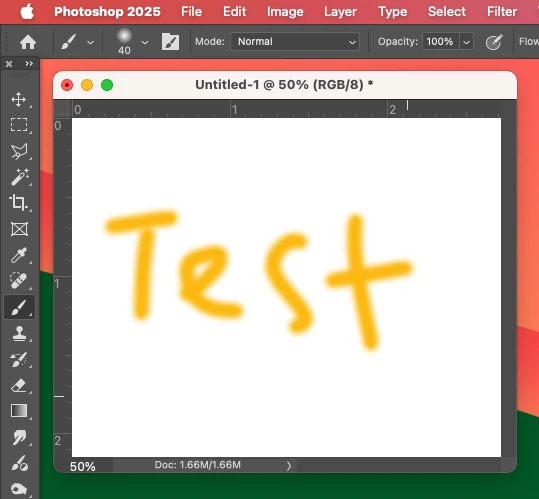
After digging around in Preferences, I tried turning off the "Use Graphics Processing" option and relaunching Photoshop afterwards, and it's working fine again...


I'm just wondering if this is a bug related to the M4 Mac Mini graphics driver compatibility with the version 26.6.0 release? And, if so, when can we expect a fix from Adobe. 


I've discovered the workaround for now, but obviously turning off the Graphics Processing setting will affect perfomance. Like I say, with this option switched on previously to the latest 26.6.0 release, it was working fine so it must be a new bug with 26.6.


I'm never updating this software ever again!!

179 replies

Mortimer St
Participating Frequently
May 3, 2025

Hi,


I have exactly the same issue since upgrading to Adobe 26.6.  I am running g the latest Mac OS on Mac Studio M1 (Apple Silicon).  I can view individual channels but not the full RGB image.  Th eonly solution is to switch off the GPU - not exactly ideal - but it is the only way to work in RGB.  I hope afix is in the pipeline.

Participant
May 3, 2025

I can't find "MachinePrefs.psp" anywhere, nor do I see "Adobe Photoshop 2025 Settings" inside my Preferences folder. I tried unchecking "Use Graphics Processor", but then Pattern Preview doesn't work. I need my file to be in RGB so I can't switch to CMYK. I tried showing hidden files and still don't see MachinePrefs.psp. Any other ideas?

Participant
May 3, 2025

thank you so much for this fix!


Participant
May 2, 2025

I had exactly the same problem on a Macbook Pro, and this fixed it.  Hope Adobe takes care of that bug!

davescm
Community Expert
Community Expert
May 2, 2025

@lee Runion and @hellokingery@gmail.com 
I've merged your post with the existing bug report thread on this issue

Dave

Participant
May 2, 2025

after updating to V26.6 photoshop opens only black page.  Disabling GPU fixed probem but this needs to be fixed, we use the GPU.


MacBook Pro with M1 chip, GPU compatabiliy registers OK from Photoshop help menu.


Community Manager
May 2, 2025

Hi @lee Runion!

Thanks for bringing this up. This is a known bug, and the team is actively working on a fix. I'll go ahead and merge your thread with the main one.

Thanks so much for your patience!

Alek 

*(If you mention me with an @, like @Aleke, I’ll get a notification and can respond faster.)*
Participant
May 2, 2025

I have a MacBook Pro (2023?) and up to date on my updates. The last couple days, Photoshop has been opening all files completely black. The program works, I just can't see the files on screen. Trying to follow the other commentor's advice (but he was on a PC) I found that if I go to "Preferences" and then uncheck the box "Use Graphics Processor" under "Graphics Processor Settings" it fixed the problem straight away. Thank you DelphiZoa!

Participant
May 2, 2025

When is this going to be fixed? It's extremely annoying and slowing me down. 

therzfeld
Participating Frequently
May 2, 2025

Thank you! Found it, removed it, and new update works fine!

Nomadfoto
Participant
May 1, 2025

same here on mac studio M2 max