
Exit
  • Global community
    • Language:
      • Deutsch
      • English
      • Español
      • Français
      • Português
  • 日本語コミュニティ
  • 한국 커뮤니티
52

P: Photoshop 2025 v26.6 Bug - black document window

Explorer ,
Apr 24, 2025 Apr 24, 2025

Photoshop 2025 v26.5 was working absolutely fine, then I made the mistake of updating to the latest patch, version 26.6.0 on my M4 Mac Mini.


After updating to 26.6, the actual document window is solid black - even if I open a photo or previous document...
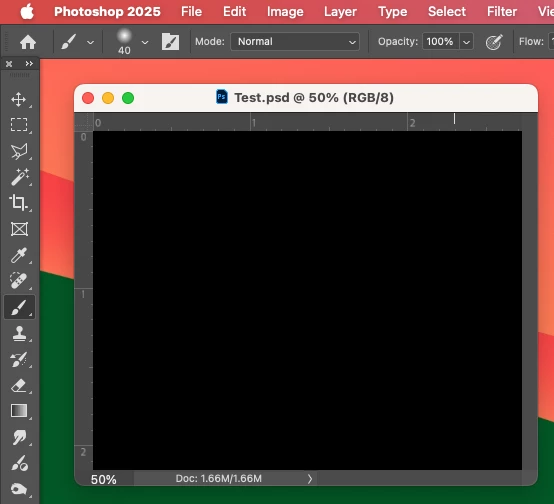
 

With-Graphics-Processing.png


Even though the Layers and Channels palette preview thumbnails are showing what's in the document...
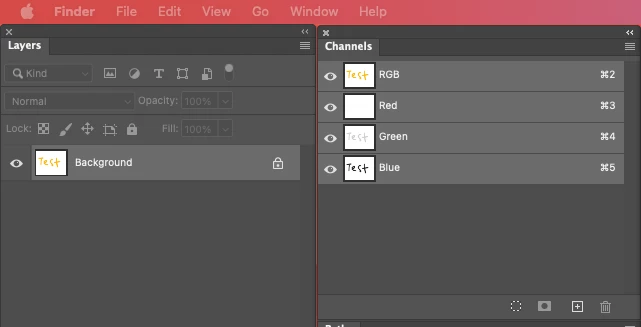
 

Layers-and-Channels.png


After digging around in Preferences, I tried turning off the "Use Graphics Processing" option and relaunching Photoshop afterwards, and it's working fine again...
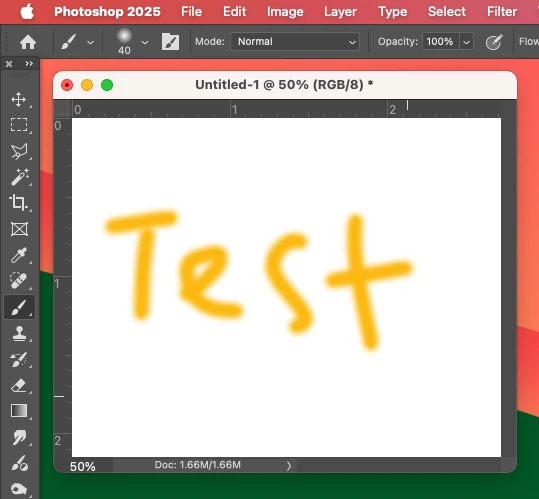
 

Without-Graphics-Processing.png


I'm just wondering if this is a bug related to the M4 Mac Mini graphics driver compatibility with the version 26.6.0 release? And, if so, when can we expect a fix from Adobe. 


I've discovered the workaround for now, but obviously turning off the Graphics Processing setting will affect perfomance. Like I say, with this option switched on previously to the latest 26.6.0 release, it was working fine so it must be a new bug with 26.6.


I'm never updating this software ever again!!

Bug Fixed Locked
TOPICS
macOS
38.4K
Translate
Report
Community guidelines
Be kind and respectful, give credit to the original source of content, and search for duplicates before posting. Learn more
community guidelines

correct answers 1 Correct answer

Explorer , May 10, 2025 May 10, 2025

Adobe Photoshop 26.6.1 fixed this bug for me.

Translate

correct answers 1 Pinned Reply

Adobe Employee , May 09, 2025 May 09, 2025

Hi all! The team has released a fix for this issue with the latest update for Photoshop to v26.6.1.
To update Photoshop, click "Update" in the Creative Cloud desktop app next to Photoshop. More detailed instructions for updating

Thanks!
Sameer K

Translate
replies 274 Replies 274
273 Comments
Community Expert ,
May 03, 2025 May 03, 2025

@RandyF79 I've merged your post with an existing thread on this issue.

Dave

Translate
Report
New Here ,
May 03, 2025 May 03, 2025

It's the same here: Everything is black, and no images show. I switched to CMYK, and a white document shows. I'm going to revert to a previous version and see if I can use the software I paid for but can't use.

Translate
Report
New Here ,
May 03, 2025 May 03, 2025

I'm having the same issue here with the 2025 version. I'm elementary when it comes to Photoshop, but I noticed that when I opened an image (file) using the 2024 version, I was able to use the program with no issues.

Translate
Report
New Here ,
May 03, 2025 May 03, 2025

I am having the same problem with my M2 Mac Studio.

Translate
Report
New Here ,
May 04, 2025 May 04, 2025

Any idea of what to do about this?

As you can see, this image shows in full colour in the Layers pallet, but its totally black and uneditable; it was opened from Lightroom

EVERY other image I’ve tried the last couple of days has been like this - it doesn’t matter if its a screengrab png, a new or very Screenshot 2025-05-04 at 08.19.39.pngold jpeg, a psd even, they all open as nothing but black

Lightroom works fine as does Bridge

Translate
Report
New Here ,
May 04, 2025 May 04, 2025

Hi all

It seems others have this issue too - and disabling the Graphics Processor sorts it

Panic over

Cheers

Translate
Report
New Here ,
May 04, 2025 May 04, 2025

Photoshop is unreadable. The window is completely black. In the layers window, the image is present. It's a bit like Adobe wants to ban me from using PS because my account is out of date. My account seems up to date. Thank you for your help. In the black frame, the cropping works.

Translate
Report
Community Expert ,
May 04, 2025 May 04, 2025
Translate
Report
New Here ,
May 04, 2025 May 04, 2025

io ho temporaneamnte risolto tenendo impostato l'avvertimento gamma ... magicamente le immagini compaiono 

Non ho una spiegazione scientifica ma in attesa di una release devo accontentarmi perchè non ho tanto tempo da dedicare alla soluzione 

Translate
Report
New Here ,
May 04, 2025 May 04, 2025

Hi, it's May 5 and the black image bug still exists. When will this be fixed? I have the online auto updating version of Photoshop. Pretty surprised it was first reported over a week ago!

Translate
Report
Community Beginner ,
May 05, 2025 May 05, 2025

You really are ungrateful! Adobe provides you with the latest, often useless AI garbage and you scream for an update that fixes this ridiculous bug that prevents you from working with your software and costs you a lot of time. Be thankful, pay your subscription, let the developers play around with AI gimmicks and: Don't criticize Adobe.

Translate
Report
New Here ,
May 05, 2025 May 05, 2025

Ingrats ? Je paye mon abonnement CHAQUE MOIS et ce depuis toujouts alors oui, je trouve inadmissible que de tels bugs persistent et ne comprends pas votre réponse...

Translate
Report
New Here ,
May 05, 2025 May 05, 2025

Je viens de comprendre que votre message était ironique ! Vraiment désolée c'était très mal traduit dans mon navigateur...

Translate
Report
Community Beginner ,
May 05, 2025 May 05, 2025

Pas de problème, c'est ma faute. J'aurais dû prendre la précaution de le marquer comme « ironie ».

Translate
Report
New Here ,
May 05, 2025 May 05, 2025

Bonjour,

Enorme probleme depuis la mise à jour sur Photoshop 26.6. Mes images ne s'affichent plus, laissant la place à un espace noir. J'ai besoin d'une aide urgente pour pouvoir travailler et livrer mes photos. Au secours Adobe, aidez-moi.

Cordialement,

Grégoire Crétinon

Translate
Report
Adobe Employee ,
May 05, 2025 May 05, 2025

Until this issue is resolved, the best and easiest way to remedy this problem is to remove your MachinePrefs.psp from your preferences folder.

macOS: Users/[user name]/Library/Preferences/Adobe Photoshop [version] Settings

https://helpx.adobe.com/photoshop/using/preferences.html

(for some users, you may need to unhide the library file)

Translate
Report
New Here ,
May 05, 2025 May 05, 2025

Deleting MachinePrefs.psp, as described in this thread, dod work to restore my access to the graphics card. One thing that hasn't been said expicitly is that this file is regenerated when Photoshop is opened again. So something in the delted file is amiss, but it isn't about having that file per se.

Translate
Report
Community Beginner ,
May 05, 2025 May 05, 2025

Adobe - It’s ridiculous that there’s not a fix for this yet! I started a chain over 10 days ago regarding the BLACK SCREEN in your update! I’ve been billed for my service since. But I can’t use it. Does Adobe even look at this?! What is being done! I’m going to find new preferred editing software and stop using Adobe if this isn’t corrected immediately. I’m not troubleshooting it. Everybody’s trying and nothing is a perfect fit. We should not be having to try to do workaround for a product that we’re paying for that we depend on to run our professional businesses! It’s not our job to support your product, Adobe! I’ve had to put my work on hold, turn it over to editors, pay editors. I don’t have time in my busy work life for these kind of things to continue without being resolved! I would like to hear from you, Adobe. I cannot believe you have not reached out yet. Even though I have a screenshot of where you said you would be reaching out to some of us. Very, very very dissatisfied. I’ve been using Photoshop since it first started. I’ve paid thousands of dollars in upgrades over the years when I used to own it. Now I can’t own it and all of that is obsolete, that software, money down the drain. But here we are paying for the service monthly. I’m sorry, I truly do not go to the battle line very often. But this is beyond ridiculous!

Translate
Report
Engaged ,
May 05, 2025 May 05, 2025

Hello Christi. As you depend on this for professional reasons I can understand your frustration, and that of many other people caught-up with this critical bug. That said, let me make one observation and one suggestion. The observation is that a number of software companies appear to be letting customers do a considerable bit of their beta testing. To some extent this makes sense because of the infinity of exact operating environments out there, but for basic functionality it is inexcusable. Those companies guilty of this practice need to seriously rethink it. The suggestion is that from one update to the next there is usually nothing so critically important that users can't roll-back to previous version that worked and use it till the key bugs get fixed, then upgrade. I always remain at least one version behind until I'm satisfied that there is no mission-critical reason not to upgrade, and I don't feel that I've missed anything super important. Would this be so terrible for the time being?

Translate
Report
Participant ,
May 05, 2025 May 05, 2025

I have this problem as well, and it was solved by getting rid of the MachinePrefs.psp file 

My System Info is below:


Adobe Photoshop Version: 26.6.0 20250414.r.14 f1f3569  arm64
Number of Launches: 1
Operating System: Mac OS 15.4.1
System architecture: Apple M1 Ultra, DOTPROD, HybridCPU(16:4)
Physical processor count: 20
Built-in memory: 131072 MB
Free memory: 77899 MB
Memory available to Photoshop: 126315 MB
Memory used by Photoshop: 70 %
Crash Handler: Adobe
DCX Version: 8.20.0
SAM SDK Version: 12.1.1
ACP.local Status:
 - SDK Version: 5.3.0
 - Core Sync Status: Reachable and compatible
 - Core Sync Running: 7.4.0.31
 - Min Core Sync Required: 4.3.66.28
Live Edit Client SDK Version: v5.0.0-beta.11
Adobe Firefly: Please use any generative AI feature to view the latest version.
OpenColorIO version: 2.4.0
C2PA library version: adobe_c2pa/0.14.2 c2pa-rs/0.43.0
NGL Version: 1.40.0.10
Chalkboard: Disabled.
Chalkboard Doc Create: Disabled.
Precise Color Management for HDR Display: Disabled.
Alias Layers: Disabled.
Highbeam: Enabled.
Touch Bar Property Feedback: Enabled.
Image tile size: 1024K
Image cache levels: 4
Font Preview: Medium
HarfBuzz Version: 8.4.0
TextEngine: Unified Text Engine
 ======= GPU
Native API stable: True
OpenCL API stable: True
GPUDeny:               0
GPUForce:              0
useGPU:                1
useOpenCL:             1
isGPUCapable:          1
isGPUAllowed:          1
GPUName:               Apple M1 Ultra
GPUVendor:             APPLE
Apple M1 Ultra  UNKNOWN, APPLE
IsNativeGPUCapable:    1
IsOpenCLGPUCapable:    1
HasSufficientRAM:      1
  GPU accessible RAM:               103,079 MB
  Required GPU accessible RAM:        1,500 MB
UseGraphicsProcessorChecked:   1
UseOpenCLChecked:              1
Display: 1
  Display Bounds: (0, 0) -> (5120, 2880)
  Display scale: 2
  High DPI Monitor
  Main Display
  Display Type: WCG
Display: 2
  Display Bounds: (5120, 322) -> (9216, 2626)
  Display scale: 2
  High DPI Monitor
  Display Type: WCG
 ------- Sniffer output
[0 ms]
  Launch GPUSnifferThread
 
[0 ms]
  Start RunAllAPIs
 
[1 ms]
  /Applications/Adobe Photoshop 2025/Adobe Photoshop 2025.app/Contents/MacOS/sniffer -baseTimeMS=67922183 -comment=Photoshop Version: Adobe Photoshop 26.6.0 20250414.r.14 f1f3569 arm64
 
[1 ms]
  Start GetSnifferResult
 
[153 ms]
  Start sniffer 2025-05-05 14:16:33
  # Photoshop Version: Adobe Photoshop 26.6.0 20250414.r.14 f1f3569 arm64
  sniffer -baseTimeMS=67922183 -comment=Photoshop Version: Adobe Photoshop 26.6.0 20250414.r.14 f1f3569 arm64
  
  {12 ms}
  Start platform native
    # displays:                   2
    Display 0
      Display:                      2
      Main:                         TRUE
      Built in:                     FALSE
      Stereo:                       FALSE
      Bounds:                       (0, 0) -> (5,120, 2,880)
      Dimensions:                   (5,120 2,880)
      Display scale:                2
      Physical size:                (599.3 329.514)
      Pixel size:                   (0.117051 0.114414)
      Dynamic range:                (0 2)
      Attached Device:              (DeviceID name=Apple M1 Ultra index=0)
    
    Display 1
      Display:                      1
      Main:                         FALSE
      Built in:                     FALSE
      Stereo:                       FALSE
      Bounds:                       (5,120, 322) -> (9,216, 2,626)
      Dimensions:                   (4,096 2,304)
      Display scale:                2
      Physical size:                (479.44 269.685)
      Pixel size:                   (0.117051 0.117051)
      Dynamic range:                (0 1)
      Attached Device:              (DeviceID name=Apple M1 Ultra index=0)
    
    # devices:                    1
    Device 0
      Name:                         Apple M1 Ultra
      Preferred:                    TRUE
      Power Envelope:               DISCRETE
      Attachment:                   EMBEDDED
      # attached displays:          2
        2
        1
      GPU accessible RAM:              103,079 MB
      VRAM:                                  0 MB
      Dedicated System RAM:                  0 MB
      Shared System RAM:               103,079 MB
      API version:                  1.0 (1.0)
      Device version:               1.0 (1.0)
      Vendor name:                  APPLE
      Driver date:                  UNKNOWN
      Driver age:                   UNKNOWN
      Driver version:               UNKNOWN
  End platform native
  {119 ms}
  
  {119 ms}
  Start platform OpenCL
    # displays:                   0
    
    # devices:                    1
    Device 0
      Name:                         Apple M1 Ultra
      Preferred:                    TRUE
      Power Envelope:               INTEGRATED
      Attachment:                   UNKNOWN
      # attached displays:          0
      GPU accessible RAM:              103,079 MB
      VRAM:                            103,079 MB
      Dedicated System RAM:                  0 MB
      Shared System RAM:                     0 MB
      API version:                  1.2 (OpenCL 1.2 (Mar  7 2025 21:04:06))
      Device version:               1.2 (OpenCL 1.2 )
      Vendor name:                  APPLE
      Driver date:                  UNKNOWN
      Driver age:                   UNKNOWN
      Driver version:               UNKNOWN
      Bandwidth:                    25,474 GB / s
      Compute score:                40,074.3
      Device name string:           Apple M1 Ultra
      Device vendor string:         Apple       
      Platform name string:         Apple       
      Platform vendor string:       Apple       
  End platform OpenCL
  {152 ms}
  
  Exit code kExitNormal
  End sniffer 2025-05-05 14:16:33
[kStatusNormal, kExitNormal]
 
[153 ms]
  Finish RunAllAPIs
 
[156 ms]
  Finish GetSnifferResult
 
 ------- Sniffer output
 ======= GPU
License Type: Subscription
Serial number: 90970840687347236124
GUIDBucket: 
Composite Core GPU (comp_core_gpu): on 
Composite Core Threads (MultithreadedCompositing): on 
Composite Core UI (CompositingDocumentTabUI): off 
Composite Core Feature Prefs (CompCoreFeaturePrefs): off 
 
Application folder: /Applications/Adobe Photoshop 2025/
Photoshop scratch has async I/O enabled
Scratch volume(s):
  Startup, 1.81T, 726.5G free
Required Plugins folder: /Applications/Adobe Photoshop 2025/Adobe Photoshop 2025.app/Contents/PlugIns/Required/
Primary Plugins folder: /Applications/Adobe Photoshop 2025/Plug-ins/
 
Installed components:
 
   dvametadata.framework   dvametadata   25.2.0.1   
   AdobeXMPScript.framework   AdobeXMPScript   79.9690a87fc   79.9690a87fc
   libdynamic-napi.framework   Torq Native   local   
   ICUUnicode.framework   ICUUnicode      14.2.2.6bc0507
   ICUConverter.framework   ICUConverter      14.2.2.6bc0507
   AdobeCrashReporter.framework   AdobeCrashReporter   16.6.0.202408200234_79b4529   
   boost_system.framework   boost_system   1   
   AdobeACE.framework   AdobeACE   6.0.1   79.ffa74136341.
   dvanet.framework   dvanet   25.2.0.1   
   AdobeOwl.framework   AdobeOwl      
   MediaCoreIF.framework   MediaCoreIF   25.2.0.1   
   dvascripting.framework   dvascripting   25.2.0.1   
   dvatemporalxmp.framework   dvatemporalxmp   25.2.0.1   
   dvaappsupport.framework   dvaappsupport   25.2.0.1   
   AdobeAXE8SharedExpat.framework   AdobeAXE8SharedExpat   6.1.1   79.4abff3a.
   AIDE.framework   AIDE   6.4.0   79.0edcdaae
   dynamiclink.framework   dynamiclink   25.2.0.1   
   dvaaccelerate.framework   dvaaccelerate   25.2.0.1   
   dvametadataui.framework   dvametadataui   25.2.0.1   
   AdobeARE.framework   AdobeARE      
   AdobePDFPort.framework   AdobePDFPort      
   dvaevefactory.framework   dvaevefactory   25.2.0.1   
   dvastorage.framework   dvastorage   25.2.0.1   
   ICUInternationalization.framework   ICUInternationalization      14.2.1.6317df5
   boost_filesystem.framework   boost_filesystem   1   
   dvaworkspace.framework   dvaworkspace   25.2.0.1   
   AdobeBIB.framework   AdobeBIB   4.0.0   79.ffa74136341.
   AdobeXMPFiles.framework   AdobeXMPFiles   79.9690a87fc   79.9690a87fc
   AdobeLinguistic.framework      16.0.0.1d87f11   
   dvaplayer.framework   dvaplayer   25.2.0.1   
   filterport.framework   filterport   29.0.0.2   
   PlugPlugOwl.framework   PlugPlugOwl   12.0.0.14   
   dvaaudiotoolkit.framework   dvaaudiotoolkit   25.2.0.1   
   AdobeAGM.framework   AdobeAGM   7.1.0   79.ffa74136341.
   dvaadameve.framework   dvaadameve   25.2.0.1   
   AdobeSVGRE.framework   AdobeSVGRE   9.3.0   "79.5724c48."
   AdobePDFL.framework   AdobePDFL   17.0.0   79 . 3325af6e
   dvavulcansupport.framework   dvavulcansupport   25.2.0.1   
   dvacore.framework   dvacore   25.2.0.1   
   aiport.framework   aiport   29.0.0.2   
   AdobePIP.framework   AdobePIP   8.2.0.16   
   AdobePDFSettings.framework   AdobePDFSettings   1.7   
   AdobeAXEDOMCore.framework   AdobeAXEDOMCore   6.1.1   79.4abff3a.
   dvatransport.framework   dvatransport   25.2.0.1   
   xerces.framework   xerces   3.2.3.0   
   exo.framework   exo   25.2.0.1   
   AdobeXMP.framework   AdobeXMPCore   79.9690a87fc   79.9690a87fc
   AdobeJP2K.framework   AdobeJP2K   4.0.3   79.6311509
   dvaaudiodevice.framework   dvaaudiodevice   25.2.0.1   
   LogSession.framework   LogSession   8.2.0.16   
   PlugPlugExternalObject.framework      12.0.0.14   
   utest.framework   utest   1   
   AdobeSVGAGM.framework   AdobeSVGAGM   4.0.0   79.6336193.
   dvametadataapi.framework   dvametadataapi   25.2.0.1   
   AdobeBIBUtils.framework   AdobeBIBUtils   4.0.0   79.ffa74136341.
   CloudAILib.framework   CloudAILib   29.0.0.2   
   SPBasic.framework   SPBasic   29.0.0.2   
   dvacaptioning.framework   dvacaptioning   25.2.0.1   
   AdobeCoolType.framework   AdobeCoolType   10.0.3   79.ffa74136341.
   boost_regex.framework   boost_regex   1   
   boost_program_options.framework   boost_program_options   1   
   dvamediatypes.framework   dvamediatypes   25.2.0.1   
   AdbePM.framework   AdbePM   1   
   boost_date_time.framework   boost_date_time   1   
   dvauxpui.framework   dvauxpui   25.2.0.1   
   dynamic-torqnative.framework   Torq Native   local   
   AdobeMPS.framework   AdobeMPS   9.0.0.56718   79.a22178b4
   dvaui.framework   dvaui   25.2.0.1   
   dvauxphost.framework   dvauxphost   25.2.0.1   
   MacMemory.framework   MacMemory   29.0.0.2   
   boost_thread.framework   boost_thread   1   
   AILib.framework   AILib   29.0.0.2   
   ICUData.framework   ICUData      14.2.2.6bc0507
   dvamarshal.framework   dvamarshal   25.2.0.1   
   aifm.framework   aifm   29.0.0.2   
   Unified Extensibility Platform  uxp-8.1.2-0-091bd7d
   UPIC  2.6.0
 
 
Required plugins:
 
   Accented Edges 26.6.0, © 1991-2025 Adobe. All rights reserved. - from the file “Filter Gallery.plugin”
   Adaptive Wide Angle 26.6.0, © 2014-2025 Adobe. All rights reserved. - from the file “Adaptive Wide Angle.plugin”
   Angled Strokes 26.6.0, © 1991-2025 Adobe. All rights reserved. - from the file “Filter Gallery.plugin”
   Average 26.6 © 1993-2025 Adobe. All rights reserved. - from the file “Average.plugin”
   Bas Relief 26.6.0, © 1991-2025 Adobe. All rights reserved. - from the file “Filter Gallery.plugin”
   BMP 26.6.0, © 2003-2025 Adobe. All rights reserved. - from the file “Standard Multiplugin.plugin”
   Camera Raw 17.3 (2224), Copyright © 2025 Adobe Systems Incorporated - from the file “Camera Raw.plugin”
   Camera Raw Filter 17.3 (2224), Copyright © 2025 Adobe Systems Incorporated - from the file “Camera Raw.plugin”
   Chalk & Charcoal 26.6.0, © 1991-2025 Adobe. All rights reserved. - from the file “Filter Gallery.plugin”
   Charcoal 26.6.0, © 1991-2025 Adobe. All rights reserved. - from the file “Filter Gallery.plugin”
   Chrome 26.6.0, © 1991-2025 Adobe. All rights reserved. - from the file “Filter Gallery.plugin”
   Cineon 26.6 © 2002-2025 Adobe. All rights reserved. - from the file “Cineon.plugin”
   Clouds 26.6 © 1993-2025 Adobe. All rights reserved. - from the file “Clouds.plugin”
   Color Halftone 26.6.0, © 2003-2025 Adobe. All rights reserved. - from the file “Standard Multiplugin.plugin”
   Colored Pencil 26.6.0, © 1991-2025 Adobe. All rights reserved. - from the file “Filter Gallery.plugin”
   Conté Crayon 26.6.0, © 1991-2025 Adobe. All rights reserved. - from the file “Filter Gallery.plugin”
   Craquelure 26.6.0, © 1991-2025 Adobe. All rights reserved. - from the file “Filter Gallery.plugin”
   Crop and Straighten Photos 26.6 © 2003-2025 Adobe. All rights reserved. - from the file “CropPhotosAuto.plugin”
   Crop and Straighten Photos Filter 26.6.0, © 2003-2025 Adobe. All rights reserved. - from the file “Standard Multiplugin.plugin”
   Crosshatch 26.6.0, © 1991-2025 Adobe. All rights reserved. - from the file “Filter Gallery.plugin”
   Crystallize 26.6.0, © 2003-2025 Adobe. All rights reserved. - from the file “Standard Multiplugin.plugin”
   Cutout 26.6.0, © 1991-2025 Adobe. All rights reserved. - from the file “Filter Gallery.plugin”
   Dark Strokes 26.6.0, © 1991-2025 Adobe. All rights reserved. - from the file “Filter Gallery.plugin”
   De-Interlace 26.6.0, © 2003-2025 Adobe. All rights reserved. - from the file “Standard Multiplugin.plugin”
   Dicom 26.6 © 2003-2025 Adobe. All rights reserved. - from the file “dicom.plugin”
   Difference Clouds 26.6 © 1993-2025 Adobe. All rights reserved. - from the file “Clouds.plugin”
   Diffuse Glow 26.6.0, © 1991-2025 Adobe. All rights reserved. - from the file “Filter Gallery.plugin”
   Displace 26.6.0, © 2003-2025 Adobe. All rights reserved. - from the file “Standard Multiplugin.plugin”
   Dry Brush 26.6.0, © 1991-2025 Adobe. All rights reserved. - from the file “Filter Gallery.plugin”
   Entropy 26.6 © 2006-2025 Adobe. All rights reserved. - from the file “statistics.plugin”
   Epson Print Layout Copyright (C) Seiko Epson Corporation 2014 - 2021. All rights reserved. - from the file “Epson Print Layout.plugin”
   Export Color Lookup Tables 26.6 © 2012-2025 Adobe. All rights reserved. - from the file “Export3DLUT.plugin”
   Extrude 26.6.0, © 2003-2025 Adobe. All rights reserved. - from the file “Standard Multiplugin.plugin”
   FastCore Routines 26.6 © 1990-2025 Adobe. All rights reserved. - from the file “FastCore.plugin”
   Fibers 26.6.0, © 2003-2025 Adobe. All rights reserved. - from the file “Standard Multiplugin.plugin”
   Film Grain 26.6.0, © 1991-2025 Adobe. All rights reserved. - from the file “Filter Gallery.plugin”
   Filter Gallery 26.6.0, © 1991-2025 Adobe. All rights reserved. - from the file “Filter Gallery.plugin”
   Fresco 26.6.0, © 1991-2025 Adobe. All rights reserved. - from the file “Filter Gallery.plugin”
   GigapixelApplyImageDataFilter NO VERSION - from the file “TopazGigapixelAIApply.plugin”
   Glass 26.6.0, © 1991-2025 Adobe. All rights reserved. - from the file “Filter Gallery.plugin”
   Glowing Edges 26.6.0, © 1991-2025 Adobe. All rights reserved. - from the file “Filter Gallery.plugin”
   Grain 26.6.0, © 1991-2025 Adobe. All rights reserved. - from the file “Filter Gallery.plugin”
   Graphic Pen 26.6.0, © 1991-2025 Adobe. All rights reserved. - from the file “Filter Gallery.plugin”
   Halftone Pattern 26.6.0, © 1991-2025 Adobe. All rights reserved. - from the file “Filter Gallery.plugin”
   Halide Bottlenecks 26.6 © 2024-2025 Adobe. All rights reserved. - from the file “HalideBottlenecks.plugin”
   HDRMergeUI 26.6, Copyright © 2002-2025 Adobe. All rights reserved. - from the file “HDRMergeUI.plugin”
   HSB/HSL 26.6.0, © 2003-2025 Adobe. All rights reserved. - from the file “Standard Multiplugin.plugin”
   IFF Format 26.6.0, © 2003-2025 Adobe. All rights reserved. - from the file “Standard Multiplugin.plugin”
   Ink Outlines 26.6.0, © 1991-2025 Adobe. All rights reserved. - from the file “Filter Gallery.plugin”
   JPEG 2000 26.6 © 2001-2025 Adobe. All rights reserved. - from the file “JPEG2000.plugin”
   Kurtosis 26.6 © 2006-2025 Adobe. All rights reserved. - from the file “statistics.plugin”
   Lens Blur 26.6.0, © 2002-2025 Adobe. All rights reserved. - from the file “Lens Blur.plugin”
   Lens Correction 26.6.0, © 2002-2025 Adobe. All rights reserved. - from the file “Lens Correct.plugin”
   Lens Flare 26.6.0, © 2003-2025 Adobe. All rights reserved. - from the file “Standard Multiplugin.plugin”
   Liquify 26.6.0, © 2001-2025 Adobe. All rights reserved. - from the file “Liquify.plugin”
   Matlab Operation 26.6 © 1993-2025 Adobe. All rights reserved. - from the file “ChannelPort.plugin”
   Maximum 26.6 © 2006-2025 Adobe. All rights reserved. - from the file “statistics.plugin”
   Mean 26.6 © 2006-2025 Adobe. All rights reserved. - from the file “statistics.plugin”
   Measurement Core 26.6 © 1993-2025 Adobe. All rights reserved. - from the file “MeasurementCore.plugin”
   Median 26.6 © 2006-2025 Adobe. All rights reserved. - from the file “statistics.plugin”
   Mezzotint 26.6.0, © 2003-2025 Adobe. All rights reserved. - from the file “Standard Multiplugin.plugin”
   Minimum 26.6 © 2006-2025 Adobe. All rights reserved. - from the file “statistics.plugin”
   MMXCore Routines 26.6 © 1990-2025 Adobe. All rights reserved. - from the file “MMXCore.plugin”
   Mosaic Tiles 26.6.0, © 1991-2025 Adobe. All rights reserved. - from the file “Filter Gallery.plugin”
   Multiprocessor Support 26.6 © 1990-2025 Adobe. All rights reserved. - from the file “MultiProcessor Support.plugin”
   Neon Glow 26.6.0, © 1991-2025 Adobe. All rights reserved. - from the file “Filter Gallery.plugin”
   Note Paper 26.6.0, © 1991-2025 Adobe. All rights reserved. - from the file “Filter Gallery.plugin”
   NTSC Colors 26.6 © 1993-2025 Adobe. All rights reserved. - from the file “NTSC Colors.plugin”
   Ocean Ripple 26.6.0, © 1991-2025 Adobe. All rights reserved. - from the file “Filter Gallery.plugin”
   OpenEXR 26.6.0, © 2003-2025 Adobe. All rights reserved. - from the file “Standard Multiplugin.plugin”
   Paint Daubs 26.6.0, © 1991-2025 Adobe. All rights reserved. - from the file “Filter Gallery.plugin”
   Palette Knife 26.6.0, © 1991-2025 Adobe. All rights reserved. - from the file “Filter Gallery.plugin”
   Parametric Filter 21.0 © 2019 Adobe. All rights reserved. - from the file “MaterialFilter.plugin”
   Patchwork 26.6.0, © 1991-2025 Adobe. All rights reserved. - from the file “Filter Gallery.plugin”
   Paths to Illustrator 26.6.0, © 2003-2025 Adobe. All rights reserved. - from the file “Standard Multiplugin.plugin”
   PCX 26.6 © 1989-2025 Adobe. All rights reserved. - from the file “PCX.plugin”
   Photocopy 26.6.0, © 1991-2025 Adobe. All rights reserved. - from the file “Filter Gallery.plugin”
   Picture Package Filter 26.6 © 1993-2025 Adobe. All rights reserved. - from the file “ChannelPort.plugin”
   Pinch 26.6.0, © 2003-2025 Adobe. All rights reserved. - from the file “Standard Multiplugin.plugin”
   Pixar 26.6 © 1989-2025 Adobe. All rights reserved. - from the file “Pixar.plugin”
   Plaster 26.6.0, © 1991-2025 Adobe. All rights reserved. - from the file “Filter Gallery.plugin”
   Plastic Wrap 26.6.0, © 1991-2025 Adobe. All rights reserved. - from the file “Filter Gallery.plugin”
   Pointillize 26.6.0, © 2003-2025 Adobe. All rights reserved. - from the file “Standard Multiplugin.plugin”
   Polar Coordinates 26.6.0, © 2003-2025 Adobe. All rights reserved. - from the file “Standard Multiplugin.plugin”
   Portable Bit Map 26.6 © 1989-2025 Adobe. All rights reserved. - from the file “PBM.plugin”
   Poster Edges 26.6.0, © 1991-2025 Adobe. All rights reserved. - from the file “Filter Gallery.plugin”
   Radial Blur 26.6.0, © 2003-2025 Adobe. All rights reserved. - from the file “Standard Multiplugin.plugin”
   Radiance 26.6 © 2003-2025 Adobe. All rights reserved. - from the file “Radiance.plugin”
   Range 26.6 © 2006-2025 Adobe. All rights reserved. - from the file “statistics.plugin”
   Render Color Lookup Grid 26.6 © 2012-2025 Adobe. All rights reserved. - from the file “Export3DLUT.plugin”
   Reticulation 26.6.0, © 1991-2025 Adobe. All rights reserved. - from the file “Filter Gallery.plugin”
   Ripple 26.6.0, © 2003-2025 Adobe. All rights reserved. - from the file “Standard Multiplugin.plugin”
   Rough Pastels 26.6.0, © 1991-2025 Adobe. All rights reserved. - from the file “Filter Gallery.plugin”
   Save for Web 26.6.0, © 1999-2025 Adobe. All rights reserved. - from the file “Save for Web.plugin”
   ScriptingSupport 26.6, © 2002-2025 Adobe. All rights reserved. - from the file “ScriptingSupport.plugin”
   Shear 26.6.0, © 2003-2025 Adobe. All rights reserved. - from the file “Standard Multiplugin.plugin”
   SilverFast 9 ©2022 LaserSoft Imaging AG - from the file “SilverFast 9 Import.plugin”
   Skewness 26.6 © 2006-2025 Adobe. All rights reserved. - from the file “statistics.plugin”
   Smart Blur 26.6.0, © 2003-2025 Adobe. All rights reserved. - from the file “Standard Multiplugin.plugin”
   Smudge Stick 26.6.0, © 1991-2025 Adobe. All rights reserved. - from the file “Filter Gallery.plugin”
   Solarize 26.6 © 1993-2025 Adobe. All rights reserved. - from the file “Solarize.plugin”
   SP Substance Suite 21.0 © 2019 Adobe. All rights reserved. - from the file “MaterialSuite.plugin”
   Spatter 26.6.0, © 1991-2025 Adobe. All rights reserved. - from the file “Filter Gallery.plugin”
   Spherize 26.6.0, © 2003-2025 Adobe. All rights reserved. - from the file “Standard Multiplugin.plugin”
   Sponge 26.6.0, © 1991-2025 Adobe. All rights reserved. - from the file “Filter Gallery.plugin”
   Sprayed Strokes 26.6.0, © 1991-2025 Adobe. All rights reserved. - from the file “Filter Gallery.plugin”
   Stained Glass 26.6.0, © 1991-2025 Adobe. All rights reserved. - from the file “Filter Gallery.plugin”
   Stamp 26.6.0, © 1991-2025 Adobe. All rights reserved. - from the file “Filter Gallery.plugin”
   Standard Deviation 26.6 © 2006-2025 Adobe. All rights reserved. - from the file “statistics.plugin”
   Substance 3D Viewer 0.24.0 © 2024 Adobe. All rights reserved. - from the file “Substance3DViewerForPs.plugin”
   Sumi-e 26.6.0, © 1991-2025 Adobe. All rights reserved. - from the file “Filter Gallery.plugin”
   Summation 26.6 © 2006-2025 Adobe. All rights reserved. - from the file “statistics.plugin”
   Targa 26.6.0, © 2003-2025 Adobe. All rights reserved. - from the file “Standard Multiplugin.plugin”
   Texturizer 26.6.0, © 1991-2025 Adobe. All rights reserved. - from the file “Filter Gallery.plugin”
   Tiles 26.6.0, © 2003-2025 Adobe. All rights reserved. - from the file “Standard Multiplugin.plugin”
   Topaz DeNoise AI CS3 (10.0) ©1993-2007 Adobe Systems Incorporated - from the file “TopazDeNoiseAI.plugin”
   Topaz Photo AI NO VERSION - from the file “TopazPhotoAI.plugin”
   Topaz Photo AI NO VERSION - from the file “TopazPhotoAIAutomate.plugin”
   Topaz Sharpen AI CS3 (10.0) ©1993-2007 Adobe Systems Incorporated - from the file “TopazSharpenAI.plugin”
   Torn Edges 26.6.0, © 1991-2025 Adobe. All rights reserved. - from the file “Filter Gallery.plugin”
   Twirl 26.6.0, © 2003-2025 Adobe. All rights reserved. - from the file “Standard Multiplugin.plugin”
   Underpainting 26.6.0, © 1991-2025 Adobe. All rights reserved. - from the file “Filter Gallery.plugin”
   Vanishing Point 26.6.0, © 2003-2025 Adobe. All rights reserved. - from the file “VanishingPoint.plugin”
   Variance 26.6 © 2006-2025 Adobe. All rights reserved. - from the file “statistics.plugin”
   Water Paper 26.6.0, © 1991-2025 Adobe. All rights reserved. - from the file “Filter Gallery.plugin”
   Watercolor 26.6.0, © 1991-2025 Adobe. All rights reserved. - from the file “Filter Gallery.plugin”
   Wave 26.6.0, © 2003-2025 Adobe. All rights reserved. - from the file “Standard Multiplugin.plugin”
   Wind 26.6.0, © 2003-2025 Adobe. All rights reserved. - from the file “Standard Multiplugin.plugin”
   Wireless Bitmap 26.6 © 1989-2025 Adobe. All rights reserved. - from the file “WBMP.plugin”
   ZigZag 26.6.0, © 2003-2025 Adobe. All rights reserved. - from the file “Standard Multiplugin.plugin”
 
Optional and third party plugins:
 
   GigapixelGatherImageDataFilter NO VERSION - from the file “/Applications/Adobe Photoshop 2025/Plug-ins/TopazGigapixelAIGather.plugin/”
   Topaz Gigapixel AI NO VERSION - from the file “/Applications/Adobe Photoshop 2025/Plug-ins/TopazGigapixelAIAutomate.plugin/”
   TPAIApplyImageDataFilter NO VERSION - from the file “/Applications/Adobe Photoshop 2025/Plug-ins/TopazPhotoAIApply.plugin/”
   TPAIGatherImageDataFilter NO VERSION - from the file “/Applications/Adobe Photoshop 2025/Plug-ins/TopazPhotoAIGather.plugin/”
 
Duplicate and Disabled plugins:
 
   GigapixelApplyImageDataFilter NO VERSION - from the file “/Applications/Adobe Photoshop 2025/Plug-ins/TopazGigapixelAIApply.plugin/”
   GigapixelGatherImageDataFilter NO VERSION - from the file “TopazGigapixelAIGather.plugin”
   Topaz Gigapixel AI NO VERSION - from the file “TopazGigapixelAIAutomate.plugin”
   Topaz Photo AI NO VERSION - from the file “/Applications/Adobe Photoshop 2025/Plug-ins/TopazPhotoAI.plugin/”
   Topaz Photo AI NO VERSION - from the file “/Applications/Adobe Photoshop 2025/Plug-ins/TopazPhotoAIAutomate.plugin/”
   TPAIApplyImageDataFilter NO VERSION - from the file “TopazPhotoAIApply.plugin”
   TPAIGatherImageDataFilter NO VERSION - from the file “TopazPhotoAIGather.plugin”
 
Plugins that failed to load:
 
   Clarity NO VERSION -  - from the file “/Applications/Topaz Studio/Topaz Studio.app/Contents/Resources/PS_Plugins/TopazClarity2.plugin/”
   Detail NO VERSION -  - from the file “/Applications/Topaz Studio/Topaz Studio.app/Contents/Resources/PS_Plugins/TopazDetail.plugin/”
   Glow NO VERSION -  - from the file “/Applications/Topaz Studio/Topaz Studio.app/Contents/Resources/PS_Plugins/TopazGlow.plugin/”
   Hidden NO VERSION -  - from the file “/Applications/Topaz Labs LLC/Topaz Mask AI/Topaz Mask AI.app/Contents/Resources/PS_Plugins/MaskAIAutomation.plugin/”
   Impression NO VERSION -  - from the file “/Applications/Topaz Studio/Topaz Studio.app/Contents/Resources/PS_Plugins/TopazImpressionTS.plugin/”
   Simplify NO VERSION -  - from the file “/Applications/Topaz Studio/Topaz Studio.app/Contents/Resources/PS_Plugins/TopazSimplify.plugin/”
   Texture Effects NO VERSION -  - from the file “/Applications/Topaz Studio/Topaz Studio.app/Contents/Resources/PS_Plugins/TopazTextureEffects.plugin/”
   TK Infinity Mask NO VERSION -  - from the file “/Library/Application Support/Adobe/Plug-Ins/CC/TK Infinity Mask 1 PS.plugin/”
   Topaz Mask AI NO VERSION -  - from the file “/Applications/Topaz Labs LLC/Topaz Mask AI/Topaz Mask AI.app/Contents/Resources/PS_Plugins/TopazMaskAI.plugin/”
   Topaz Simplify 4 NO VERSION -  - from the file “/Applications/Topaz Labs/Topaz Simplify 4.app/Contents/Resources/TopazSimplify4.plugin/”
   Topaz Studio 2 NO VERSION -  - from the file “/Applications/Topaz Labs LLC/Topaz Studio 2/Topaz Studio 2.app/Contents/Resources/PS_Plugins/TopazStudio2.plugin/”
   Topaz Studio NO VERSION -  - from the file “/Applications/Topaz Studio/Topaz Studio.app/Contents/Resources/PS_Plugins/TopazStudio.plugin/”
 
 
Unified Extensibility Platform - Extensions:
 
   Home Screen (Loaded) 9.0.0.122 - from the file "/Library/Application Support/Adobe/UXP/extensions/com.adobe.ccx.start-9.0.0/"
   CmdN: 1.24.7
    UAB: 2.18.0-8
UAB4: npm:@ccac/universal-asset-browser@5.9.0
      Loaded at: 109 ms - launch time impact: 13 ms
   Discover Panel (Loaded) 2503.120.0.14 - from the file "Required Folder"
      Loaded at: 109 ms - launch time impact: 16 ms
   ccx-timeline (Prepared) 3.1.12.0 - from the file "Required Folder"
   CCX Commenting UXP Webview (Loaded) 30.7.0.0 - from the file "Required Folder"
      Loaded at: 8267 ms - launch time impact: 0 ms
   CCX Sharesheet UXP (Prepared) 30.24.0.0 - from the file "Required Folder"
   CC Libraries Panel (Prepared) 4.10.74.0 - from the file "/Library/Application Support/Adobe/CEP/extensions/CC_LIBRARIES_PANEL_EXTENSION_4_10_74/"
   CAPTURE: 2.0.41  STOCK: 4.2.6
   In app notifications (Loaded) 2.0.25.0 - from the file "Required Folder"
      Loaded at: 110 ms - launch time impact: 0 ms
   Seamless 2 (Prepared) 1.1.0.0 - from the file "Plugin Marketplace"
   TK8 Multi-Mask Beta (Prepared) 1.3.0.0 - from the file "Plugin Marketplace"
   TK Gen Fill (Prepared) 1.4.0.0 - from the file "Plugin Marketplace"
   TK Luminosity Mask (Prepared) 1.4.0.0 - from the file "Plugin Marketplace"
   TK Magic Mixer (Prepared) 1.0.0.0 - from the file "Plugin Marketplace"
   TK Selection Brush (Prepared) 1.3.1.0 - from the file "Plugin Marketplace"
   TK Print (Prepared) 1.0.0.0 - from the file "Plugin Marketplace"
   TK9 Combo (Prepared) 3.0.0.0 - from the file "Plugin Marketplace"
   TK9 Cx (Prepared) 3.0.0.0 - from the file "Plugin Marketplace"
   TK9 Export (Prepared) 3.0.0.0 - from the file "Plugin Marketplace"
   TK9 Multi-Mask (Prepared) 3.0.0.0 - from the file "Plugin Marketplace"
   TK9 My Actions-Tab 1 (Prepared) 3.0.0.0 - from the file "Plugin Marketplace"
   TK9 My Actions-Tab 2 (Prepared) 3.0.0.0 - from the file "Plugin Marketplace"
   TK9 My Actions-Tab 3 (Prepared) 3.0.0.0 - from the file "Plugin Marketplace"
   TK9 My Actions-Tab 4 (Prepared) 3.0.0.0 - from the file "Plugin Marketplace"
   TK9 My Actions (Prepared) 3.0.0.0 - from the file "Plugin Marketplace"
   Content Credentials (Loaded) 0.51.4.0 - from the file "Required Folder"
      Loaded at: 7521 ms - launch time impact: 0 ms
   Parametric Filter (Prepared) 1.0.0.0 - from the file "Required Folder"
   Photoshop Adjustments Panel (Loaded) 2.3.4.0 - from the file "Required Folder"
      Loaded at: 8267 ms - launch time impact: 1 ms
   Photoshop UXP Export-As (Prepared) 5.12.1.0 - from the file "Required Folder"
   Photoshop In App Messaging (Loaded) 4.5.10.0 - from the file "Required Folder"
      Loaded at: 8268 ms - launch time impact: 0 ms
   Information Alert (Prepared) 0.5.0.0 - from the file "Required Folder"
   Photoshop Selection Feedback (Prepared) 0.5.0.0 - from the file "Required Folder"
   Share Panel (Prepared) 1.0.12.0 - from the file "Required Folder"
   Plugins Panel (Prepared) 1.6.9.0 - from the file "Required Folder"
   Substance 3D Viewer Plugin for Photoshop (Prepared) 1.0.0.0 - from the file "/Library/Application Support/Adobe/UXP/extensions/com.adobe.substance-3d.viewer.ps/"
   IC popup message (Loaded) 1.0.0.0
      Loaded at: 7522 ms - launch time impact: 0 ms
   Multilayer Protection (Loaded) 1.0.0.0
      Loaded at: 7522 ms - launch time impact: 0 ms
   Neural Filters (Registered) 1.15.0.102 - from the file "Required Folder"
   Scan time: 7 ms - entries: 63 
 
Installed TWAIN devices: NONE


Translate
Report
Community Beginner ,
May 05, 2025 May 05, 2025

Frankly, I found that the easiest way to resolve the problem is to delete 26.6 and re-install version 26.5 and work with that until Adobe's next release. 

Translate
Report
New Here ,
May 05, 2025 May 05, 2025

I am running a MBP 16" Apple M3 Max w/ 36 GB RAM running Sequoia 15.4.1 and I have this issue.

The image in every other color mode is visible for me... except RGB. 

Translate
Report
Adobe Employee ,
May 05, 2025 May 05, 2025

Hi @MarkDS, thanks for contributing and making a recommendation!

Hi @ChristiThayerPhotography, I hear your frustration and understand how disruptive this issue has been for your workflow. Your thread and feedback are being seen, and I’ve added your experience to our internal tracking, so it’s part of the broader picture.


If you’re not in a position to troubleshoot right now, that’s totally understandable. But if you have time later, even minimal details like your OS, steps to recreate, and screen recordings can make a real difference in narrowing this down. If possible, please also share a screenshot of Lightroom along with your system info. You can find it by going to Help > System Info, then copying and pasting it into a text file to attach here. This will help us look into it further.


In the meantime, if rolling back to a previous version that worked is an option for you, I’m happy to share steps—many users have found that helpful while the issue is being worked on.

I’ll continue monitoring updates and post here as soon as I have any new information. ^CH

Translate
Report
Explorer ,
May 06, 2025 May 06, 2025

For anyone having trouble locating the folder where the "MachinePrefs.psp" file resides, the easiest way is to use Finder's "Go to Folder" option...


In Finder, click on "Go" and slect to "Go to Folder" option - or use the keyboard shortcut: Shift-Command-G


The copy and paste this below into the window and hit Return/Enter...


~/Library/Preferences/Adobe Photoshop 2025 Settings


This will open the "Adobe Photoshop 2025 Settings" folder, you just need to find the MachinePrefs.psp file in here - I renamed mine to "MachinePrefs-OLD.psp" to keep the old one just in case.

Translate
Report
Community Beginner ,
May 06, 2025 May 06, 2025

Any image I open appears black in the work area. If I change the mode from 8 bits to 32bits the image appears in the work area 

If I modify the color from RGB to Grey scale it appers in grey.

This behavior happens since few days and only on MAC , I don't have the same issue in Windows

(Photoshop is the last version)

I have just tried to reset workspace/ preferences


Can anyone help me ?

Translate
Report