
Participating Frequently
February 26, 2020

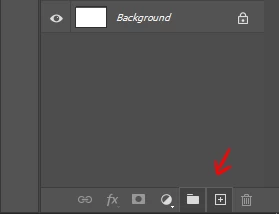
P: "New Layer" and "New Group" buttons in the Layers panel stay down after clicking on it

  • February 26, 2020
  • 56 replies
  • 3391 views

Hello,

since the last update, almost every time I click on the New Layer and/or New Group buttons in the Layers panel, the buttons become stuck and unusable. I have to restart Photoshop to reset their state.
Not game breaking but definitely annoying.


Regards
This topic has been closed for replies.

56 replies

Participating Frequently
February 27, 2020
Hi David, thanks for looking into it.

To answer your questions :
- I'm on a French language Win 10 Pro x64 v.1909
- It happens fairly often but I failed to find a way to recreate it consistently.
- The other apps I'm running are usually Outlook, Chrome (up-to-date), Microsoft Teams
- No 3rd party plug-ins
- I don't have any issue with my internet connection, but my work files are on a local network, which can sometimes lag a little when opening or saving files.

I noticed that if there's a delay when clicking on these buttons they stay down until the lag ends. Maybe that's where it can bug out?

Hope it helps.
RosaPerry
Inspiring
February 27, 2020
Hi David,

Yes, I'm on English Windows 10.

This has happened to me twice since 21.1. update. 
I had Google Chrome open as well as my mail app.
I wasn't using any plugins at the time.
I wasn't downloading any files.
External hard drive attached which is fine and no issues with.

I had only created 2 pieces of artwork since the update.

I can remember exactly what happened with my last piece. 

The Create New Layer button became unresponsive towards the end of a photo-manipulation artwork which had a total of 43 layers. I needed to add a last layer for some brushwork. The document size was only 17.9M/433.2M 

I had to save my work and restart Photoshop and the button became responsive.

The previous time this happened would have been a similar scenario.


Rosa
Participant
February 26, 2020
This has also been happening to me. English windows 10. Using Lazy Nezumi and Coolorus 2.5, but the issue still happens without them. 
Participant
February 26, 2020
Mine too. But also the trashcan & add mask button. I haven't used either yet on this project but they are blacked out. Yes Win10. Has happened on/off since last update. Only other program I have open is chrome (always have & never had issues before!) Network fine, just me, no downloads/uploads.  
David Mohr
Participating Frequently
February 26, 2020
Howdy Julien and Rosa,

You're both on English Win10?  How frequently does this happen?  Other apps running at the same time?  Any 3rd party plugins?  What about your network -- how stable is it?  Could you have been down/uploading a file in the background, particularly a large cloud doc?

I'd like to dig into this and figure out the trigger.  Any additional info is appreciated.

Thanks,
David
RosaPerry
Inspiring
February 26, 2020
I can confirm. This has happened to me on two occasions after the 21.1.0 update.

I had been working on a document which I had already added quite a few layers then all of a sudden when trying to create a new layer, the Create New Layer button on the bottom of the Layers Panel  becomes unresponsive. I have to save my document and restart Photoshop.

I can't reproduce as it's a random thing for me but it has happened.

I have the latest Windows OS. All drivers are up to date.
Rosa