
Participating Frequently
May 19, 2020

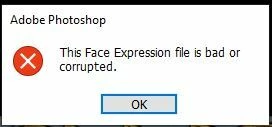
P: This Face Expression File is bad or corrupted

  • May 19, 2020
  • 93 replies
  • 178010 views

I keep gettting the following error when I launch Photoshop 2020 on a Windows 10 64bit machine


This Face Expression File is bad or corrupted


I assume it relates to the Default Face Expression Presets.p3f file, which a scan reveals to be OK. The application launches after I click OK but how can I get rid of the error?


I have reinstalled, tried the clean up tool and there has even been an update since it started but still it persists. Is there anywhere I can find a replacement file?


Thanks in advance


Steve


93 replies

Participant
January 17, 2024

Bonjour.

It's correct with the explication under and it works : 


Sadly i couldn't find any file named "face" in above mentioned destination,
But i was able to find the same file in "\AppData\Roaming\Adobe\Adobe Photoshop 2024\Adobe Photoshop 2024 Settings", i renamed it as above mentioned and the problem / error message is gone, 

Inspiring
January 14, 2024
Sadly i couldn't find any file named "face" in above mentioned destination, But i was able to find the same file in "\AppData\Roaming\Adobe\Adobe Photoshop 2024\Adobe Photoshop 2024 Settings", i renamed it as above mentioned and the problem / error message is gone
Samantha Fury Creating Characters you can love!
chrisw63857
Participant
December 31, 2023

None of these work for me.  I do not have Go to C:\Users\[username]\AppData\Roaming\Adobe this file nor is there anything in my adobe photoshop 2020 folder.


Participant
December 14, 2023

Thank you,worked for me

About Space
Participant
December 5, 2023

Hello. Every time I open Photoshop Beta. This message always appears. My PS Beta is up to date. What should be done? Help/ Thanks!


kglad
Community Expert
Community Expert
December 5, 2023

in the future, to find the best place to post your message, use the list here, https://community.adobe.com/

p.s. i don't think the adobe website, and forums in particular, are easy to navigate, so don't spend a lot of time searching that forum list. do your best and we'll move the post (like this one has already been moved) if it helps you get responses.


<"moved from cc desktop bugs">
Participant
December 3, 2023

Works until the next day and I have to do it again. How to fix permanently? 

Participant
November 28, 2023

Do you see a button in the middle top of the screen that says "Reset Essentials" - if so, click on it and the screen should return to normal.

Participant
November 28, 2023

I did the renaming solution - but next day I got the same error message. So it seems to me that this is just a temporary fix.

Participant
November 26, 2023

A month later I am getting the same message. Same day of the month in fact. But this time I can't get my settings back. This is not great. 

Participant
November 23, 2023

Awesome! This worked for me! Thanks! 🙂