


Participating Frequently
May 19, 2020

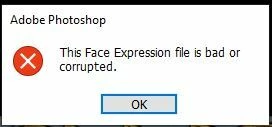
P: This Face Expression File is bad or corrupted

  • May 19, 2020
  • 93 replies
  • 178010 views

I keep gettting the following error when I launch Photoshop 2020 on a Windows 10 64bit machine


This Face Expression File is bad or corrupted


I assume it relates to the Default Face Expression Presets.p3f file, which a scan reveals to be OK. The application launches after I click OK but how can I get rid of the error?


I have reinstalled, tried the clean up tool and there has even been an update since it started but still it persists. Is there anywhere I can find a replacement file?


Thanks in advance


Steve


93 replies

Participating Frequently
April 28, 2024

I keep getting this whenever I boot up Photoshop. I have to click on 'ok' before the program will even open. Also, earlier tonight when I was working on a piece, it glitched out so bad I couldn't use it properly and when I tried saving and closed it out, it DID NOT save what I had been working on. Super frustrated. Is there something that can fix this? Is anyone else having this problem?
Thanks.

John Young Photography
Known Participant
April 10, 2024

That worked for me thank you very much

Participant
April 5, 2024

While switching on the Photoshop getting an error as The face Expression file is bad or currupted and also facing the issue of profiles in Photoshop Camera Raw where only matrix profile is available even the photoshop default files are missing 

Bojan Živković11378569
Community Expert
Community Expert
April 5, 2024
stephans79998306
Inspiring
March 26, 2024

Perfect! Thank you so much.

Participant
March 16, 2024

It works for me 🙂


Thank you !!

KAJ150949
Participant
January 30, 2024

Thank you.

Known Participant
January 24, 2024

"This face expression file is bad or corrupted" 

jane-e
Community Expert
Community Expert
January 24, 2024

@iCimages.net 


Try this for the "This Face Expression File is bad or corrupted" message box:

  • Quit Photoshop
  • Go to C:\Users\[username]\AppData\Roaming\Adobe in Windows File Explorer and search for "Face".
  • When you find a file called "FaceExpressionPresets.psp", rename it with .old at the end (to preserve it just in case).
  • Restart Photoshop. The file will recreate itself. If there is still an issue, the older file is still there and can be renamed again.

Jane

Participant
June 4, 2024

it helps but file keeps getting bad, more permanent solution would be lovely

tedt6258165
Participating Frequently
January 19, 2024
no issues here
jane-e
Community Expert
Community Expert
January 19, 2024


@Augusto Miranda wrote: My worry now is; does it damage any functionality doing this?


The file recreates itself on relaunch, so no harm done!


Jane

Participant
January 19, 2024

I had this issue and i fixed it by doing what Jane said. My worry now is; does it damageany functionality doing this?