
Participant
March 4, 2024

P: Unusual Account Activity Detected popup in Photoshop

  • March 4, 2024
  • 28 replies
  • 9168 views

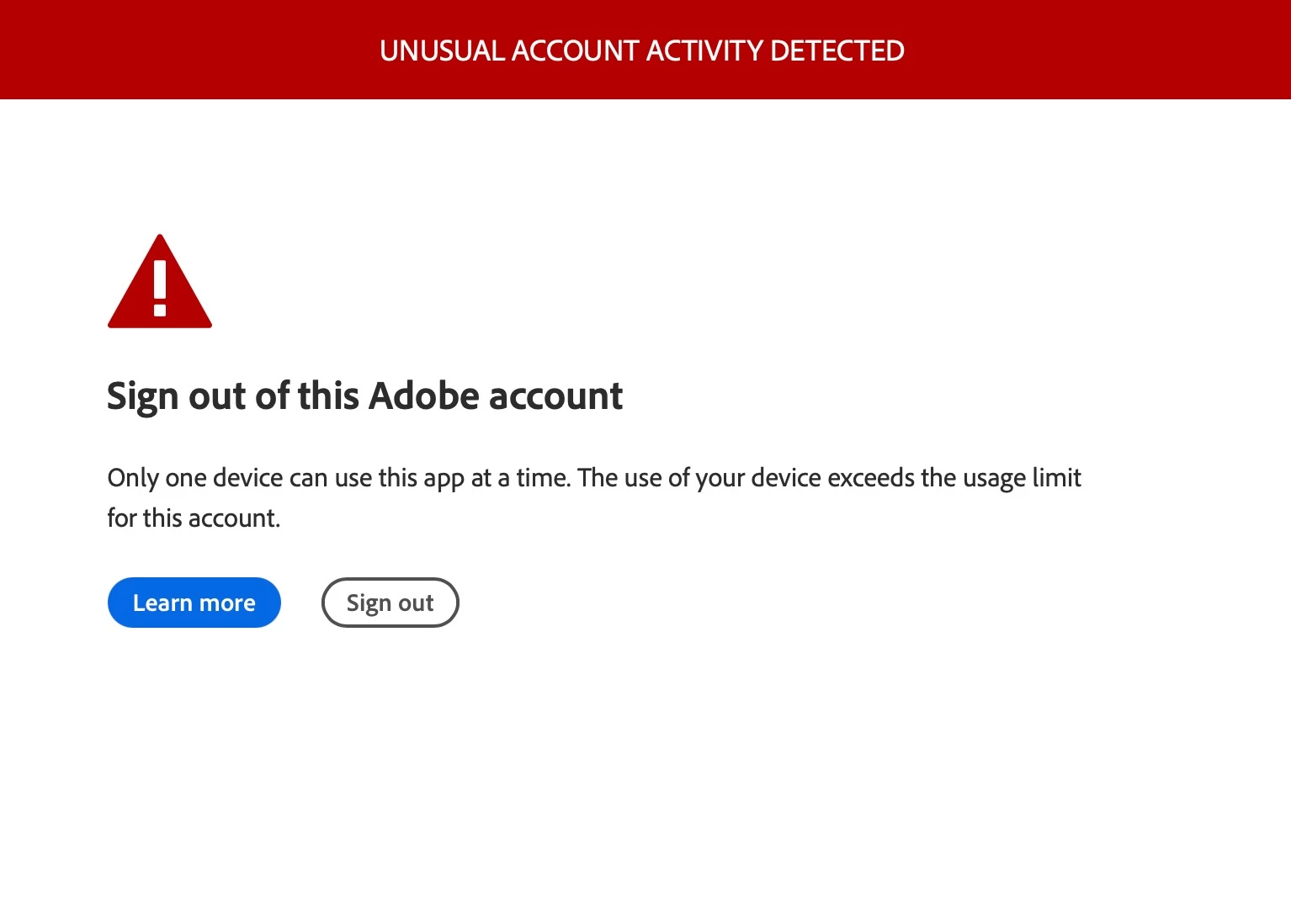
My partner is getting this modal popup blocking her activity in Photoshop v 25.5—but not in any other CC apps. It feels like a phishing scam, but could just be a bad design. She didn't follow the links (Learn more and Sign out) in the modal. She has deactivated access on other machines, and deleted and reinstalled Photoshop. The message still appears.


Has anyone else seen this before?
 

28 replies

Participating Frequently
March 10, 2024

I am getting this as well. I do cycle between 3 devices, (Macbook, Desktop and a SUrface Pro) But I always deactivate one to use on another. I have done this for years. As of this week I'm getting this and and am now down to 4 days. I do use a VPN, but there is nothign unusual on my account.


I'm hopeing this is just a bug.

Participating Frequently
March 10, 2024

I have this issue too for days now. Tried all the troubleshooting steps. Reset password twice, deacivated both installed machines, ended all sessions, using Adobe authenticator app. Uninstalled, reinstalled, downgraded and updated Photoshop. Still getting the popup constantly.


Constantly interrupting my work. I have deadlines! This is unacceptable!


My account isn't compromised, I am not using the apps on more than one machine at a time.


This needs immediate attention please.

Participating Frequently
March 11, 2024

I noticed for myself if I downgrade to v22 that i dont get the notification. Nots ure what that means in the long term, but it seems to be specifica to an issue in  v25. 

Conrad_C
Community Expert
Community Expert
March 7, 2024

I got this error yesterday too. I’m not new to Creative Cloud so I followed the directions and both closed all Creative Cloud sessions on all devices and browsers and also changed my password, since it had been a few years since I last did that. But then a little while later later the error appeared again. I was pretty sure the new password wasn’t already compromised because I also use multi-factor authentication as another layer of security.


The fact that no other Adobe app was complaining made me think it was probably a Photoshop-only glitch we would have to sit through until they fixed it. I left Photoshop running for a couple hours today and have not seen the message come back. So my guess is that it was a temporary server-based problem affecting only Photoshop, that some people got hit with regardless of how well they were following the rules with a non-compromised account.


It’s just unfortunate that this caused many of us to spend valuable time running around resetting accounts and passwords that we probably did not actually have to do.

Participant
March 9, 2024

I've been having this since 5 days ago. And today it actually shut down my Photoshop. No need to mention I was working on something with an immenent deadline. 

Any solution yet, Adobe? I tried updating to latest verison to no avail. 


DavidLloydImageworks
Inspiring
March 10, 2024

This is absolutely not ok. It's one thing to be help hostage by adobe for our professional tools, but this is malpractice for them to be cutting us off like this. WE ARE NOT SHARING OUR ACCOUNTS! WE HAVE PASSKEYS ON OUR ACCOUNTS! ADOBE FIX THIS!!!!


gener7
Community Expert
Community Expert
March 7, 2024

I setup a new (used) Macbook yesterday. In the process of using Photoshop, I got the "too many devices" popup, but my one shows me the three Macs I am signed into, and gives me the option of signing out of one of them. I sign out of one of them and I'm back in business. This is what the dialog  should look like.

https://helpx.adobe.com/download-install/using/device-activation-limit.html


Not being tech savvy on what could be the problem, perhaps work with them on deleting the old account and creating a new one.

Participating Frequently
March 7, 2024
You're lucky it worked. Mine shows 3 connections. The current session can't be deleted, only the 2 other sessions can be - one of which is my laptop which IS running the Adobe suite of products - the other two don't even have the Adobe software installed and are shut down. I don't know why I or they can't delete the one 'current' connection that's blocking me - they just said they can't. I'm glad you're up and running, though! 🙂
Kevin Stohlmeyer
Community Expert
Community Expert
March 7, 2024

It doesnt matter if the hardware is powered off/shut down. The account can still be allocated to the machine.

Participant
March 7, 2024

Same issue. Support solutions have not been any help. I've always had 2-factor and never allowed anyone else to use my account. I have had it activated on 2 computers, but currently just one.

DavidLloydImageworks
Inspiring
March 6, 2024

Yes, I am getting this. First contact with chat support made me feel like a criminal, but then said that I should log out of all devices and change my password. that didnt change anything, kept getting it, but now it says "you will lose access to this Adobe app in 4 days" called support and got shuffled over to Photoshop because that is the only app this is happening in. Phone support said that they were getting A LOT of these calls and that it was on thier radar... and that I should not worry... I wass like "um... when you threaten to take away my livelyhood in 4 days, I am going to worry!"


I logged out all devices in the adobe creative cloud online page. I did not see any unexpected activity. I changed my password. Anyway, they say that I should not be cut off in 4 days, but we will see.


DavidLloydImageworks
Inspiring
March 7, 2024

 Day 3... dealing with teh countdown and the billable hours lost... and I love how there is no way to move the widget to get to the buttons


Participating Frequently
March 5, 2024
Yep. Same here. I feel your pain.

Now, the error message says I'll lose access to Photoshop in 2 days. My subscription payment is due tomorrow, too.

I had another support session yesterday and the same thing - log out of everything, reset password, reboot, wait 24 hours. This isn't working. They closed my ticket. I did a complete uninstall of all Adobe apps on my laptop and 2 other laptops that weren't powerful enough to run all the stuff I need for my business. But I did a full uninstall on those and shut them down. Same problem occurred today.

It's been 22 hours since my chat yesterday with support. I tried to re-open my case by replying to the 'case closed' email I got but it bounced back and said to use the chat. I'm going to ask if I can just cancel this subscription and create a new one instead.

I can't afford the downtime and business lost. I like the Adobe apps but I'm going to install GIMP and Inkscape as a backup or maybe I'll bite the bullet and buy Corel Draw and write it off. The thing is that I've been running the Adobe apps on this new laptop since December. IDK why, all of a sudden, I'm having this issue now. I'm more than frustrated. I'll update my original post if anything changes.

After using Photoshop 25.5.1 for five minutes, an error message with "Unusual Account Activity Detected" at the top appears in a red bar. This is a known bug – just got off a 40 minute call with Adobe application support. The current workaround is to click the "Unusual Account Activity Detected" title in the red bar which will open up an Adobe web page. You can close the web page and return to Photoshop and the error message should be gone. I've been able to continue working in Photoshop without the message returning. Once I close the application and reopen it, the message appears again after five minutes.


If you have two monitors, as I do, there's an extra twist. When I run Photoshop in the second monitor (a larger monitor attached to my MacBook Pro), the error message doesn't appear in the middle of the screen – it appears off the screen and can only be seen when I click F3 (Expose view). Then I can see it off to the side of the main Photoshop window. In this case, Photoshop itself is frozen and only makes a dull sound when trying to click on anything. The only way to get past it is to force quit Photoshop.


Apparently, there is another known issue related to this that appears on your Adobe account web page. Under Account and Security > Sign-in and security, if you scroll to the bottom, you'll see Active Sessions. You may be seeing a phantom session (I am) called "Safari, Mac OS X 10.15.7" labeled as the "Current session". This session cannot be ended or deleted in any way. The Adobe support rep said he and his team would look into it because it is not real and is related in some way to this Photoshop error message issue.


ALSO (yes, there's more), in that same Active Sessions section, the session identified with my computer's name shows a location of "Unknown". This too is a bug. Good times had by all.


Fingers crossed Adobe can straighten all this out. I will say the Adobe support rep was wonderful and patient and very apologetic. 


_____

Photoshop 25.5.1

macOS Sonoma 14.3.1

MacBook Pro M3 Max

Participating Frequently
March 5, 2024

Hello. Yes. I have the same issue. I spent almost 4 hours with technical support in a chat last night. He tried so many different ways to try to resolve it. He did a remote session on my laptop and used the Creative Cloud cleaner tool but it didn't work. He said he checked with another team and other people were experiencing this issue and said they were working to resolve it. He said that I should 24 hours and try again. That was 9 hours ago. I still received it this morning but now it's saying I'll lose access to the app in 4 days. I better not. I use this for my business. My laptop is new, has antivirus/antimalware, VPN. We disabled the VPN and it didn't help. When I looked at my account, in the security settings, there are 3 connections. It lets me end 2 of the 3 (one of which is my laptop) but I can't remove this other instance that it thinks is me. I asked the support rep if there was any way we could kill that connection. He said no. I sent him sysinfo from my machine so he could see the hostname of my laptop, he watched me log into my machine with 2FA and a passkey. He tried to tell me someone else was using my account! I told him how can that be? I'm using 2FA, passkey, password which I reset earlier in the day when this error began popping up. I think that somehow the connections that Creative Cloud makes to their servers is hosed up and thinks I've tried using the app over 3 connections that are not properly terminated? That's my guess. I haven't tried Ai or InDesign but I will later today. I'll update the thread if my issue gets resolved. The support rep said that if, after 24 hours, the issue isn't resolved, to open another chat and they would be happy to help.

Participating Frequently
March 5, 2024

I forgot to mention that it's the same 3 connections every time it happens. I'm quite certain they are all me. 2 are listed as Chrome connections and one is from my new laptop. I even uninstalled the Adobe PDF extension from Chrome thinking that might be contributing to the issue but it didn't help. What I don't like is that it keeps hanging onto this one old connection from February, which isn't even the right connection. It lets me end the one for my laptop and the other Chrome connection. I also have a password that is more than 20 characters long and I doubt anyone is using it, since I reset it, use 2FA, a passkey directly from my laptop. I've worked in IT for over 25 years and am very careful with my security.   🙂

Participating Frequently
March 5, 2024

I meant, log into Adobe with a username, passkey and password. I'm sorry. I am tired this morning.

Kevin Stohlmeyer
Community Expert
Community Expert
March 4, 2024

@Darrell Stokes This is legit. Do you each have a subscription for Photoshop? You are allowed to install on as many computers as you want but only one can be open/active at a time. Sounds like sharing access might be catching up.

Participant
March 4, 2024

@Kevin Stohlmeyer  Thanks for confirming that it's legit. I couldn't find anything about it in any Adobe help docs, and the design made me expect it to request a Walmart gift card. 😂


We don't share an Adobe ID, but each of us uses it on two computers. She had quit Photoshop on her second computer, but to no avail. The ony thing that worked was to deactivate, uninstall and reinstall it on the second computer. So it seems it somehow wasn't getting the message to the mothership that it wasn't running on the second machine.

Participant
March 4, 2024

Ok, false positive—it just happened again, and she doesn't even have Photoshop activated on any other computer now. Back to the drawing board.