
Inspiring
December 1, 2015

P: Liquify lightens result on 16 bit/channel images

  • December 1, 2015
  • 231 replies
  • 4068 views

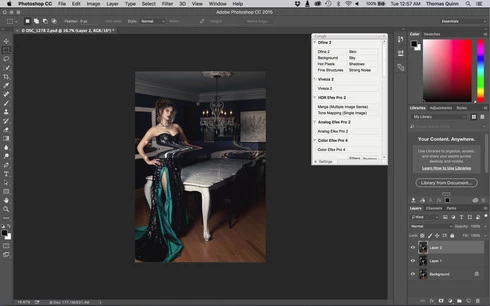
I am having issues with the new upgrade to Photoshop CC 2015 on Mac El Captain. The only thing I did was upgrade from a working CC 2015 to the new version. Using the liquify tool give the following look. There is a box around the area liquified that is lighter than the other areas. When I turn of Use Acceleration in Graphics Processor, it is better but .... I didn't have to do this in the prior version i.e.. Yesterday.

New Update: The Squiggly waist is the liquified:
This topic has been closed for replies.

231 replies

atelier-3021
Participating Frequently
December 27, 2015
True. I reinstalled the driver. Merry Christmas!
Inspiring
December 27, 2015
No, that is related to your video card drivers, and not related to this topic.
atelier-3021
Participating Frequently
December 27, 2015
I've noticed that my "use OpenCL" checkbox is greyed out.
Is it related to 2015.1.1 update?
Inspiring
December 22, 2015

Inspiring
December 18, 2015
nice job adobe I love you
Participant
December 16, 2015
Latest versions works for me! My problem is solved.
Participant
December 16, 2015
I now see it, wil try that
Inspiring
December 16, 2015
Did you install the 2015.1.1 update?
Participant
December 16, 2015
Hi, it's not only with 16 bit that something goes wrong.
Also in 8 bit strange things happen to.
When I liquify a transparant image I get an border around the image.
Once I'm done and press enter the line will be bright and visible and in some cases really big.

Participating Frequently
December 16, 2015
Thanks very much Jeffrey. This link worked simple and effective!