
Inspiring
December 4, 2014

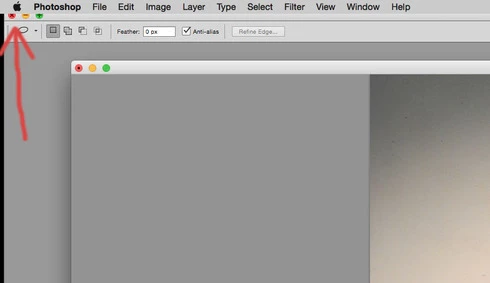
P: Minimize buttons disappear under upper menu bar

  • December 4, 2014
  • 15 replies
  • 800 views

In CS6 my minimize buttons sometimes move under the upper menu bar. If they go too far under, I can't get them back. I've tried pressing F, but that does not make them reappear. I've tried checking/unchecking the various interface options under "preferences" and also uninstalling and reinstalling the app. So far, the only way I can fix the problem is to reset all of the defaults. I've noticed this only happens on my Mac using Mt Lion and/or Yosemite. I have another Mac using snow leopard, but on that machine it's not possible for the minimize buttons to go under the upper menu bar.
This topic has been closed for replies.

15 replies

Legend
June 16, 2015
This should be fixed in the Photoshop CC (2015) update.
Jaredfromspace9745341
Participant
February 26, 2015
Monitors are not mirrored. And thanks Jeffrey!
Legend
February 26, 2015
Engineering is looking at this. Hoping it will be fixed in the next update.
Inspiring
February 25, 2015
Jared, if this is the same problem I had....it's because you have two monitors which are mirrored.
Jaredfromspace9745341
Participant
February 25, 2015


Updated to Yosemite 10.10.2 and having an issue where "Save As" window is above and out of the screen. I can't drag it down or even see anything above my list of files. Only happens on my second monitor, but that's where I do most of my work as it's larger. Nothing else is ever place outside of the usable screen unless I drag it there.
Inspiring
December 4, 2014
If you find out anything more or come up with a patch to fix this, I'd love to know. thanks again, DS
Legend
December 4, 2014
Yup. I need to look into that.
Inspiring
December 4, 2014
It's odd that PS is the only app on my machine that behaves this way when two monitors are mirrored.
Legend
December 4, 2014
Cool. I'll see if there's anything we can do on our side to make this better.
Inspiring
December 4, 2014
Now that I know what's causing this, I'm going to play around with it. Thanks a million!