
I Am Eddie
Known Participant
April 24, 2024

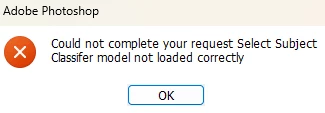
P: PS Error: Could not complete your request Select Subject Classifier model not loaded correctly
  • April 24, 2024
  • 84 replies
  • 47428 views

Hi,Is this a BUG?It happens after a new update. (2.57)

This topic has been closed for replies.

84 replies

Participant
October 7, 2025

Thanks mate !

Participant
June 16, 2025

Thanks its works 

Participating Frequently
March 4, 2025

yo lo soluciones parcialmente al poner por defecto seleccionar directamente desde la nube- edicion>preferencias>prosesamiento de imagen>seleccione sujete y quite fondo>nube.

Participant
March 4, 2025

Probé esto pero todavía no funciona. Gracias de todos modos.


[PII removed]
[Lord Wholesale Co]<>

This e-mail and files transmitted are confidential and may be subject to legal professional privilege. It is for the use of the named recipient(s) only. If you have received this e-mail in error, please notify us immediately. Furthermore, you are expressly prohibited from copying or disclosing its contents to any third party, and should delete it from your computer systems immediately. Please note that information sent by e-mail may be intercepted in transmission and may be altered without our knowledge. You are advised to verify any advice given before acting upon it.

Participant
March 4, 2025

Hi. Did this get resolved. I am having the exact same issue.

Participant
February 24, 2025

Thank You! That worked for me!

Participant
February 16, 2025

When I installed the latest version of photoshop, 26.3, the object selection tools, such as removing the background, were not accessible to me. When I try to use them, I get the error below.


I use windows 11, with this version of photoshop. 


I've uninstalled the programme and reinstalled it, but the problem reappears because it says that the select subject model is not loaded correctly.


Can anyone in the community help me?


c.pfaffenbichler
Community Expert
Community Expert
February 17, 2025

What have you done for all-purpose trouble-shooting so far?
Restoring Preferences after making sure all customized presets like Actions, Patterns, Brushes etc. have been saved might be a good starting point:
https://helpx.adobe.com/photoshop/using/preferences.html
https://helpx.adobe.com/photoshop/kb/basic-trouble-shooting-steps.html
https://helpx.adobe.com/photoshop/kb/troubleshoot-gpu-graphics-card.html


This seems to have been an issue a while back, suprised to see it in the current version … 

https://community.adobe.com/t5/photoshop-ecosystem-bugs/select-tool-not-working-aug-2024/idi-p/14806244

jane-e
Community Expert
Community Expert
January 23, 2025


@CMass wrote: Can you confirm that the correct answer shared in this primary post helped? 


Do you mean this reply from @Sameer K in May 2024 or another one?


Jane


Participant
January 22, 2025

Been getting this error since the last update (1/25)

Participant
January 22, 2025

Bonjour,

J'utilise PS version 26.2 avec window 11 Famille.

Aprés avoir chargé une image au format JPEG, lorsque je souhaite faire une sélection du sujet, le message d'erreur suivant apparait. " Impossible d'exécuter la commande Sujet Select, Subject classifer model not loaded correctly".

Merci pour votre aide.

CMass
Legend
January 23, 2025

Hi @christian_5788

Can you confirm that the correct answer shared in this primary post helped? 


^CM

Jqqerry
Inspiring
January 1, 2025

In May 2024, it was stated that "The team has determined the root cause, and a fix should be released soon."
And today is January 1, 2025.
Yes, 2025........