
Exit
  • Global community
    • Language:
      • Deutsch
      • English
      • Español
      • Français
      • Português
  • 日本語コミュニティ
  • 한국 커뮤니티
0

unable to update photoshop version 25.4 to 25.9 Mac book pro

Community Beginner ,
Jun 09, 2024 Jun 09, 2024

when I go to help option in photoshop in the dropdown menu it is greyed out.


I'm having issues saving psds to pdfs ..


using ventura 13.6.7

2017 macbook pro

processor 2.9 GHz Quad-Core Intel Core i7

graphics Radeon Pro 560 4 GB
Intel HD Graphics 630 1536 MB


Can anyome help please?


TOPICS
macOS
216
Translate
Report
Community guidelines
Be kind and respectful, give credit to the original source of content, and search for duplicates before posting. Learn more
community guidelines
Adobe
Community Expert ,
Jun 09, 2024 Jun 09, 2024

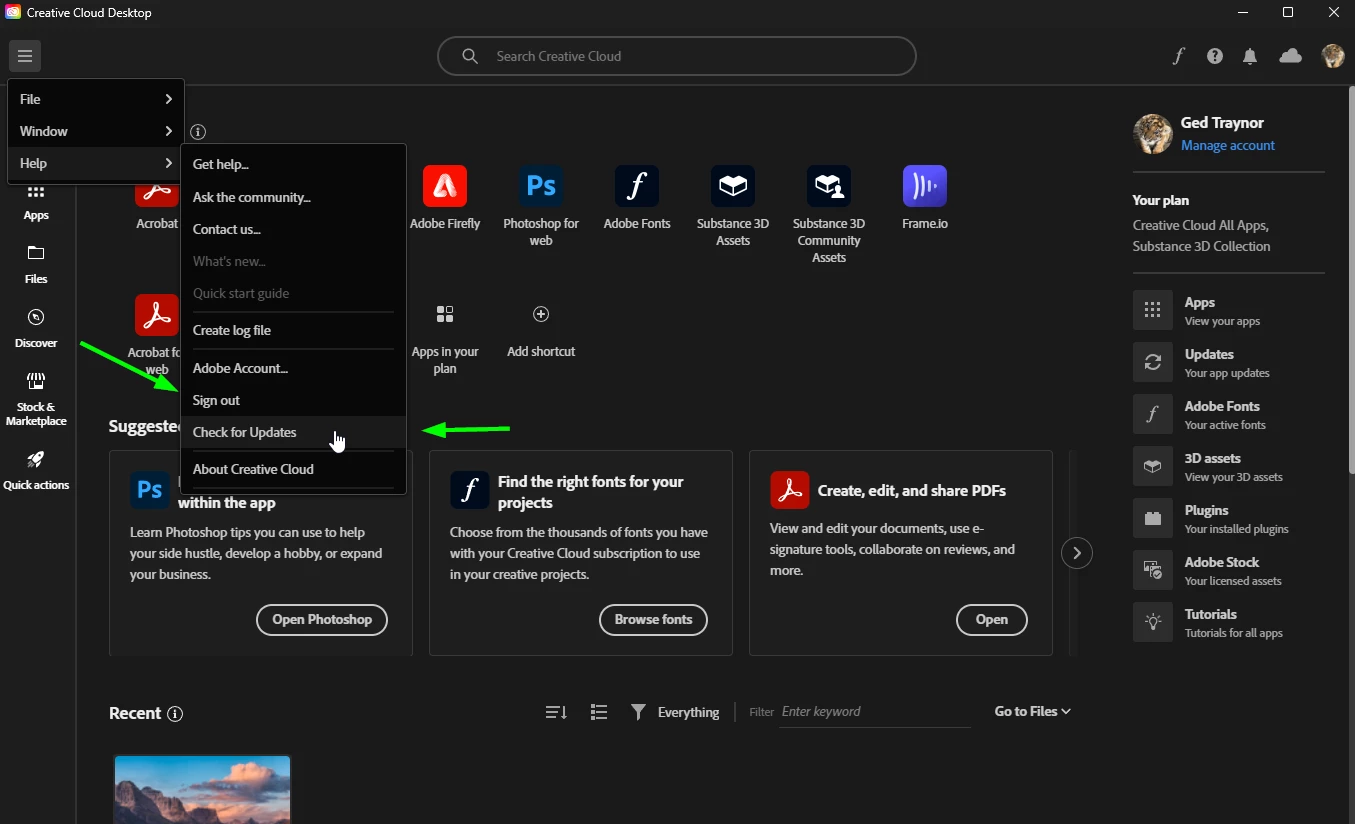
@Cardine did you try checking for updates via the Creative Cloud app, if that doesn't work, try signing out and back in again

2024-06-09 13_53_34-Creative Cloud Desktop.png

Translate
Report
Community guidelines
Be kind and respectful, give credit to the original source of content, and search for duplicates before posting. Learn more
community guidelines
Community Beginner ,
Jun 09, 2024 Jun 09, 2024

No I didn't but thank oyou very much indeed. I was able to update like that . And in addition my saving function now works. I am extremely grateful for you having taken the time to advise. 

Translate
Report
Community guidelines
Be kind and respectful, give credit to the original source of content, and search for duplicates before posting. Learn more
community guidelines
Community Expert ,
Jun 09, 2024 Jun 09, 2024
LATEST

@Cardine you're welcome

Translate
Report
Community guidelines
Be kind and respectful, give credit to the original source of content, and search for duplicates before posting. Learn more
community guidelines