

Sawiro Takoni
Known Participant
December 7, 2025

P: Vibrance panel doesn't support "zero" when sliding
  • December 7, 2025
  • 4 replies
  • 666 views

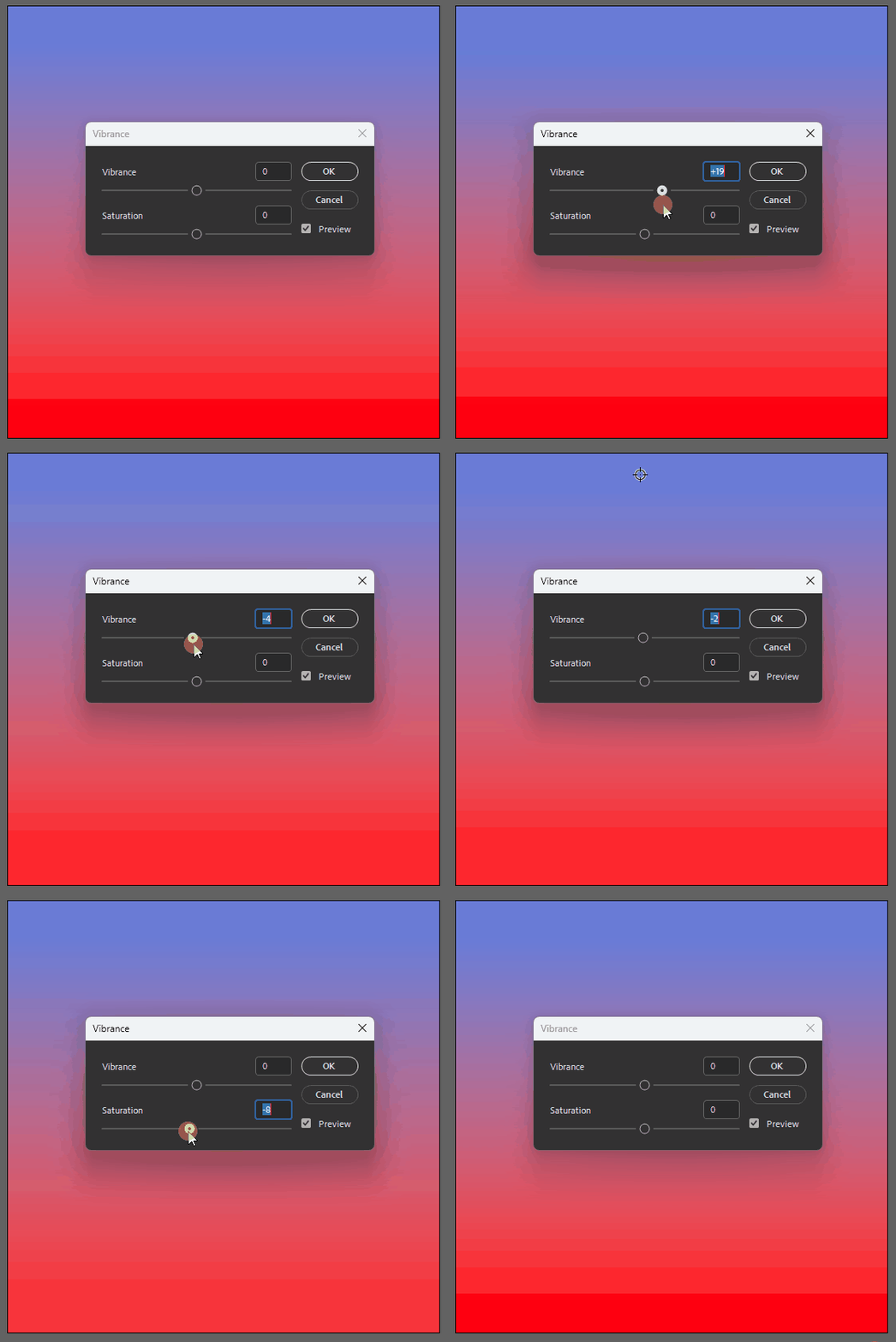
map-2.gif


Just updated to Photoshop 27.1.0 because I wanted to see the "modern GUI panels" as stated in the release notes.


First thing I noticed was (besides the GUI drag-icon inconsistentcy between panels like, vibrance and levels), that "0" is not selectable when using the vibrance panel.


When you slide from left to right - and vice versa - zero is not an option; it's skipped.


Other panels, like levels, do support 0 as a valid value (as does the keyboard), but when using the mouse to quickly slide to a + or - integer, 0 is simply skipped.


I checked in Photoshop 26.x.x and there "0" was an option in the exact same panel.


See screenrecording, where I try to set the value to 0 by mouse. It's only possible by keyboard (arrow up and down).

4 replies

Anshul_Saini
Community Manager
Community Manager
January 6, 2026

Updating status.

Sawiro Takoni
Known Participant
December 24, 2025

Well, for me it's still not working.


map-3.gif


To be clear: I can't select 0 when purely using the mouse in both the vibrance or saturation slider.


I can do using the numeric keyboard or the up/down arrows, but not when only using the mouse.


When I fiddle around with the keyboard (entering 0 manually, using the arrowkeys to adjust the parameter) I can get -0 (negative zero) and after a while (when 0 is set by the keyboard) also using the mouse.

davescm
Community Expert
Community Expert
December 24, 2025

It works fine here in Windows 11, but if you are having that problem a shortcut to return the slider to 0 is to double click the slider with with the mouse.
Dave

Sawiro Takoni
Known Participant
December 24, 2025

Thanks for the headsup!

I know about the "shortcut" to restore all parameters to the integer /  numeric defaults.


But I also think it's odd that you are not able (in my case) to "select" when sliding, where -0 is available (which should trigger a stack overflow, I think).

Sawiro Takoni
Known Participant
December 7, 2025

Will try, thanks!


I started with Photoshop 2.0 in 1993 I think. So my preferences are all chained to eachother since then 🙂

Ged_Traynor
Community Expert
Community Expert
December 7, 2025

@Sawiro Takoni I just tested on my system, and it's working fine for me with Photoshop version 27.1 on Windows 11, try manually resetting your Photoshop preferences
https://helpx.adobe.com/ie/photoshop/using/preferences.html#Manually
Remember to back up your settings before doing the preference reset
https://helpx.adobe.com/ie/photoshop/using/preset-migration.html