Mark Haldane
Participating Frequently
May 28, 2021
Answered

3D has stopped working, "OpenGL disabled."

  • May 28, 2021
  • 2 replies
  • 13105 views

Hello,


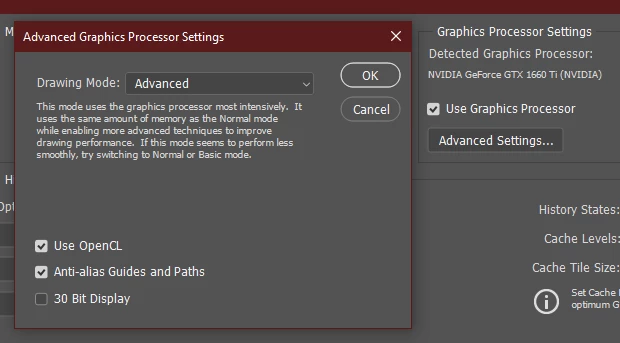
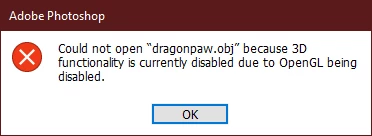
Recently I have been unable to do any 3D work in Adobe Photoshop. If I make a 3D extrusion I get a preview of it but I can't make any changes to it or even roate the view. It's as if the preview is not updating. Additionally if I try to open an .OBJ file, Photoshop tells me 3D is disabled because OpenGL is disabled. I see no option for OpenGL however my graphics card is listed and enabled, including an option for OpenCL.


This used to work fine so I can only assume either a recent Photoshop update or a graphics driver update has caused this.


Can anyone help?
 

This topic has been closed for replies.
Correct answer davescm

Adobe are updating the core graphics functions in Photoshop. This is driven by the operating systems of Apple and Microsoft in which the old Open GL functions are being removed in the case of Apple, or deprecated in the case of Microsoft. This means that the graphics functions that have worked for years must be rewritten to use Metal and Direct X. At the same time, Adobe are sensibly updating those core functions to deliver the additional speed we require to handle the very large files of today.

Some functionality in Photoshop, such as 3D, still relies on the older Open GL graphics functions. To make these work, an additional preference Preferences>Technology previews>Deactivate Native Canvas has been added. This can be checked and Photoshop restarted to restore 3D functions to where they were in 22.3


Dave

2 replies

Mark Haldane
Participating Frequently
May 28, 2021

Update: despite being up-to-date, I reinstalled my NVIDIA driver. The error has stopped appearing but I'm still not able to get any live preview on 3D objects in the scene. The only way I can see what's there is by rendering the scene. I've tried Basic, Normal and Advanced Drawing Modes in my Advanced Graphics Processor Settings but it makes no difference.

davescm
Community Expert
Community Expert
May 28, 2021

Did you Deactivate Native Canvas and restart as advised earlier?

Dave

Mark Haldane
Participating Frequently
May 28, 2021

Sorry, I posted that second comment without realising you'd replied. Yes, disabling that worked, thank you.

davescm
Community Expert
davescmCommunity ExpertCorrect answer
Community Expert
May 28, 2021

Adobe are updating the core graphics functions in Photoshop. This is driven by the operating systems of Apple and Microsoft in which the old Open GL functions are being removed in the case of Apple, or deprecated in the case of Microsoft. This means that the graphics functions that have worked for years must be rewritten to use Metal and Direct X. At the same time, Adobe are sensibly updating those core functions to deliver the additional speed we require to handle the very large files of today.

Some functionality in Photoshop, such as 3D, still relies on the older Open GL graphics functions. To make these work, an additional preference Preferences>Technology previews>Deactivate Native Canvas has been added. This can be checked and Photoshop restarted to restore 3D functions to where they were in 22.3


Dave

Participant
July 9, 2021

Thank you Dave this was driving me nuts!!! Problem solved.

giannunziol63338487
Participating Frequently
July 16, 2021

You are my Hero too 😉 ! i went crazy for 2 days with same problem ... 3D Photoshop didn't work, issue to enable Open GL and everything i tried was useless.

Thank you so so much Dave !


Bye

Gian