
Innotex Nico Tanne
Inspiring
May 5, 2021
Answered

activeLayer

  • May 5, 2021
  • 4 replies
  • 3341 views
Hello all,
I hope I have a simple question.
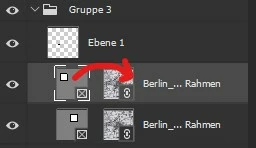
I have selected the frame and now I want to set the active layer to the smart object, but since I don't really know how, I have no idea how?
and then I just come from the smart object back to the frame?.
 
myDoc.activeLayer = ?
 

This topic has been closed for replies.
Correct answer r-bin


var frame_name = "My Frame";

// select frame group
select_frame(frame_name, false);

// select smart object in frame
select_frame(frame_name, true);

///////////////////////////////////////////////////////////////////////////////
function select_frame(name, smart_object)
    {
    try {
        var d = new ActionDescriptor();
        var r = new ActionReference();
        r.putName(stringIDToTypeID("layer"), name);
        d.putReference(stringIDToTypeID("null"), r);
        d.putBoolean(stringIDToTypeID("makeVisible"), false);
        executeAction(stringIDToTypeID("select"), d, DialogModes.NO);

        if (smart_object) app.activeDocument.activeLayer = app.activeDocument.activeLayer.artLayers[0];
        }
    catch (e) { throw(e); }
    }


upd.

corrected typos


4 replies

r-binCorrect answer
Legend
May 5, 2021


var frame_name = "My Frame";

// select frame group
select_frame(frame_name, false);

// select smart object in frame
select_frame(frame_name, true);

///////////////////////////////////////////////////////////////////////////////
function select_frame(name, smart_object)
    {
    try {
        var d = new ActionDescriptor();
        var r = new ActionReference();
        r.putName(stringIDToTypeID("layer"), name);
        d.putReference(stringIDToTypeID("null"), r);
        d.putBoolean(stringIDToTypeID("makeVisible"), false);
        executeAction(stringIDToTypeID("select"), d, DialogModes.NO);

        if (smart_object) app.activeDocument.activeLayer = app.activeDocument.activeLayer.artLayers[0];
        }
    catch (e) { throw(e); }
    }


upd.

corrected typos


Innotex Nico Tanne
Inspiring
May 5, 2021

oh thats it 🙂

Thank you verry much 👍👍

JJMack
Community Expert
Community Expert
May 6, 2021

You need to understand that the Frame visible Image area and the Smart object layers in the frame bounds can  be different. The smart  Object layer's  bound can be larger, smaller or the same as frame mask visible area bounds. Place may scale the smart object up or down in size because the Image file has a different Print resolution then the current document.  If place scale the image too large for the frame's visible ares the Adobe frame implementation will rescale the smart object to fit with in the frames visible area. However if Place scales the object smaller then the frame's visible area. the frame implementation will not scale the image to fit the frame's visible area. The image in the frame will bet smaller then the frame's image area. I reported the problem when the tool was release.   Adobe responded that the way the frame tool works.  So I removed the Frame tool from my ToolBar and disabled its shortcut. The tool is not needed and has a problem and IMO it also messes with the formats of the layers in the layers palette  no other layer is a Layer Set and a Layer.  Why do we need this?  Photoshop has more issues than we need.  I just ignore that Photoshop has a Frame tool.  Adobe just add thing to Photoshop just so the can write they added something.   Did Photoshop need a new triangle tool. The Polygon tool  has more feature for creating triangle then the triangle tool.  Adobe needs to do better by its users.

JJMack
JJMack
Community Expert
Community Expert
May 5, 2021

Photoshop Frame layers are strange they are both a layer set and a snart object layer. IMO Photoshop Frame tool is not needed Photoshop never had a problem framing images with  Layer Mask, Vector mask or clipping  mask. Why Adobe added a Frame mask and implemented  them the way the did is beyond me.  Read this thread.coordinates from a frame 


JJMack
Abambo
Community Expert
Community Expert
May 5, 2021

Are you doing programming/macros?

ABAMBO | Hard- and Software Engineer | Photographer
Innotex Nico Tanne
Inspiring
May 5, 2021

Yes I must have been too impatient 😅


Yes I'm trying to build a script that can first read the bounds from the frame and then to get the document name, would have to set the smart object active.

Abambo
Community Expert
Community Expert
May 5, 2021

Sorry, I'm not the scripting guru you're waiting for. You need to wait for one to come on-line...

ABAMBO | Hard- and Software Engineer | Photographer
Innotex Nico Tanne
Inspiring
May 5, 2021

it looks like there is no easy solution here? 😞

Abambo
Community Expert
Community Expert
May 5, 2021

Hey, give people a chance to respond... 🙂


ABAMBO | Hard- and Software Engineer | Photographer