
Participant
April 11, 2017
Answered

Adobe PS CC print borderless PDF (Mac OS)

  • April 11, 2017
  • 2 replies
  • 2748 views

Hi, i have quite anproblem to print my cv which is done in PS CC as PDF without borders... somehow in the past i managed by pulling the pivture bigger with the mouse to fit the page but after reinstalling Sierra and PS i dont remember how i did so now i always have that print page with the shadings for a border and cant get the picture pulled over the full page in the print view to print that cv borderless as PDF.... can someone please help me im desperated... starting to hate my mac book and PS CC for beeing so difficult with this page borders ... i just want to print a cv and be able to print it as pdf without borders why its so complicated in PS ?
    This topic has been closed for replies.
    Correct answer Jeff Arola

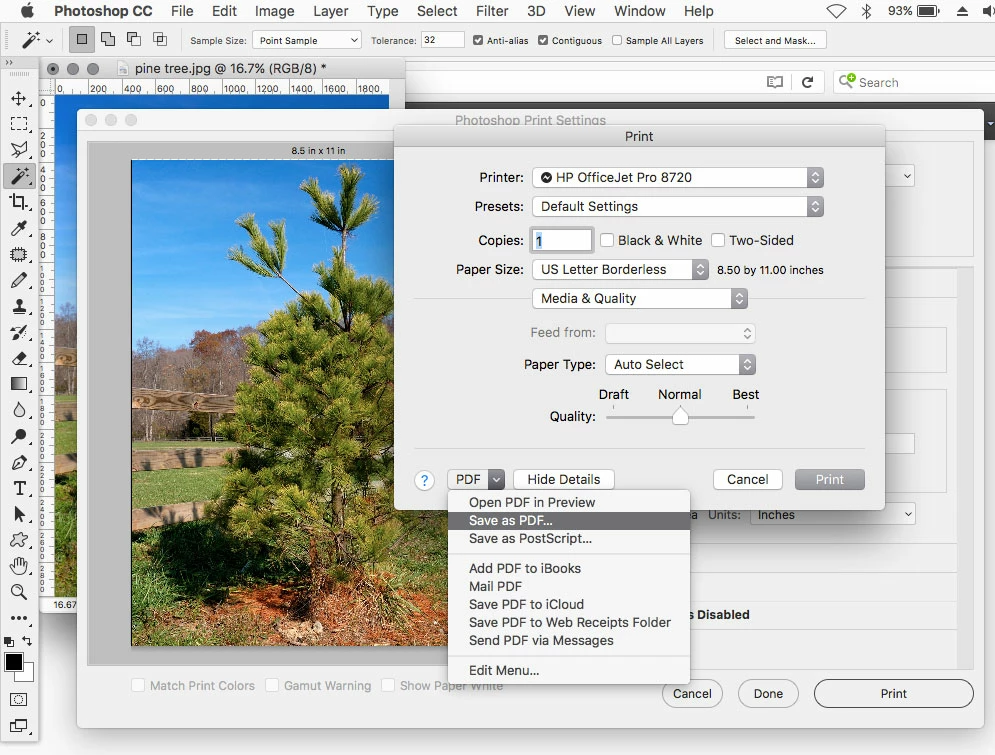
    I believe you need to set one of your printers to print borderless in the Print Settings and then if need be you can resize the print preview and then hit the Print button and in the dialog that opens Save As PDF at the left bottom of the dialog.

    2 replies

    Participant
    April 11, 2017

    OMG you saved my day after i tried yesterday from 10pm till 2am... Thank youuuu sssooo much

    Jeff Arola
    Community Expert
    Jeff ArolaCommunity ExpertCorrect answer
    Community Expert
    April 11, 2017

    I believe you need to set one of your printers to print borderless in the Print Settings and then if need be you can resize the print preview and then hit the Print button and in the dialog that opens Save As PDF at the left bottom of the dialog.