Copy link to clipboard
Copied
So, I got an .OBJ file and a pre made textures(a separate .tga file) that I want to put on the OBJ file.
Note that I am not trying to make the material stay there forever, I just need it for preview purposes since I am using photoshop to see how models would look like in the games I am working for.
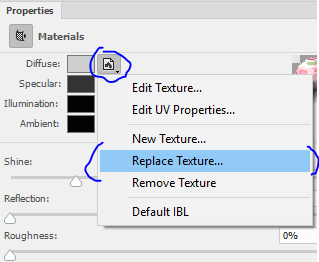
After loading your .obj file, have you clicked on the Diffuse folder in properties and then on "Replace Texture" and then loaded your .tga file?

Dave
Copy link to clipboard
Copied
And what exactly is the problem?
Mylenium
Copy link to clipboard
Copied
After loading your .obj file, have you clicked on the Diffuse folder in properties and then on "Replace Texture" and then loaded your .tga file?

Dave
Copy link to clipboard
Copied
That's what I was looking for
Thank you very much!
Copy link to clipboard
Copied
You're welcome ![]()
Dave
Copy link to clipboard
Copied
i need to do this but accidently deleted 3D dropdown where the diffuse option is. how can i get it back?
Copy link to clipboard
Copied
I don't understand when you say "I......... deleted 3D dropdown"?
To get to diffuse menu, click on a material in the 3D panel

In the properties panel click on the small folder icon next to Diffuse

You will be given a menu

Note - if you don't see the 3D or properties panels, go to the menu bar choose "Window" and check the appropriate panel

Dave

Get ready! An upgraded Adobe Community experience is coming in January.
Learn more