
Participant
March 24, 2021
Question

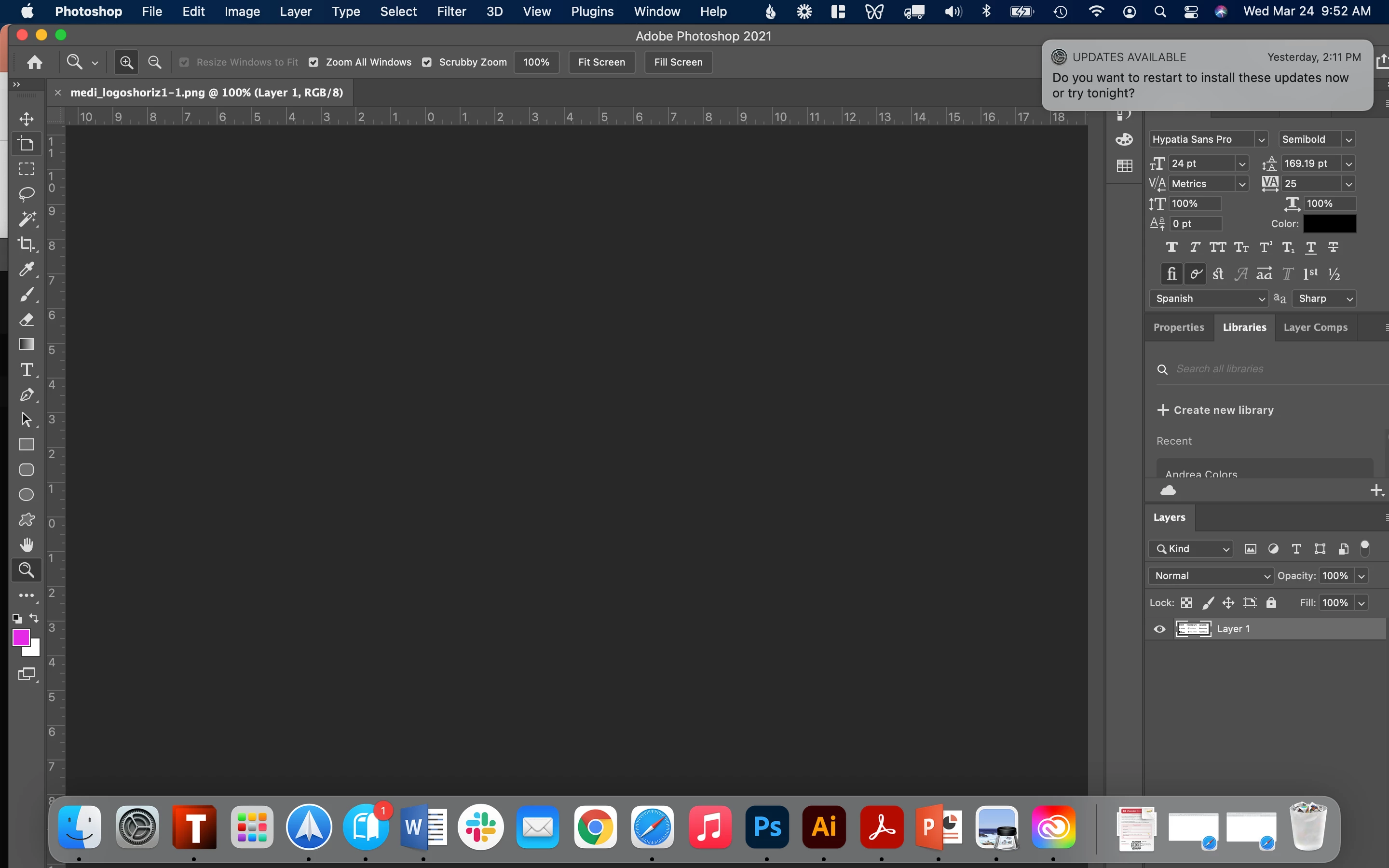
Art visible in layers panel but dartboard does not show (Photoshop)

  • March 24, 2021
  • 1 reply
  • 584 views

When I try to open any document in Photoshop, I get a blank artboard - the file does not display at all. I can see a tiny preview in the layers panel but not the actual art.

Any ideas about how to fix this?
 

This topic has been closed for replies.

1 reply

Participating Frequently
March 24, 2021

Hi there, Lets get the obvious out the way. Have you updated and restarted your machine?

If so, can you create a new document without this happening?

Participant
March 24, 2021

I have just updated and restarted, and new documents are also not visible.

Participating Frequently
March 24, 2021

Ok thanks. It could be the artboard tool options. See attached please.

Basically you want to make sure you have the artboard tool selected. Hold down on the move tool until you see it, or hit shift+V until it toggles into selection. 


Then look for the gear option in the header bar and make sure Auto-size canvas is selected.


Let me know how you get on.