Exit
  • Global community
    • Language:
      • Deutsch
      • English
      • Español
      • Français
      • Português
  • 日本語コミュニティ
  • 한국 커뮤니티
0

Auto leading massively increased in Photoshop CC2019

Engaged ,
Apr 29, 2019 Apr 29, 2019

I've just opened Photoshop 2019 after being away from work for a few days and my entire Tools and Windows appear to have re-set, causing all kinds of inconveniences, but the main problem I have is that, when I select 'Auto leading' in my Character panel, it is now setting the leading at almost 90% of the font size - for example, my Auto is currently the equivalent of 9/16pt. I've checked Paragraph and all Space Before and Space After is all set at 0pt. It was never this much before. Can anybody give me any pointers as to what is happening and how I can re-set to a more reasonable spacing, as it was in CC2018?

1.4K
Translate
Report
Community guidelines
Be kind and respectful, give credit to the original source of content, and search for duplicates before posting. Learn more
community guidelines

correct answers 1 Correct answer

Community Expert , Apr 29, 2019 Apr 29, 2019

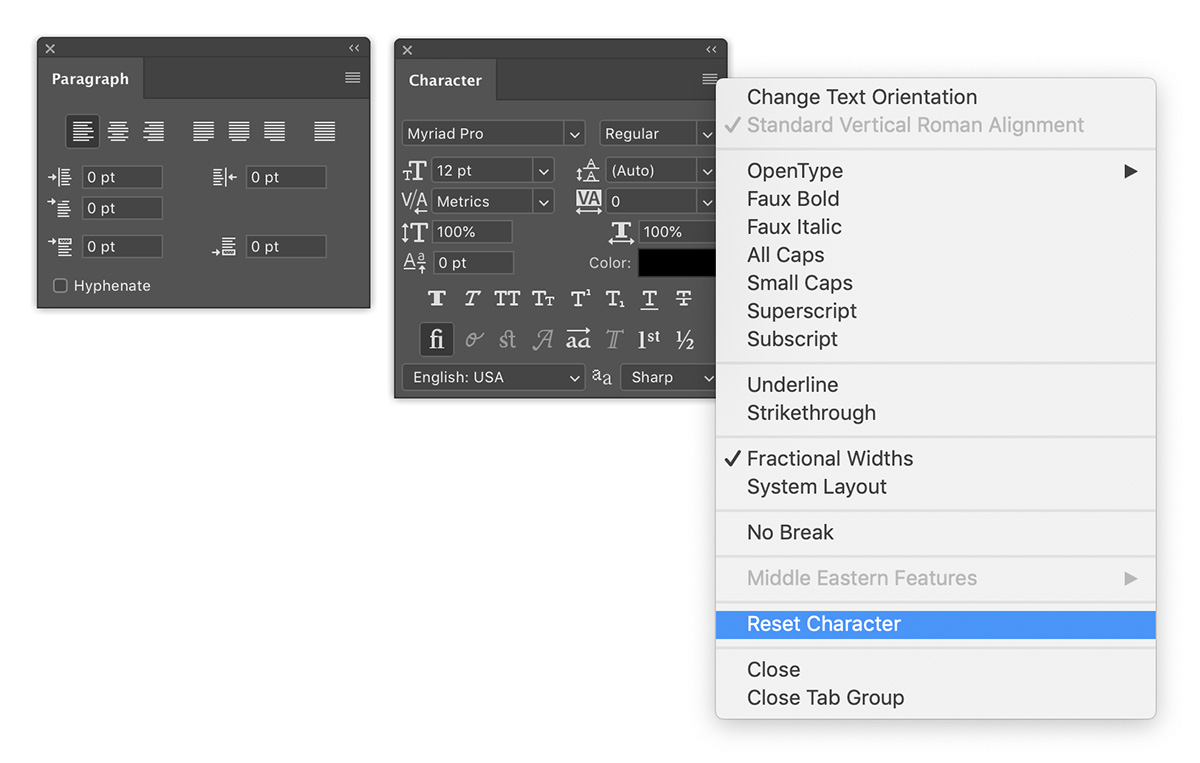
Both the Character and Paragraph panels have a reset option within their respective flyout menus. Does this help?

reset-panels.jpg

Translate
Adobe
Community Expert ,
Apr 29, 2019 Apr 29, 2019

Both the Character and Paragraph panels have a reset option within their respective flyout menus. Does this help?

reset-panels.jpg

Translate
Report
Community guidelines
Be kind and respectful, give credit to the original source of content, and search for duplicates before posting. Learn more
community guidelines
Engaged ,
Apr 29, 2019 Apr 29, 2019

Thanks, Michael.

Tried both and resetting the Paragraph panel seemed to do the trick. Any thoughts on why that should have happened? I've never seen it before.

Translate
Report
Community guidelines
Be kind and respectful, give credit to the original source of content, and search for duplicates before posting. Learn more
community guidelines
Community Expert ,
Apr 29, 2019 Apr 29, 2019
LATEST

Good to hear that fixed the problem. As to why it happened in the first place? Hard to say.

You may have accidentally set some other values using keyboard shortcuts. For example, the keyboard shortcuts for leading and baseline shift are extremely similar. The reset may have cleared out settings that you might not have noticed had been changed.

Translate
Report
Community guidelines
Be kind and respectful, give credit to the original source of content, and search for duplicates before posting. Learn more
community guidelines