
Inspiring
October 1, 2018
Answered

behind the background

  • October 1, 2018
  • 4 replies
  • 888 views

I was using the custom shape called Registration Target 2. The one that give you a sunburst.

I pulled the image out so far, the background area that is usually always gray turned red (the color I was using).

Now every image I open has that red background around the image if I pull it out.  This is weird.  How can I get the gray back?

Thanks

I can send screenshot if necessary.
This topic has been closed for replies.
Correct answer Trevor.Dennis

coldwetnozz  wrote

The workspace background is okay, it's the area area around the image.  I didn't know this was possible to happen.   The red is always supposed to be gray.  I used red for the sunburst and pulled it too far and this happens to all my images now.

Thanks

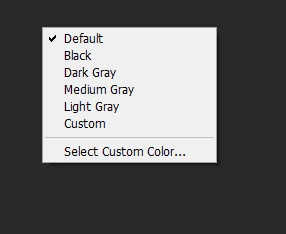
Right click the workspace outside the image area, and choose default (or the your colour of choice)

4 replies

barbara_a7746676
Community Expert
Community Expert
October 1, 2018

Perhaps you have inadvertently changed the dark gray background color that Photoshop normally uses.

If you create a new image or open any image, you can hold down the Shift key and right click in the area where the dark gray apron usually appears. You will get a menu to change the color.

The background color can also be change in Preferences -- under Edit menu in Windows and under Photoshop menu on Mac.

pslane1Author
Inspiring
October 1, 2018

The workspace background is okay, it's the area area around the image.  I didn't know this was possible to happen.   The red is always supposed to be gray.  I used red for the sunburst and pulled it too far and this happens to all my images now.

Thanks

October 1, 2018

Hi

Have you tried resetting Photoshop preferences

happie_97
Community Expert
Community Expert
October 1, 2018

I agree with everyone else, it’s hard to troubleshoot this for you without a screenshot so that we can see what you are seeing.

Ussnorway7605025
Legend
October 1, 2018

yes a screenshot would help

lambiloon
Community Expert
Community Expert
October 1, 2018

Hi please send screenshot this is best way to help you....Thanks.

Ali Sajjad / Graphic Design Trainer / Freelancer / Adobe Certified Professional