
Inspiring
March 26, 2023
Answered

Bild flackert in Photoshop

  • March 26, 2023
  • 2 replies
  • 3351 views

Hallo Zusammen 


Ich öffne in Lightroom Classic ein Bild zur Bearbeitung in Photoshop 2023. Beide Programme sind auf dem neusten Stand!


Doch es flackert in Photoshop die ganze Zeit. GPU ausschalten, PS neu installieren hat alles nicht genutzt. Das Problem tritt erst seit kurzem auf.


Ich nutze Windows mit einem i7, 2.6Ghz Prozessor und 32GB Arbeitsspeicher.


Öffne ich die RAW Datei (CR3, Canon) direkt im Photoshop tritt das Problem ebenfalls auf!!
 

Zum Video  

This topic has been closed for replies.
Correct answer Ged_Traynor

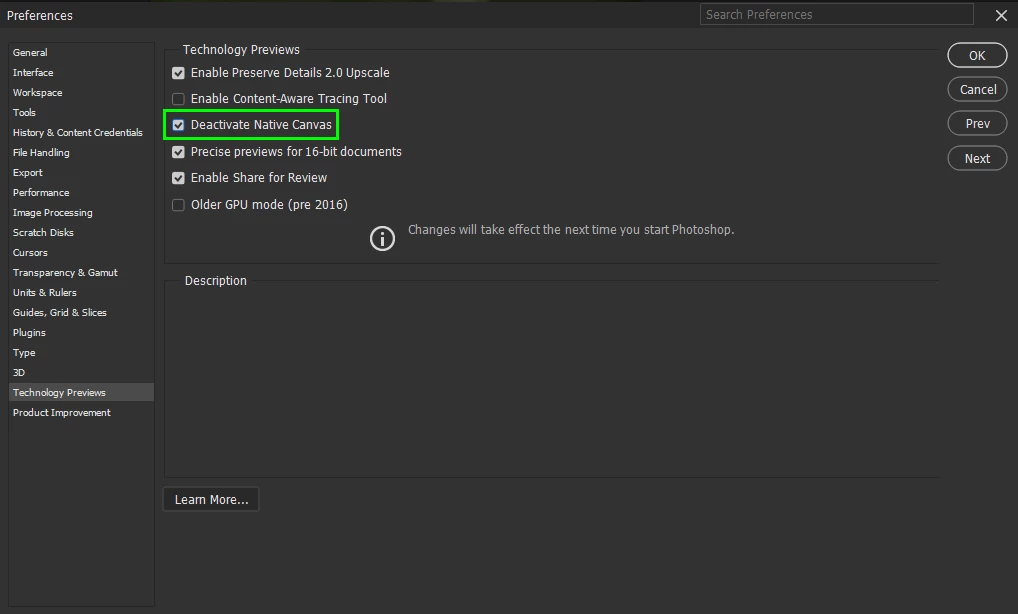
@Dominic Kurz Fotografie just enable this option in preferences and restart Photoshop

2 replies

Ged_Traynor
Community Expert
Ged_TraynorCommunity ExpertCorrect answer
Community Expert
March 26, 2023

@Dominic Kurz Fotografie just enable this option in preferences and restart Photoshop

Inspiring
March 26, 2023

Thanks 🙂 It works

Imaginerie
Community Expert
Community Expert
March 26, 2023

The problem seems to be happening for a lot of people for the last update and multiple threads have already been created for this particular problem, see this one for example:
See if it helps!
https://community.adobe.com/t5/photoshop-ecosystem-discussions/flashing-white-oblong-instead-of-the-image-you-are-trying-to-open/td-p/13669766