


Legend
June 10, 2025
解決済み

Brush Tool: Opt-click used to set foreground colour but now sets bg colour - how to fix?

  • June 10, 2025
  • 返信数 2.
  • 319 ビュー

Hi There, this one has been bugging me for a while - anyone know how to fix?


Title says it all, with a brush selcted, option click now sets the background colour insted of the freground colour - the eyedropper tool itself has always worked this way but not the brush tool.


Does anyone know how to get the previous behvior? It now takes extra clicks.


Any help much apprecitaed. Cheers, Ben
解決に役立った回答 csscms

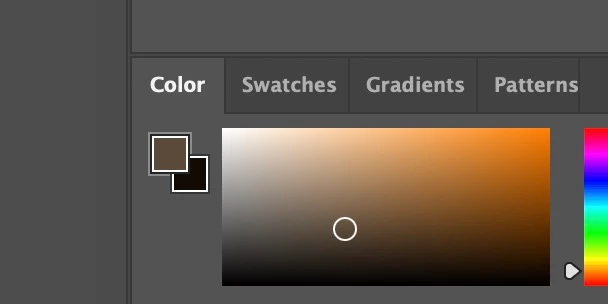
OK, finally found it but you have to have the Color panel open (not the colour switcher on the main toolbar).

See attached, the foreground colour has to be selected or OPT-Click will set the background colour.


Not sure if this is new behaviour or if mine got switched somehow – make sure your color panel looks like the attached with the foreground colour selected...


返信数 2

melissapiccone
Community Expert
Community Expert
June 12, 2025

Mine works just fine, try resetting your preferences. The behavior has not changed. 

Melissa Piccone | Adobe Trainer | Online Courses Author | Fine Artist
csscms作成者解決!
Legend
June 10, 2025

OK, finally found it but you have to have the Color panel open (not the colour switcher on the main toolbar).

See attached, the foreground colour has to be selected or OPT-Click will set the background colour.


Not sure if this is new behaviour or if mine got switched somehow – make sure your color panel looks like the attached with the foreground colour selected...