



jfi0rin0
Inspiring
August 9, 2020
질문

Brushes with pressure for opacity turned on leave a blotch at the end of a stroke.

  • August 9, 2020
  • 3 답변들
  • 661 조회

I've just run into a problem when using the brush in photoshop with pressure sensitivity for opacity turned on. When making strokes the end of the stroke is met with a blotch.


I am using a Cintiq Pro 24. (Driver: 6.3.40-2)

Mac Pro 2019 OS Catalina 10.15.5

Photoshop 21.2.0
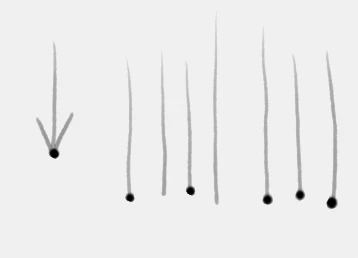
 

This is as annoying at the infamous blotch that starts at the beginging of a stroke when build up is turned on. 

Has anyone else experienced this problem yet and has anyone found a solution for this?

이 주제는 답변이 닫혔습니다.

3 답변

estupendamente
Participant
October 31, 2020

Hi, in this thread someone finally has found the solution and it apparently works. I am testing with my brushes and it seems that there are no more blotches. I hope this helps you.


https://community.adobe.com/t5/photoshop/photoshop-2020-random-ink-spots-when-using-wacom-tablet-on-mac/m-p/11557547?page=1#M479983

jfi0rin0
jfi0rin0작성자
Inspiring
October 31, 2020

Hey thanks for the follow up! I actually found the Tip-Up Assist option in another thread about a week ago. I got involved in another post and someone mentioned that solution fixed it. 
For anyone else that stumbles across this post.

System Preferences > Wacom > Options > un-check Tip-Up Assist. 

jfi0rin0
jfi0rin0작성자
Inspiring
August 23, 2020

So far the only solution I've come across is setting the smoothing to at least 1%. This eliminates the dot that appears at the end of a brush stroke when brush opacity/shape dynamics is controlled by pen pressure. 

Hopefully Adobe will fix this soon. It's inconvenient to set the smoothing for every brush you switch between. 

estupendamente
Participant
August 30, 2020

I hope so. In the previous update the problem was solved by deactivating the "build up" option. But now there is no solution. In my case, the brushes that I have the most problems are the ones with size variation and setting the minimum value to 1% does not seem to work. 😞

jfi0rin0
jfi0rin0작성자
Inspiring
August 9, 2020

I just upgraded to Photoshop 21.2.1 and it's still happening.

estupendamente
Participant
August 14, 2020

I have the same problem with my Intuos Pro. I tried to back to work on Photoshop 2019, but the blotches now appear in this version, too.

jfi0rin0
jfi0rin0작성자
Inspiring
August 19, 2020

Interesting. Wonder if it's a Wacom issue. Although, this wasn't happening in the previous version of PS 12.2.