
Known Participant
April 4, 2025

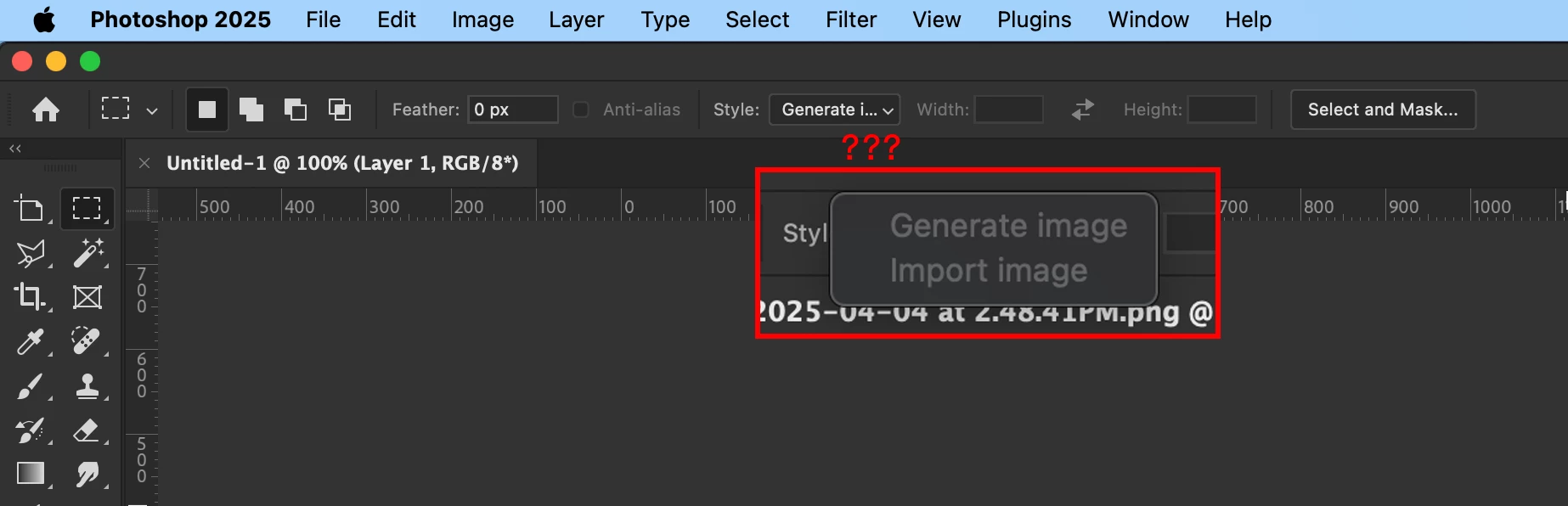
P: Marquee Tool style dropdown shows Generate Image and Import Image

  • April 4, 2025
  • 8 replies
  • 1506 views

What is going on here? I can't change the rectangular marquee tool a specific ratio. The Width and Height fields are greyed out, and the Style dropdown options that are supposed to say "Ratio" has replaced with this "Generate image" nonsense, which is also greyed out.

PLEASE FIX THIS!
 

8 replies

Srishti Bali
Community Manager
Community Manager
November 20, 2025

Hi all,


Thank you all for your time and patience. The issue has been fixed in our latest release, Photoshop 27.1. Please update to the newest version and let us know how it goes.

For more details on the latest release, you can check the official release notes:
https://helpx.adobe.com/photoshop/desktop/whats-new/photoshop-on-desktop-release-notes.html?linkId=1...


Regards,

Srishti

Participating Frequently
October 13, 2025

Quit Photoshop and re-open it. That fixes it for me.

New Participant
October 13, 2025

Same problem here, I can't set fixed size for rectangle to used as cutting edge for specific sizes. I've tried reset the layout and get latest updates but still unable to fixed size rectangle. It's really frustating because I have many campaigns need to cut the edges, now looking for other tool to help me with my work. 

Sameer K
Community Manager
Community Manager
October 7, 2025

Setting status.

New Participant
July 23, 2025

Had the exact same issue and Photoshop was up to date. Just to echo what Dan34553834wpif said in a reply... Simply quit and restart Photoshop, don't worry about updating.

johng44721896
Community Expert
July 30, 2025

Updated to v29.6.0  v26.9.0 (transposed the numbers) yesterday (29July25), just noticed this problem with being unable to set style for the rectangular marquee tool and set a fixed ratio.

Quitting and relaunching Ps fixed it.

macOS 15.6 on MBP M3 Pro.

Brainiac
June 26, 2025

patrickhennessey, I see what I failed to understand -- it's not that you couldn't access the H and W boxes; but that the Style box, instead of allowing a choice between Fixed Ratio and Fixed Size, is that Generate Image and Import Image are presented as choices. Man, dense am I.

Reset Tool; if that fails, reset Settings. [and now I read that Ps update fixed the problem!]

Larry
Known Participant
April 4, 2025

Resetting the tool didn't work. Just updated Photoshop and the issue has gone away.

New Participant
May 20, 2025

I am having the same issue. Resetting the tool didn't do anything and my Photoshop is up to date. Is there a solution to this?

Claire H.
Community Manager
Community Manager
May 20, 2025

Hi @creativec96190577, Welcome to the Photoshop forums! I don't see this behavior on my end, so I can't replicate the issue. Have you tried reinstalling Photoshop?


How to reinstall Photoshop:

1. Uninstall via the Adobe Creative Cloud app (click the three dots next to Photoshop > Uninstall).

2. (Optional) Delete preferences for a clean reset: Windows: C:\Users\[YourName]\AppData\Roaming\Adobe\Adobe Photoshop [version]; macOS: ~/Library/Preferences/Adobe Photoshop [version] Settings

3. Reinstall from the Creative Cloud app.

4. Launch Photoshop. If you're troubleshooting, hold Shift while launching to skip third-party plug-ins. Then follow the prompts to complete the process.


If this doesn't work, we could use a few more details to help you better with this issue. Can you send your system info so we can try replicating it? You can find this by going to Help > System Info, copying and pasting it into a text file, and attaching it here. Thanks! ^CH

jane-e
Community Expert
April 4, 2025

@patrickhennessey 


The first thing to try is to reset the tool. Right-click the rectangular marquee tool in the options bar (not tools panel) and choose Reset Tool from the drop-down. 


Jane