


- Home
- Photoshop ecosystem
- Discussions
- Re: can someone pls tellme what dis smudge tool is...
- Re: can someone pls tellme what dis smudge tool is...
can someone pls tellme what dis smudge tool is and were to find it

Copy link to clipboard
Copied
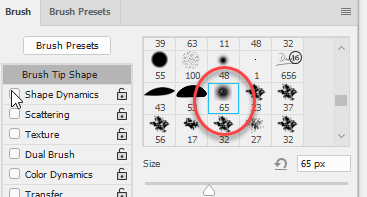
its the one that aays 65 please someone tellme where to find it and download it im struggling http://prntscr.com/g9ycfe



Explore related tutorials & articles
 24
Replies
24
24
Replies
24




Copy link to clipboard
Copied
It's just a brush preset, exactly the same as you could use with the brush tool, or eraser, dodge, burn, blur, sharpen, or even the clone tool, as well as with the smudge tool. We have no way of knowing what the preset's properties are, other than it appears to be soft but with some texture. Where did the screen shot come from? What is the context?

Copy link to clipboard
Copied
Incidentally, seeing as that page has links to Microsoft Surface computers, I saw on Tom's Hardware a few days ago, that Consumer Reports have withdrawn their recommendation because of a number of reliability issues. That's the first I'd heard of it, and it is nice looking hardware that I suspect the lot of Photoshop users would be very tempted by, so not good news. I spent twenty minutes using a high end Surface Studio at MAX last year, and considering it was the high spec version, there was definitely some lag, and the brush strokes were pretty ragged. I would strongly recommend that you try before you by if tempted, because that is a lot of money to spend if you are going to end up disappointed. I wish I'd never bought my Cintiq Companion 2 for the same reason.
Microsoft's Surface Computers Lose Consumer Reports Backing - Bloomberg
Copy link to clipboard
Copied
the person in dis video uses the brush 65 Repainting Imvu - YouTube go to 4:36 and changes the skin of the girl shes eidting i tried every bbrush make it like hers but that 65 one makes it look like da i needhelp finding da brush
Copy link to clipboard
Copied
There's nothing special about it. Just a soft round brush.
Select the Smudge tool

Right click inside the image window, and chose a soft round brush. If you are using the mouse choose the very first brush preset. If using a tablet choose the third preset as shown below.

Size it to suite. Set the strength to 50%, blend mode to normal, and start painting. The layer mode is normal. Everything is normal. No trickery at all. Just the Smudge tool set to its default strength.

Here's another idea. Bear in mind I am using a very low res screen shot grabbed from the video.
All I have done is use the Camera RAW filter on the layer, and move the Clarity slider all the way to the left.

It tries to minimise its effect on detail areas, but if you use it on a copy of the layer, you can use a layer mask to control where the effect is applied. You could still use the smudge tool to remove the last of the freckles if you wanted.

Copy link to clipboard
Copied
weres clarity? and na bro your sorta wrong cause i tried alllllllllllllllllllll brushes aNd it doesnt make the person face look like hers wen i do it
Copy link to clipboard
Copied
Please don't start multiple threads on the same subject. It wastes people's time answering something already answered elsewhere.
So what is causing you a problem?
This is grabbed from your video

Same image using the Smudge tool on part of the face

You need to move the brush back and forth over the same area rather than simply making a single continuous stroke.
The Clarity slider is at the bottom of the Camera RAW filter, as told to you back up the thread. Please read what has been told you carefully, and follow the steps.
Copy link to clipboard
Copied
Was your strength set to 50%? The smudge tool is actually not a great way to do this, which is why I suggested using Camera RAW.
If I set the Strength to 100%, for instance, and make one long stroke, then it does this. In fact it _smudges_ just like it's name suggests. Very short back and forth strokes is the way to go.

Copy link to clipboard
Copied
how do i do clarity thing were do i find da
Copy link to clipboard
Copied
i tried with normal brush mate -_- and it looks nothing like wah she makes face look like
Copy link to clipboard
Copied
im telling u its brush shes using
Copy link to clipboard
Copied
i dont have camera raw filter
Copy link to clipboard
Copied
its the brush shes using thats doing it cause i tried with 50% ugh
Copy link to clipboard
Copied
IM TELLLLLLLLLLLLLING YOU ITS THE BRUSH SHE DOWNLOADED A SMUDGE BRUSH....................... THATS MAKING THE EFFECT ON DA FACE SMOOTH LIKE DA

Copy link to clipboard
Copied
Since you don't believe a word we're sayin to you, probably best to contact the dude who made the video and ask what magic they have.

Copy link to clipboard
Copied
Rather than shouting at people - listen to what they are saying.
There is no such thing as a smudge brush.
There is a smudge tool with which you can use any brush preset. The 65 just denotes the size of the brush as it was saved as a preset. You can use an existing brush or define and make your own by drawing a pattern - Selecting it and using Edit - Define Brush Preset.
You could easily make a brush similar to the one shown. Make a dot with a soft brush - with a smaller brush add in a little texture in it. Select the area

Then Edit - Define Brush Preset
I agree with Trevor - it is not the brush that matters here it is the way the tool is used
Dave
Copy link to clipboard
Copied
u have it so how do i do da?
Copy link to clipboard
Copied
http://prntscr.com/ga3vop see you haave it and i dont how did u get it?
Copy link to clipboard
Copied
can u pls link me da brush u made  im struggling
Copy link to clipboard
Copied
your explaining in words to me how to do it when i have no idea how to add lil texture in it or define it see ur professional and im new at it can u pls just link it to me
Copy link to clipboard
Copied
Hi
you can make a brush from an image as explained here :
Create and modify brushes in Adobe Photoshop
In my example I used a soft brush and clicked on a white background to create a black soft circle. Then I reduced the brush size and opacity and painted on some soft grey dots . I then made the brush out of that image.
However, as Trevor rightly explained earlier, it is not the brush that matters here. Short strokes of the smudge tool using a small soft brush will do the same job.
Dave
Copy link to clipboard
Copied
i need make my assignment look like hers at the end of video ............................ that brush she made or downloaded only makes it look like hers............................ http://prntscr.com/ga45yh this doesnt look like hers at all and i did what first guy said to do use normal soft brush
Copy link to clipboard
Copied
That image you attached shows that you are clicking and using long brush strokes with the smudge tool.
Keep the smudge strokes short and use lots of them rather than trying to drag across the canvas.
Dave
Copy link to clipboard
Copied
-_- can u explain how to do it in full detail and better description -_- ugh im going fail my class so badly
Copy link to clipboard
Copied
she does long strokes aswell listen im going send u da link to da video and show you that what she does is wha i need to do Repainting Imvu - YouTube go to 3:34 and watch how brish makes her skin different da certain brush i neeed it very badly before i hand my hw in


Get ready! An upgraded Adobe Community experience is coming in January.
Learn more
 AdChoices